How To Take Car Light Trail Photos Like A Pro (Easy Guide)
Seeing those magical streaks of light from moving cars at night is really cool. It makes ordinary streets look like something out of a sci-fi movie. Maybe you’ve tried to get those shots yourself, but they just didn’t turn out right.
You might have ended up with blurry messes or just dark pictures. It can feel frustrating when you know what you want to create but can’t quite make it happen. Don’t worry, you’re not alone!
Taking great car light trail photos is a skill that anyone can learn. We’ll walk through it step-by-step.
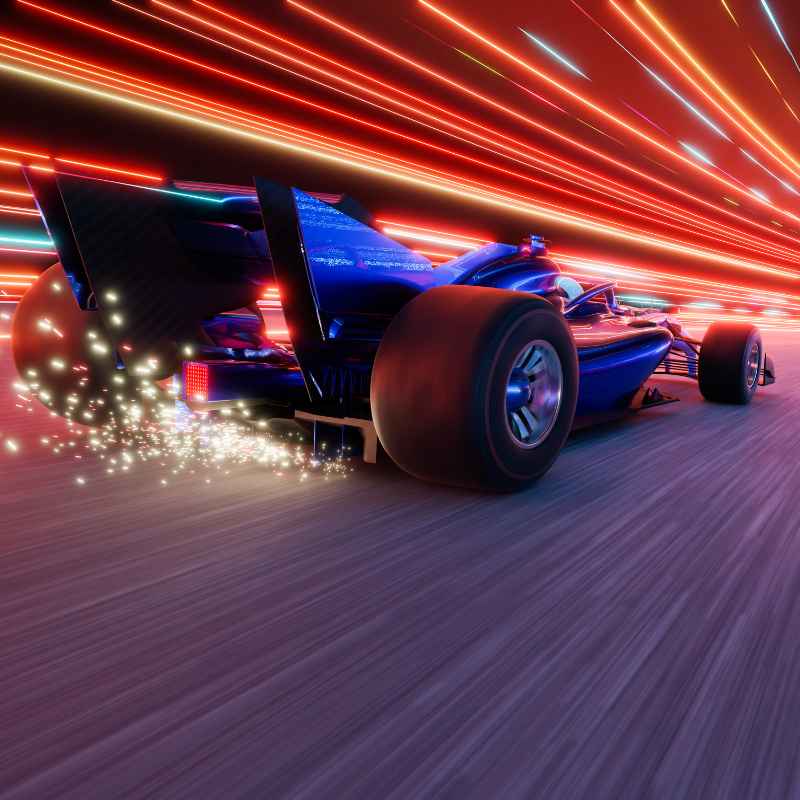
Car light trail photography captures the motion of vehicles at night. It uses long exposure settings on a camera to record the headlights and taillights as solid lines of color. This technique turns moving cars into streaks of light, creating dynamic and artistic images of urban or road scenes.
Understanding the Magic: What Makes Light Trails
Car light trails are a type of long exposure photography. This means your camera’s shutter stays open for a longer time than usual. Think of it like leaving a window open for light to pour in.
When a car moves while the shutter is open, its lights paint a picture on your camera’s sensor. The longer the shutter is open, the longer the light streaks will be. This is how cars become streaks of red and white light.
Many factors help create these streaks. The speed of the car matters. A faster car will create a longer streak in the same amount of time.
The ambient light in the scene is also key. You want it dark enough so the light streaks really stand out. But you don’t want it so dark that you can’t see anything else.
Your camera settings play the biggest role.
This is different from taking a regular photo. Normally, you want to freeze motion. With light trails, you want to capture motion.
You’re not just taking a picture; you’re painting with light. It’s a fun way to see the world differently. You get to show the movement that’s usually too fast for our eyes to notice.
My First Light Trail Fiasco
I remember my first attempt very clearly. It was a warm summer night. I’d seen some amazing shots online and thought, “I can do that!” I grabbed my old DSLR and headed to a busy intersection.
I set my camera to automatic mode, pointed it at the road, and took a picture. What I got was a dark, blurry mess. The car lights were just smudges.
I felt pretty deflated.
I tried again, this time leaving the shutter open longer. It helped a little, but the whole image was shaky. My hands were probably shaking too from excitement and nerves.
The cars were still just blobs of light, not nice, clean streaks. It looked amateur. I almost gave up right then.
But I knew there had to be a way to get it right. I just needed to learn the proper steps.
That night taught me a big lesson. You can’t just point and shoot for this type of photo. It needs planning and specific settings.
It’s about understanding how light and time work together through your camera lens. That feeling of wanting to capture something beautiful but not knowing how is what drives many photographers. It’s a journey of learning and trying again.
Essential Gear for Light Trails
Camera: Any camera that allows manual settings works. DSLRs and mirrorless cameras are great.
Tripod: This is a must-have. It keeps your camera perfectly still.
Remote Shutter Release (Optional but Recommended): This lets you trigger the camera without touching it. It stops any tiny shakes.
Extra Batteries: Long exposures use more power.
Headlamp: For seeing your gear in the dark.
The Science Behind the Streaks: Camera Settings Explained
To get those amazing car light trails, your camera settings are super important. You need to control how much light comes in and for how long. This is where manual mode on your camera shines.
Shutter Speed: The Main Player
This is the most critical setting. It controls how long the camera’s sensor is exposed to light. For light trails, you want a slow shutter speed.
This means the shutter stays open for a longer time. A good starting point is 5 to 30 seconds. If you want really long, smooth streaks, you might go even longer.
Aperture: Controlling Depth and Light
The aperture controls how wide the lens opens. This affects how much light enters and how much of the scene is in focus. For light trails, you usually want a smaller aperture.
Think of f/8, f/11, or even f/16. This helps make sure the background is sharp and also limits the amount of light. Too wide an aperture (like f/1.8) lets in too much light.
This can wash out your image.
ISO: Keeping It Low
ISO controls how sensitive your camera’s sensor is to light. For night photography, you might think you need a high ISO. But high ISO creates ‘noise’ or grain.
This makes your image look speckled. For light trails, keep your ISO as low as possible. Usually, ISO 100 or 200 is perfect.
This gives you a clean image.
Focus: Crystal Clear
Autofocus often struggles in the dark. It’s best to switch to manual focus. Focus on a distant light source, like a streetlamp or a traffic light.
You can often set your focus to infinity. Make sure it’s sharp before you start shooting.
White Balance: The Right Colors
White balance tells your camera what “white” looks like. In low light, the default settings can make your photo look too blue or too yellow. Try settings like “Tungsten” or “Incandescent” for a warmer look.
Or, you can set it manually if your camera allows. You can also adjust this later in editing.
Quick Setting Cheat Sheet
- Shutter Speed: 5-30 seconds (or longer)
- Aperture: f/8 to f/16
- ISO: 100 or 200
- Focus: Manual, set to infinity or a distant light
- White Balance: Tungsten or manual
Choosing Your Canvas: Location, Location, Location
Where you choose to take your light trail photos makes a huge difference. The best spots have a steady flow of traffic. But you don’t want it so busy that cars are stopping and starting constantly.
Consistent movement creates the best trails.
Look for places with interesting backgrounds. A city skyline, bridges, or even a well-lit building can add depth. Roads with gentle curves can create dynamic, flowing lines.
Avoid areas with too much direct light from shops or signs. This can overpower the car lights. You want the dark canvas to make the light pop.
Safety is also a big deal. Never stand in the middle of a busy road. Find a safe spot with a good view.
Elevated positions, like overpasses or hills, can offer a great perspective. Just make sure you can safely place your tripod there. Sometimes, the best spots aren’t obvious.
Explore your local area and see what you find.
Think about the direction of traffic. You can capture cars coming towards you or going away. Both create different looks.
Shooting from a bridge can give you a bird’s-eye view of the lights. Shooting from the side of the road gives a more grounded feel. Experiment with different angles and vantage points.
The Art of Setup: Getting Ready to Shoot
Once you have your location, the setup is key. A stable tripod is your best friend. Set it up firmly on the ground.
Make sure it’s not wobbly. Extend the legs fully and lock them. If you’re on uneven ground, use your tripod’s adjustments to make it level.
Mount your camera securely onto the tripod. Once it’s on, frame your shot. Think about what you want in the picture besides the light trails.
Do you want the whole street? A building? Adjust the tripod head until you like the composition.
Now, set your camera to manual mode. Input those settings we talked about: slow shutter speed, smaller aperture, and low ISO. Before you take your first real shot, take a test photo.
Look at it closely. Is it too dark? Too bright?
Adjust your shutter speed or aperture. For example, if it’s too dark, you can try a slightly longer shutter speed or a wider aperture. If it’s too bright, do the opposite.
If you’re using a remote shutter release, connect it. This helps avoid any camera shake when you press the button. If you don’t have one, set your camera to its self-timer.
A 2-second or 5-second delay is usually enough. This lets the camera settle after you press the shutter button.
Double-check your focus. Take another test shot and zoom in on the screen. Is it sharp?
If not, adjust your manual focus. Getting these details right before you start shooting saves a lot of time and frustration. It’s all about building a solid foundation for your image.
Setting Up Like a Pro
- Tripod: Sturdy and level
- Camera Mount: Secure
- Composition: Frame your shot
- Manual Mode: Input settings
- Test Shots: Adjust exposure
- Focus: Manual and sharp
- Shutter Trigger: Remote or self-timer
The Wait and the Click: Capturing the Moment
This is where patience comes in. You’ve set everything up. Now you wait for the right car to come along.
As cars approach, keep an eye on their speed and the length of their lights.
When you see a car that looks promising, take your shot. If you’re using a remote or self-timer, trigger it. Then, wait for the entire duration of your shutter speed.
Don’t touch the camera or the tripod. Resist the urge to peek too soon. Let the camera do its work.
Once the shutter closes, check your image. Is the streak the right length? Is the exposure good?
If it’s too short, try a longer shutter speed for the next car. If the lights are too blown out (too bright and white), you might need to close your aperture a bit more or try a shorter shutter speed.
Sometimes, you’ll get lucky and nail it on the first try. Other times, it takes several attempts. That’s part of the process.
You’re learning what works best for that specific location and traffic flow. Don’t get discouraged if your first few shots aren’t perfect. Each attempt is practice.
What I often do is shoot a series of photos. I might keep the settings the same for a few cars, just to see how they look. Then, I might adjust one setting slightly, like the shutter speed, and try again.
This helps me understand the impact of each change.
Shooting Flow
Observe: Watch traffic patterns.
Identify: Spot a good car or moment.
Trigger: Start the exposure.
Wait: Let the shutter do its job.
Review: Check the photo.
Adjust: Make changes if needed.
Beyond the Basics: Adding More to Your Shots
Once you’ve got the hang of basic light trails, you can get creative. Think about adding other elements to your photo.
Foreground Interest: Including something in the foreground can make your image more engaging. This could be a tree, a sign, or even a person standing still. Just make sure it doesn’t distract too much from the light trails.
Multiple Exposures: Some cameras allow you to take multiple exposures in one shot. This means you can layer several images on top of each other. You could capture different colored car lights separately and combine them.
Or, you could combine light trails with a static subject.
Different Colors: Notice the different colors of car lights. Headlights are usually white or yellowish. Taillights are red.
Sometimes, you’ll see blue or green lights from emergency vehicles or custom modifications. Try to capture a variety of these colors in your photos.
Star Trails: While we’re talking about light trails, you can also do this with stars. It’s a similar process but requires a much darker sky and longer exposures. Combining car light trails with star trails can be stunning.
Using ND Filters: If you’re shooting in an area that’s not completely dark, or if you want even longer exposures in daylight (for different effects), you might use a Neutral Density (ND) filter. This is like sunglasses for your lens. It cuts down the amount of light entering the camera, allowing for slower shutter speeds even in brighter conditions.
Editing Your Masterpiece: Bringing Out the Best
Editing is where you can really make your light trail photos shine. Most editing software lets you fine-tune your images. You don’t need to be a Photoshop wizard to do this.
Adjusting Exposure: You might need to brighten the overall image a little. Or, you might want to darken it slightly to make the lights pop more. It’s a balancing act.
Enhancing Contrast: Increasing the contrast can make the light streaks more defined and the dark areas deeper. Be careful not to overdo it, as it can make the image look harsh.
Color Correction: You can adjust the colors to make the reds of the taillights richer or the whites of the headlights cleaner. White balance adjustments are very useful here.
Sharpening: A little bit of sharpening can make the image crisper. Again, don’t go overboard. Too much sharpening looks unnatural.
Noise Reduction: If you noticed any grain in your image (especially if you had to push your ISO higher than ideal), noise reduction can help smooth it out.
Software like Adobe Lightroom, Photoshop, or even free options like GIMP or Luminar Neo can help you with these edits. The goal is to enhance the image, not to change it drastically. You want to highlight the beauty of the light trails you captured.
Post-Processing Checklist
- Adjust exposure
- Boost contrast
- Refine colors
- Apply sharpening
- Reduce noise if needed
Common Problems and How to Solve Them
It’s easy to run into issues when trying new photography techniques. Here are some common problems and how to fix them:
Troubleshooting Light Trails
Problem: Image is too dark
Causes: Shutter speed too short, aperture too small, low ISO.
Fixes: Increase shutter speed duration, open aperture (lower f-number), slightly increase ISO (if absolutely necessary).
Problem: Image is too bright (blown out lights)
Causes: Shutter speed too long, aperture too wide, bright ambient light.
Fixes: Decrease shutter speed duration, close aperture (higher f-number), use an ND filter if in daylight.
Problem: Light trails are blurry or broken
Causes: Camera shake, car speed not consistent, short shutter speed.
Fixes: Use a sturdy tripod, remote shutter release, ensure shutter speed is long enough for car speed, check tripod stability.
Problem: Background is too dark or noisy
Causes: Exposure set only for lights, high ISO.
Fixes: Adjust shutter speed and aperture to balance foreground and background, keep ISO low, consider shooting during twilight when there’s more ambient light.
Problem: Focus is soft
Causes: Autofocus struggling in dark, focus point not set correctly.
Fixes: Switch to manual focus, focus on a distant light source, use live view to zoom in and confirm focus, set to infinity.
Problem: Colors look off
Causes: Incorrect white balance setting.
Fixes: Experiment with different white balance presets (Tungsten, Daylight, etc.) or set it manually using a gray card or by referencing a neutral tone in the scene.
What This Means for Your Photography Journey
Learning to take car light trail photos is more than just a technical exercise. It teaches you patience. It shows you the power of slow and deliberate action.
You start to see light and movement in a new way. It’s a gateway into understanding long exposure photography.
This skill can open doors to other types of night photography. Think about capturing waterfalls, fireworks, or even the movement of clouds. The principles are similar.
You learn to control light and time. You also learn the importance of reliable gear, especially that tripod.
Don’t be afraid to experiment. The best way to learn is by doing. Try different locations, different times of night, and different camera settings.
What works in one place might not work in another. Each shoot is a learning experience. Keep a small notebook to jot down what settings you used and what you liked or didn’t like about the results.
Tips for Beginners to Keep in Mind
If you’re just starting out, focus on the basics. Don’t try to do too much at once. Master your tripod setup and manual settings first.
Getting a well-exposed, sharp image of a light trail is the first goal.
Always prioritize safety. If a location feels unsafe, leave. There will always be other opportunities to practice your photography.
Look for well-lit areas where you can be seen.
Don’t be afraid to ask for help or look at tutorials. Seeing what others do can give you new ideas. But remember that every photographer has their own style.
Find what works for you.
Finally, have fun! Photography should be enjoyable. The process of creating something unique and beautiful is incredibly rewarding.
The frustration of a bad shot is temporary, but the satisfaction of a great one lasts.
Frequently Asked Questions
What is the best time of night for car light trails?
The best time is often during twilight, just after the sun has set but before it’s completely dark. This “blue hour” gives you enough ambient light to see the surroundings while still allowing the car lights to stand out dramatically. However, you can also achieve great results in full darkness.
Do I need a fancy camera for light trails?
No, you don’t need a super expensive camera. Any camera that allows you to control shutter speed, aperture, and ISO manually will work. Even some smartphones have “pro” modes that offer these controls.
The most important pieces of gear are a stable tripod and patience.
How long should my shutter speed be?
Start with a shutter speed between 5 and 30 seconds. If you want longer, more defined streaks, try going for 30 seconds or even longer. You can also use a “bulb” mode on your camera, where the shutter stays open as long as you hold the button (or keep the remote pressed).
Can I shoot light trails in the city with lots of lights?
Yes, you can. However, you’ll need to adjust your settings carefully. You may need a smaller aperture (higher f-number) to avoid overexposing the scene.
Sometimes, shooting in a less light-polluted area can make the car trails pop even more.
What if there aren’t many cars?
If traffic is light, you can try shooting during peak commuting hours or on weekends. If there are still very few cars, you might need to wait or rethink your location. Alternatively, you can combine light trails with other subjects that are still in the scene.
How do I prevent my photos from being too noisy?
Keep your ISO as low as possible, ideally 100 or 200. If you must increase it, do so sparingly. Using a tripod and a longer shutter speed helps you keep the ISO low.
Editing software also has noise reduction tools, but it’s always best to get it right in-camera.
Putting It All Together
Capturing those mesmerizing car light trails is totally achievable. It’s a blend of technical know-how and a bit of artistic flair. By understanding your camera’s settings and planning your shots, you can transform ordinary night scenes into vibrant works of art.
Remember to use a tripod, set your shutter speed long, and keep your ISO low. Don’t be afraid to practice and adjust. Happy shooting!
See also car stop light not working here’s how to fix it fast. See also what’s the difference between car lights types explained.
Products related to this article
Sponsored / affiliate links. As an Amazon Associate I earn from qualifying purchases. I may earn additional commission from eligible campaigns.