Can Ford Auto Start Stop Be Disabled? Yes, Here’S How
It’s a common thing for drivers these days. You’re in your Ford, maybe at a stoplight or waiting to pull out into traffic. Suddenly, the engine just… stops.
Then, as you lift your foot from the brake, it whirs back to life. This is Ford’s Auto Start-Stop system at work. While it’s designed to save fuel and cut down on emissions, many drivers find it a bit jarring or even annoying.
You might be wondering if you can just turn it off and have your engine run like it used to. Let’s dive into whether Ford Auto Start-Stop can be disabled and what that really means for your car and your driving.
The Auto Start-Stop system in Ford vehicles is designed to improve fuel efficiency and reduce emissions by automatically shutting off the engine when the vehicle is stopped. While it’s a standard feature on many new models, some drivers seek ways to disable or manage it due to personal preference or perceived inconvenience. Understanding how it functions and the available options is key for drivers looking to tailor their driving experience.
Understanding Ford’s Auto Start-Stop System
So, what exactly is this system and why does your Ford have it? Think of it as a smart engine management tool. When your car detects you’ve come to a complete stop, like at a red light or in heavy traffic, it automatically turns off the engine.
This stops fuel from being used when the car isn’t moving. As soon as you need to go again, like when you lift your foot off the brake pedal, the engine quickly restarts.
The main goal here is to help the environment and your wallet. By not idling, your Ford uses less gasoline. This means fewer trips to the pump.
It also means your car is releasing fewer harmful gases into the air. Ford, like many other car makers, is trying to meet stricter fuel economy and emission standards. The Auto Start-Stop feature is one way they do this across their entire lineup.
This system is quite sophisticated. It uses sensors to know when the car is stopped. It also monitors things like battery charge and engine temperature.
If the battery is low, or if the engine needs to stay running for other reasons (like for air conditioning on a very hot day), the system might not engage. It’s designed to be smart and only shut off the engine when it’s safe and beneficial to do so.
The restart process is usually very quick. You might barely notice it. Most systems are designed to have the engine running again in less than a second.
This is important for drivers who need to react quickly, like in situations where traffic starts moving unexpectedly. The technology has improved a lot over the years, making the transitions smoother.
However, the frequency of these stops and starts can be a lot for some drivers. If you do a lot of stop-and-go driving, your engine might be shutting off and starting up many times during a single trip. This can feel different from what drivers are used to.
It’s this feeling that leads many people to ask if they can just turn the system off.
My Own Bump with Auto Start-Stop
I remember the first time I really noticed this system. It was a sweltering August afternoon in Texas. I was driving my friend’s new Ford Explorer on a long road trip.
We hit some heavy traffic outside of Dallas, and my friend wasn’t really paying attention. Suddenly, the engine died. I remember grabbing the steering wheel, a little startled, and thinking, “What just happened?” My friend just casually said, “Oh, that’s just the Auto Start-Stop.
It does that.”
At first, I found it a bit unnerving. Every time we stopped, the engine would go silent. Then, as soon as my friend’s foot nudged the gas pedal, it would roar back to life.
It felt… unnatural. Especially on that really hot day, I was worried the air conditioning would stop working properly. But to my surprise, it kept blowing cool air.
The system seemed to know when to keep the engine running to maintain comfort.
Later, during that same trip, we were driving through some smaller towns with lots of short stops. The engine was shutting off and starting up constantly. I started to get a little tired of the sound and the slight jolt each time it restarted.
I found myself wishing for the old, steady hum of an engine that just kept running. I even asked my friend, “Can’t you just turn that thing off?” She just shrugged and said, “I haven’t figured out how, or if you even can.” That’s when my own curiosity kicked in, and I started looking into it.
It’s funny how something designed to be helpful can sometimes feel like a small irritation. But that’s the nature of new technology, I guess. We get used to things, and then when they change, we notice it.
This experience with my friend’s Ford really got me thinking about how many other drivers must be feeling the same way.
How Auto Start-Stop Works Under the Hood
Let’s peek under the hood a bit, without getting too technical. The Auto Start-Stop system relies on a few key components working together. One of the most important is a heavy-duty starter motor.
This starter is built to handle many more starts and stops than a traditional one. It’s designed to be durable and quick.
There’s also a more robust battery. Because the engine is shut off frequently, the battery needs to be able to power the car’s accessories (like lights, radio, and air conditioning) for longer periods. It also needs to have enough power to reliably restart the engine each time.
So, you’ll find a high-performance battery in cars with this system.
Sensors play a crucial role. Various sensors tell the car’s computer when the vehicle is truly stopped. This includes sensors for brake pedal position, gear selection (it won’t shut off if you’re in Park or Neutral with the clutch engaged, for manual transmissions), and vehicle speed.
The computer analyzes this data constantly.
The engine control module (ECM) is the brain of the operation. It decides when to shut off the engine and when to restart it. It takes input from all the sensors and decides based on programmed logic.
This logic includes checks for things like:
- Engine temperature
- Battery state of charge
- Air conditioning system load
- Steering wheel position (some systems consider this an indicator of driver intent)
- Cabin temperature (if it’s too far from the set point)
When you press the brake pedal and the car stops, the ECM checks these conditions. If they are all within the acceptable range, it signals the engine to shut off. When you lift your foot off the brake, or gently press the accelerator, the ECM immediately signals the heavy-duty starter to crank the engine back up.
For manual transmission vehicles, the system usually disengages when you press the clutch pedal. For automatic transmissions, it typically disengages when you release the brake pedal. The goal is always to make the restart seamless and prompt.
It’s worth noting that the system is designed with comfort and functionality in mind. It won’t shut off the engine if the battery is too low to restart it. It also won’t shut off the engine if the cabin temperature is too far from your desired setting, as that would require the engine to run to power the climate control.
This smart management ensures you don’t experience discomfort or unexpected issues.
How to Tell If Auto Start-Stop is Active
System Status Light: Many Fords have a small indicator light on the dashboard that shows the status of the Auto Start-Stop system. It might be green when the engine is off and amber or off when it’s running or the system is inactive.
Engine Behavior: The most obvious sign is the engine turning off when you stop and restarting when you move. Pay attention to whether this happens consistently.
Check Your Vehicle’s Manual: Your owner’s manual is the best resource for specific details about your model’s Auto Start-Stop system, including how to interpret dashboard indicators.
Can You Actually Disable Ford Auto Start-Stop?
This is the big question, isn’t it? The direct answer is: Yes, in many cases, but it’s not always a simple one-button solution. Ford designs the Auto Start-Stop system to be a core fuel-saving feature. Because of this, they don’t always make it easy to permanently turn off with a simple switch accessible to the driver on the dashboard.
Many Ford models have a button on the center console or dashboard that allows you to temporarily disable the Auto Start-Stop system for that particular driving cycle. You’ll typically press this button, and the system will be deactivated until you turn off the car and restart it. The next time you start your Ford, the Auto Start-Stop system will usually re-engage by default.
This means that if you want to disable it every time you drive, you’ll likely need to press that button each time you start your engine. For many drivers, this is an acceptable solution. It’s a quick action they can take right after starting their car.
However, some drivers want a more permanent solution. They want the system to stay off without them having to press a button every single time. For these drivers, options can become more complex.
These might involve aftermarket devices or modifications. It’s important to understand the potential implications of these more permanent solutions.
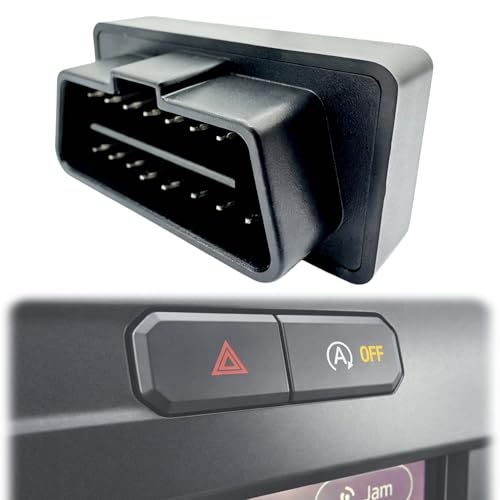
Some methods involve special devices that plug into your car’s OBD-II port. These devices can sometimes trick the car’s computer into thinking the Auto Start-Stop button has been pressed every time the car starts. Other methods might involve more complex wiring or computer reprogramming.
These are usually best left to professionals.
It’s also crucial to remember that disabling this system might affect your vehicle’s fuel economy. Since the system’s primary purpose is to save fuel, turning it off will likely lead to higher fuel consumption. This is a trade-off you have to consider.
Additionally, tampering with the vehicle’s computer systems could potentially void your warranty. It’s always wise to check your warranty terms before making any modifications.
In short, while a simple button often offers a temporary fix, a truly permanent disable might require more advanced methods that come with their own set of considerations. Always weigh the convenience against potential downsides.
Temporary Disable Button Location
Common Spots: Look for a button typically located near the gear shifter, on the dashboard, or within the climate control panel. It often has an icon showing a circular arrow around an “A” or a crossed-out engine symbol.
Indicator Light: When you press the button to disable the system, an indicator light on the dashboard should illuminate, confirming the Auto Start-Stop is off for the current drive cycle.
Default Behavior: Remember, this button usually only deactivates the system for the current ignition cycle. It will likely re-enable itself when you turn off and restart your car.
Why Drivers Want to Disable Auto Start-Stop
There are several common reasons why drivers wish to disable the Auto Start-Stop feature. Understanding these helps explain the demand for solutions.
1. Driving Feel and Annoyance
For many, the primary reason is simply the sensation. The frequent engine stops and restarts can feel unnatural. It disrupts the smooth, continuous flow of power that drivers are accustomed to.
Some find the restarts to be slightly jarring. This is especially true if the system restarts the engine at an unexpected moment, such as when a driver is still preparing to move.
2. Concern About Wear and Tear
A common worry is that constantly starting and stopping the engine will cause more wear and tear on critical components. People think about the starter motor, the battery, and even the engine’s internal parts. While manufacturers design these systems to handle the extra load, this concern persists for many drivers.
They worry about long-term reliability and potential repair costs down the line.
3. Air Conditioning Performance
In very hot climates, drivers often worry about the air conditioning. When the engine shuts off, the A/C compressor stops running. While modern systems are designed to maintain cabin temperature for a while, drivers in extremely hot areas may notice a drop in cooling effectiveness during prolonged stops.
This can be uncomfortable and lead them to want the engine running constantly.
4. Battery Longevity
Similar to wear and tear, there’s concern about battery lifespan. The battery is used more intensely to restart the engine. While the batteries are beefier, some drivers fear that the increased demand will shorten their battery’s life.
They prefer to keep the battery at a steady charge by having the engine run.
5. Specific Driving Conditions
Some driving scenarios make the system feel particularly out of place. For instance, in heavy, slow-moving traffic where you stop and start every few seconds, the system engages and disengages rapidly. This constant cycle can be more annoying than the fuel savings it provides in such situations.
Drivers might also find it inconvenient when needing to quickly move, like pulling into a tight parking spot or making a quick lane change.
6. Aftermarket Systems
If a vehicle has aftermarket audio systems or other power-hungry electronics, drivers might worry about the Auto Start-Stop draining the battery more quickly. While the system is designed to manage battery levels, some users prefer to keep the engine running to ensure ample power for all accessories.
Auto Start-Stop Myths vs. Reality
Myth: The system causes excessive engine wear.
Reality: Modern starters and engines are built to withstand many more starts than older models. Ford engineers design this system to manage wear effectively.
Myth: It drastically shortens battery life.
Reality: Vehicles with Auto Start-Stop use enhanced batteries designed for more frequent cranking. While batteries do have a lifespan, this feature isn’t typically the primary cause of premature failure.
Myth: The A/C will stop blowing cold air immediately.
Reality: The system is programmed to keep the A/C running for a set period, or until the cabin temperature reaches a certain threshold, before shutting off the engine.
Options for Managing or Disabling Auto Start-Stop
As we’ve touched on, managing this feature can be done in a few ways. Let’s break down the most common and accessible options.
The Simple Button Method
This is the most common and recommended method by Ford. As mentioned, most Ford vehicles equipped with Auto Start-Stop have a physical button dedicated to disabling it. You’ll find it on the dashboard or center console.
- How it Works: When you press this button, you’re essentially telling the car’s computer to temporarily deactivate the Auto Start-Stop function.
- When to Use It: Ideal for situations where you know you’ll be doing a lot of stop-and-go driving, or if you simply prefer not to have the engine shut off.
- The Catch: This deactivation usually only lasts for the current driving cycle. When you turn off your Ford and then start it again, the Auto Start-Stop system will likely re-enable itself by default. You’ll need to press the button again each time.
For many drivers, this is perfectly fine. It’s a simple habit to get into: start the car, press the disable button. It requires minimal effort and doesn’t involve any complex modifications.
Aftermarket Disable Modules
If pressing a button every time is too much, you might consider aftermarket modules. These are small electronic devices designed to plug into your car’s diagnostic port (OBD-II port). They are programmed to send a signal to the car’s computer that mimics pressing the disable button automatically every time you start the vehicle.
- How it Works: You plug the module into the OBD-II port, usually located under the dashboard. Once plugged in, it typically works in the background without any further interaction needed from you.
- Pros: Offers a truly automatic, permanent disablement of the Auto Start-Stop feature without requiring manual intervention each drive.
- Cons:
- Warranty Concerns: These devices can potentially affect your vehicle’s warranty. If you have an issue related to the powertrain, and Ford discovers an aftermarket module was installed, they might deny warranty claims.
- Compatibility: Not all modules are compatible with all Ford models and years. You need to ensure you buy a module specifically designed for your vehicle.
- Reliability: While many work well, there’s always a slight risk with any aftermarket electronic device.
- Cost: These modules can range from $30 to $100 or more.
Before buying such a module, do thorough research on reputable brands and read reviews from other Ford owners with similar vehicles.
Professional Programming / Custom Tuning
For those who want a more integrated solution, some professional automotive tuning shops offer to reprogram your Ford’s Engine Control Module (ECM). This can permanently disable the Auto Start-Stop system at the software level.
- How it Works: A technician uses specialized software to access and modify the car’s computer programming.
- Pros: This is often considered the most seamless way to disable the system permanently, as it’s done at the software level.
- Cons:
- Cost: This is usually the most expensive option, often costing several hundred dollars.
- Warranty Void: Similar to other modifications, reprogramming the ECM can certainly void your powertrain warranty.
- Expertise Required: This should only be done by highly experienced and reputable tuners who understand Ford’s specific systems.
This is generally for enthusiasts who are looking to make other performance modifications as well.
Consider the Impact on Fuel Economy
It’s important to reiterate that the Auto Start-Stop system is in place primarily to improve fuel efficiency. If you disable it, you should expect to see a decrease in your miles per gallon (MPG). The amount of difference can vary greatly depending on your driving habits and conditions.
In city driving with lots of stops, the impact can be more noticeable. In highway driving, where the engine runs more continuously, the difference might be minimal. If fuel savings are a significant factor for you, you might want to reconsider disabling the system, or at least try to live with it for a while.
Quick Scan: Options for Auto Start-Stop
| Method | Ease of Use | Permanence | Potential Downsides |
|---|---|---|---|
| Manual Button Press | Very Easy | Temporary (per drive cycle) | Requires repeating action |
| Aftermarket OBD-II Module | Easy (initial install) | Permanent | Warranty concerns, cost, compatibility |
| ECM Reprogramming | Requires professional | Permanent | High cost, warranty void, expertise needed |
What This Means for You and Your Ford
So, what’s the takeaway for you as a Ford owner? Understanding the Auto Start-Stop system and its disablement options can help you make a decision that suits your driving style and preferences.
When is Auto Start-Stop Normal and Beneficial?
It’s perfectly normal for your Ford’s engine to shut off at red lights, in drive-thrus, or when idling in traffic. This is exactly what the system is designed to do. For many, it’s a silent helper, saving them a bit of money on gas and contributing to cleaner air, without them needing to do anything.
If you drive mostly in urban environments with frequent stops, the fuel savings can add up over time. The system is also designed to work seamlessly with your car’s climate control, audio, and other electrical systems, so you shouldn’t experience significant loss of comfort.
When Might You Consider Disabling It?
You might consider disabling it if:
- You find the frequent restarts disruptive or annoying.
- You live in a very hot climate and are concerned about A/C performance during longer stops.
- You perform many very short trips or frequent inching in traffic where the system cycles rapidly.
- You have significant aftermarket electrical accessories that you worry might strain the battery.
- You simply prefer the traditional driving experience of a continuously running engine.
Simple Checks You Can Do
Before deciding to disable anything, try these simple checks:
- Observe the System: Drive for a few days and really pay attention to when and how the Auto Start-Stop system engages and disengages. Notice the smoothness of the restarts.
- Check Your A/C: On a warm day, stop the car and see how long the A/C maintains a comfortable temperature. Many systems are quite effective.
- Battery Status: Ensure your battery is in good health. A weak battery can sometimes make restarts feel rougher.
- Consult Your Manual: Your owner’s manual is the best guide for understanding how the system works in your specific Ford model. It will explain the dashboard lights and any specific behaviors.
Ultimately, the decision to disable Auto Start-Stop is a personal one. There’s no right or wrong answer. It depends on what feels best to you and how you use your Ford.
Quick Fixes & Tips for Managing Auto Start-Stop
While a full disable might be what some want, there are also simpler ways to manage the system or make its presence less noticeable.
1. The “One-Touch” Habit
Make it a routine. As soon as you start your Ford, reach over and press the Auto Start-Stop disable button. This takes one second and becomes second nature very quickly.
Many drivers find this to be the easiest and safest way to manage the system.
2. Understanding the Triggers
Learn what conditions prevent the system from engaging. For example, if the engine is cold, the battery charge is low, or the A/C is working very hard, the system might not shut off the engine. You can sometimes subtly influence these triggers if needed, though it’s not always practical.
3. Light Brake Pressure
In some Fords, the system is more sensitive to brake pedal pressure. If you find the engine restarting when you don’t want it to, try applying slightly firmer, consistent brake pressure when stopped. Conversely, if you want it to stay off, sometimes a very light touch on the brake can prevent the “ready to go” signal.
4. Consider Your Driving Route
If possible, sometimes planning your route to minimize excessive stop-and-go traffic can reduce how often you encounter the Auto Start-Stop system. This isn’t always feasible, but it’s a thought for optimizing your drive.
5. Focus on the Benefits
Try to reframe your perspective. Think about the money saved on fuel and the reduction in your car’s emissions. For many, embracing the technology, even if it feels different, can be a positive step towards more efficient driving.
These tips focus on working with the system or making its temporary deactivation easy, rather than complex modifications.
Frequent Questions About Ford Auto Start-Stop
Is it bad for my Ford’s engine to have Auto Start-Stop?
Ford designs its vehicles with Auto Start-Stop systems to withstand the increased number of starts and stops. While any mechanical system can experience wear, the components like the starter and battery are upgraded to handle this feature. For most drivers, it does not cause premature engine failure.
Can I disable Auto Start-Stop permanently on my Ford F-150?
Yes, for most Ford F-150 models, there is a button on the dashboard to temporarily disable the Auto Start-Stop system. For a permanent disablement, aftermarket OBD-II modules or professional reprogramming are options, but be aware of potential warranty implications.
Does disabling Auto Start-Stop really save much fuel?
The amount of fuel saved varies greatly depending on your driving. In heavy city traffic with many stops, disabling the system could lead to a noticeable increase in fuel consumption. On the highway, the impact is much smaller.
The system is most effective in stop-and-go conditions.
What if my Auto Start-Stop doesn’t seem to be working?
There are many reasons the system might not engage. These include a cold engine, low battery charge, high A/C demand, or if certain driving conditions aren’t met. Your owner’s manual will list the specific conditions required for Auto Start-Stop to function.
Will disabling Auto Start-Stop affect my car’s other features?
Using the factory-provided disable button typically only affects the Auto Start-Stop feature for that drive cycle. If you use aftermarket modules or reprogramming, there is a small risk that it could interfere with other vehicle systems or software updates, though reputable modules are designed to minimize this.
Is there a way to reset the Auto Start-Stop system to always be on?
The system is designed to re-enable itself by default each time you start your Ford. If you have previously disabled it using the manual button and wish to re-enable it, you simply need to start your car and ensure the disable button is not pressed. The system should then engage as normal when conditions are met.
Conclusion: Making Auto Start-Stop Work for You
Ford’s Auto Start-Stop system is a smart piece of technology aimed at saving fuel and reducing emissions. While it’s designed to be seamless, it’s understandable that some drivers prefer a different experience. Fortunately, you have options.
Whether you choose the simple habit of pressing the disable button each time you drive, or explore more permanent solutions, understanding how the system works is key. By making an informed choice, you can ensure your Ford drives in a way that feels most comfortable and practical for your daily journeys.
See also what is the worst ford car ever made owners speak out. See also which ford car is the fastest top speed models ranked.
Products related to this article
Sponsored / affiliate links. As an Amazon Associate I earn from qualifying purchases. I may earn additional commission from eligible campaigns.