Can Pedal Commander Cause Check Engine Light To Come On?
It’s a common worry for car owners who love to tweak their ride’s performance. You install a new gadget, hoping for that extra boost, and then. the dreaded check engine light pops on.
You start to wonder, “Did I break something?” Especially with performance add-ons, this feeling is all too real. You want your car to feel better, but not at the cost of dashboard warnings.
This guide is here to clear things up. We’ll explore if that popular pedal commander device can indeed be the reason your check engine light shines. We’ll break down how it might happen, what signs to look for, and what you can do.
By the end, you’ll feel more confident about your car’s behavior and understand the link between these performance chips and those warning lights.
The Pedal Commander, a throttle response controller, generally does not directly cause a check engine light (CEL) on its own. However, improper installation, compatibility issues, or unexpected interactions with your vehicle’s existing systems can lead to fault codes that illuminate the CEL. Understanding these potential links is key to enjoying performance upgrades safely.
Understanding the Pedal Commander
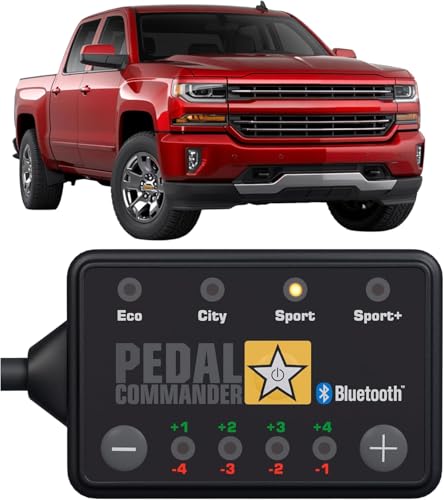
PEDAL COMMANDER
PEDAL COMMANDER for Chevrolet Silverado 1500 2007-2018…
- Compatible with Chevrolet Silverado 1500 (2007–2018): For compatible WT, LT, LTZ, High Country and Z71 configurations with 4.3L V6…
- Adjustable Sensitivity Settings: Choose from four modes with nine sensitivity levels per mode, for a total of 36 settings. Use the…
- Plug-and-Play Connection: Connects in line with your truck’s accelerator pedal position sensor using the supplied connectors, with…
As an Amazon Associate I earn from qualifying purchases.
What exactly is a Pedal Commander? Think of it as a small device that plugs into your car’s accelerator pedal. Your car’s computer controls how quickly the throttle opens.
This affects how fast your car responds when you press the gas pedal. The Pedal Commander changes the signal going to your car’s computer. It can make the signal stronger or weaker.
This makes your car feel faster or more responsive. You can often choose different modes. Some modes make the throttle super sensitive.
Others might make it less sensitive for better fuel economy. It’s like having different driving personalities for your car. You get to pick how your car reacts to your foot.
It’s important to know that the Pedal Commander doesn’t add more horsepower. It doesn’t change the engine itself. It only changes how the gas pedal feels.
It tricks the car’s computer into thinking you’re pressing the pedal harder than you are. This makes the engine react more quickly.
How Car Computers and Warning Lights Work
Your car has a brain. This brain is its engine control unit (ECU), or sometimes called the powertrain control module (PCM). This computer watches over many things.
It monitors the engine, the transmission, and emission systems. It uses many sensors to gather data. These sensors check things like engine temperature, air intake, and oxygen levels.
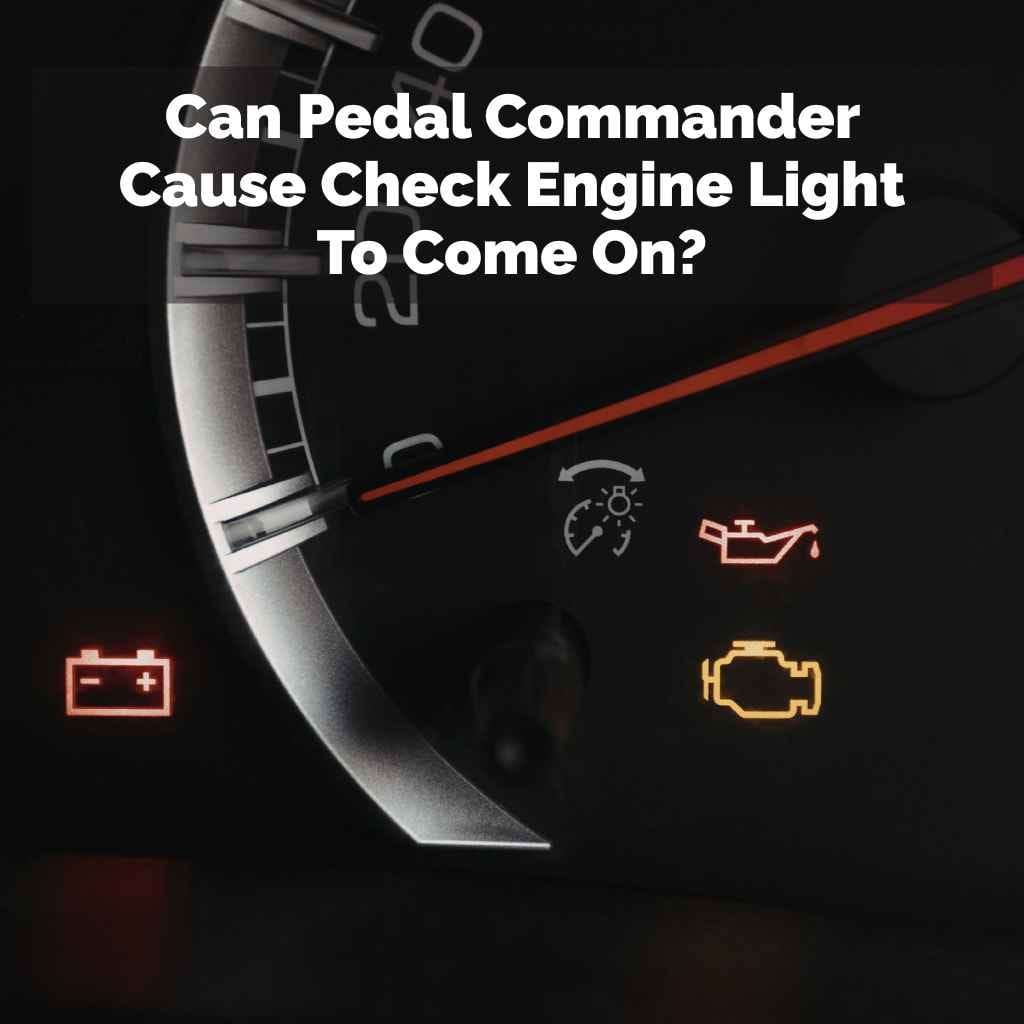
When something is not right, the computer records a “fault code.” This code tells mechanics what might be wrong. If the problem affects your car’s emissions or safety, a light on your dashboard comes on. This is the check engine light.
It’s a signal that your car needs attention.
The computer is programmed to expect certain readings from sensors. It also expects signals to behave in a certain way. When it sees something unusual or outside its expected range, it flags it.
This is how it decides if a fault code needs to be stored and if the check engine light should be turned on.
Can a Pedal Commander Trigger the Check Engine Light?
The short answer is: it’s not common, but it can happen. The Pedal Commander works by altering the signal from your accelerator pedal sensor. It sends a modified signal to your car’s computer.
Most modern cars can handle this fine. Their computers are designed to accept a range of signals.
However, some car models or specific computer systems might be more sensitive. If the modified signal is too far outside what the computer expects, it can register a fault. It might see this as a problem with the accelerator pedal position sensor itself.
Or, it might interpret the unusual signal as an issue with how the engine is responding.
Another way it might happen is through faulty installation. If the wiring harness is not connected correctly, it can cause issues. Loose connections can lead to intermittent signal loss.
This can confuse the car’s computer. It’s the same for any electronic device you add to your car. Proper installation is vital.
Sometimes, the issue isn’t the Pedal Commander itself, but how it interacts with other systems. If you have other modifications on your car, they could play a role. It’s like a chain reaction.
One change affects another, and then the computer gets confused. This is less about the Pedal Commander being “bad” and more about the complexity of modern car electronics.
Real-World Scenarios: When It Happens
I remember a friend, Mark, who installed a Pedal Commander on his pickup truck. He was so excited to feel the difference. The first few days were great!
He loved how the truck felt more eager to go. Then, one morning, he started it up, and there it was: the check engine light glowing bright orange.
Mark panicked. He immediately thought the Pedal Commander was the culprit. He started Googling, just like you might be doing now.
He was worried about the warranty and the cost of repairs. He even considered ripping the Pedal Commander out right then and there. He felt a bit of dread mixed with annoyance.
He decided to take it to his trusted mechanic. The mechanic plugged in his scanner. He found a code related to the accelerator pedal position sensor.
It was reading values that the computer didn’t expect. The mechanic checked the Pedal Commander installation. He found that one of the clips on the harness wasn’t fully seated.
It was a tiny oversight during installation.
Once he re-seated the clip, cleared the code, and test-drove the truck, the light stayed off. The truck ran fine. Mark learned a valuable lesson about careful installation.
It wasn’t the device itself that was the problem, but a simple connection issue that confused the car’s brain. This is a common story. It shows how small things can matter.
Common Causes of Pedal Commander CEL
Improper Installation: Wires not connected securely. Connectors not fully locked in place. This leads to faulty signals.
Vehicle Compatibility: Some car models have more sensitive ECUs. They might flag unusual signals more easily.
Faulty Device: Though rare, the Pedal Commander unit itself could have a defect. This could cause it to send wrong signals.
Sensor Issues: Sometimes, the Pedal Commander might highlight an existing, minor issue with your car’s accelerator pedal sensor.
Other Modifications: If you have other engine or electronic mods, they might interact negatively.
Understanding the Accelerator Pedal Position Sensor
Let’s dive a bit deeper into the accelerator pedal position (APP) sensor. This sensor is crucial. It tells your car’s computer how far down you’re pressing the gas pedal.
It’s usually a multi-part sensor. This means it sends two signals to the computer. This redundancy is for safety.
If the two signals don’t match up properly, the computer knows there’s a problem. This is where the Pedal Commander comes in. It intercepts the signal from the APP sensor and changes it.
It sends this new, altered signal to the computer.
For example, if you press the pedal 20%, the sensor might normally send a signal value of 20. The Pedal Commander might change this to, say, 40. This makes the computer think you’re pressing the pedal harder.
The computer then opens the throttle more. This gives you quicker acceleration.
The problem arises if the Pedal Commander sends a signal that is too different from what the computer expects. Or if the two signals it generates (if it generates two) don’t align correctly. The computer’s built-in safety checks can then trigger a fault code.
This code might be P2135, which often points to an issue with the APP sensor.
Pedal Commander Functionality at a Glance
Purpose: Enhances throttle response for a sportier feel.
How it Works: Modifies the signal from the accelerator pedal sensor.
Modes: Typically offers various settings like Eco, City, Sport, and Sport+.
No Engine Tuning: Does not increase horsepower or torque directly.
Connection: Plugs directly into the accelerator pedal wiring harness.
Installation: The Critical First Step
I cannot stress this enough: installation is key. When you get a Pedal Commander, it comes with instructions. These instructions are usually very clear.
They show you exactly where to plug it in. They explain how to secure the wiring. Taking your time here prevents many headaches.
Most modern cars have the accelerator pedal sensor connector located behind the pedal assembly. You usually need to gently pull the connector apart. Then, you plug one part of the Pedal Commander harness into the car’s original connector.
You plug the other part of the Pedal Commander harness into the Pedal Commander unit itself. It’s like a sandwich.
Make sure each connection clicks securely. You should hear or feel a distinct “snap.” This means it’s locked in place. If a clip is broken or not engaged, the signal can become intermittent.
This is a prime way to get a check engine light. Always double-check every connection before you start the car.
Some people get impatient. They might rush the process. They might force a connector.
This can damage the pins or the connector housing. Damaged connectors can cause poor signal quality. This can lead to the car’s computer throwing a fit.
It’s always better to be slow and steady. Read the manual. Watch a video if you need to.
Another common mistake is where the wiring is routed. You want to make sure the wiring harness from the Pedal Commander is not pinched. It should not rub against any moving parts.
It should not be in a place where it can be damaged by heat or sharp edges. Keep it tidy and secure.
Quick Installation Checklist
1. Read the Manual: Always start by reading the provided instructions.
2. Locate Connector: Find the accelerator pedal sensor connector behind the pedal.
3. Disconnect Safely: Gently separate the original connector.
4. Connect Pedal Commander: Plug the device’s harness into the car and the device.
5. Ensure Secure Fit: Make sure all connectors “click” into place.
6. Route Wiring Properly: Secure the harness away from moving parts.
7. Test Connections: Double-check all points before starting the engine.
Compatibility Issues and Vehicle Models
While Pedal Commanders are designed to work with a vast array of vehicles, not every car is the same. Newer cars, in particular, have more complex electronics. Some manufacturers design their systems with tighter tolerances.
This means they are less forgiving of signals that deviate too much from the norm.
For instance, some luxury brands or performance-oriented models might have very sophisticated throttle mapping. Their computers might be programmed to detect subtle anomalies more quickly. This doesn’t mean the Pedal Commander is faulty.
It means the car’s system is designed to be very protective of its precise electronic controls.
It’s always a good idea to check the manufacturer’s website or reviews specific to your car model. They often list known compatibility issues or specific recommendations. If you have a very new or unusual vehicle, do your homework first.
Ensure the Pedal Commander is explicitly stated to work with your make and model.
Sometimes, software updates for your car’s ECU can affect how it interacts with aftermarket devices. A software update from the dealer might tighten up certain parameters. This could potentially cause a previously working Pedal Commander to trigger a light.
This is rare, but it’s something to be aware of with any electronic mod.
If you’re unsure, reaching out to the Pedal Commander customer support is a wise move. They can often tell you if there are known issues with your specific vehicle. They might have advice on settings or installation that can help prevent problems.
Vehicle Compatibility Considerations
Manufacturer Specifics: Some car brands are more sensitive to signal changes.
ECU Software: Dealer software updates can sometimes alter system behavior.
Newer Models: Advanced electronics in newer cars may react differently.
Research Your Model: Check reviews or manufacturer notes for your specific car.
Customer Support: Contacting the manufacturer can provide model-specific advice.
When the Check Engine Light Comes On: What To Do
Okay, so the light is on. Don’t panic. The first thing you should do is not ignore it.
While it might be a false alarm from the Pedal Commander, it could also be a real issue. Your car’s computer is trying to tell you something.
The best course of action is to check the fault codes. You can buy a basic OBD-II scanner online or at an auto parts store for not too much money. These scanners plug into a port under your dashboard.
They can read the codes stored by your car’s computer. This is your first clue.
If the code points to the accelerator pedal position sensor (like P2135), the Pedal Commander is a likely suspect. If the code is for something completely unrelated (like a misfire or a catalytic converter issue), then the Pedal Commander is probably not the cause. The issue is likely something else with your car.
If you suspect the Pedal Commander, try removing it. Follow the installation instructions in reverse. Carefully disconnect the device.
Reconnect the original connector to the car’s harness. Then, start your car. If the check engine light goes off, the Pedal Commander was indeed the cause.
You can then re-examine your installation or consider the settings you used.
If you’ve removed the Pedal Commander and the light stays on, or if you get a different code, you’ll need to investigate further. It’s possible the installation issue caused a lasting fault code, or there’s another problem. At this point, it’s often best to consult a qualified mechanic.
Remember, most Pedal Commander units can be set back to their “off” or “stock” setting. This essentially bypasses the device, making it act like it’s not even there. This is a good first step before full removal.
It helps isolate the problem without undoing all your work.
Troubleshooting Steps for CEL
1. Don’t Ignore: Check the light as soon as possible.
2. Scan for Codes: Use an OBD-II scanner to read fault codes.
3. Identify Code: Determine if the code relates to the APP sensor.
4. Try “Off” Mode: Set Pedal Commander to stock/off to bypass it.
5. Remove if Needed: Disconnect the Pedal Commander completely.
6. Clear Codes: Reset the car’s computer after removal.
7. Seek Mechanic: If issues persist, consult a professional.
Can You Use Pedal Commander Safely?
Yes, absolutely! Millions of people use Pedal Commanders and similar devices without ever seeing a check engine light. The key is proper installation, understanding your vehicle, and using the device responsibly.
It’s not about the device being inherently bad; it’s about ensuring it integrates well with your car.
Start with the lowest settings. When you first install it, don’t jump straight to Sport+ mode. Begin with Eco or City mode.
See how your car responds. Gradually increase the sensitivity over a few days. This allows your car’s computer to adapt to the new signals.
It also lets you get used to the car’s behavior.
Always ensure you are buying from a reputable seller. Genuine products are made with quality components. They undergo rigorous testing.
This reduces the chance of a faulty unit. Also, stick to the manufacturer’s recommended applications for your vehicle.
Be mindful of your driving conditions. If you’re on a slippery road, a super-sensitive throttle might not be the best idea. Using the right mode for the right situation is part of safe driving.
It also helps prevent unintended reactions that might confuse the car’s systems.
Regular maintenance of your vehicle is also important. Ensure your car’s basic systems are in good working order. Healthy sensors and a well-maintained engine are less likely to throw unexpected codes.
The Pedal Commander is just one part of your car’s overall system.
Tips for Safe Pedal Commander Use
Start Low: Begin with the least aggressive settings.
Gradual Increase: Slowly move to higher modes as you get used to it.
Reputable Source: Buy genuine products from trusted vendors.
Match Vehicle: Ensure compatibility with your car model and year.
Check Connections: Always verify secure installation.
Observe Behavior: Pay attention to how your car drives.
Know Your Codes: Have an OBD-II scanner handy.
What This Means for Your Car’s Health
When the check engine light comes on, it means the car’s computer has detected something outside its normal operating parameters. If it’s related to the Pedal Commander, it’s usually because the signal from the accelerator pedal is not what the computer expects. This can sometimes be an issue with the sensor itself.
However, in many cases, the car’s computer is just being cautious. It sees an unusual signal and flags it. It doesn’t necessarily mean your engine is about to blow up.
But, it does mean the computer might be operating in a “limp mode.” This mode often reduces engine power to prevent further damage.
If the light is on because of a Pedal Commander issue, and you’ve confirmed it’s just a signal anomaly, then the actual engine components are likely fine. The system is designed to protect itself. The Pedal Commander doesn’t alter the fundamental way your engine produces power.
It just changes how you ask for it.
What’s important is to address the light promptly. Ignoring it can lead to bigger problems down the line. Even if you believe it’s just the Pedal Commander, a persistent fault code can sometimes mask a more serious underlying issue.
It’s like a false alarm that makes it hard to hear a real emergency.
For those with warranties, be aware that some dealerships may flag aftermarket modifications. If a CEL is caused by an aftermarket part, they might deny a warranty claim related to that issue. However, the Pedal Commander typically affects the throttle response system, not usually engine internals, making it less likely to void an entire powertrain warranty.
Understanding the CEL Impact
ECU Caution: The computer flags unexpected signals.
Potential Limp Mode: Engine power might be reduced for protection.
Signal Anomaly: Often, it’s a signal mismatch, not engine damage.
Address Promptly: Don’t ignore the light; check for codes.
Warranty Awareness: Be mindful of dealership policies on aftermarket parts.
Quick Fixes and Tips
If your check engine light comes on and you suspect the Pedal Commander, here are some quick things to try. First, set your Pedal Commander to the “off” or stock setting. This essentially takes it out of the loop.
If the light goes off after a few drive cycles (starting the car, driving a bit, turning it off), then the Pedal Commander was likely the cause.
If it stays on even in “off” mode, try removing the Pedal Commander completely. Disconnect it from the accelerator pedal connector. Reconnect the original car connector.
Then, clear the fault codes using your OBD-II scanner. Drive the car for a while. If the light stays off, the Pedal Commander caused the issue.
If it comes back on with the same code, the problem might be with the original sensor or wiring, or the installation itself caused a lasting fault.
Consider the settings. If you were using a very aggressive setting, try dialing it back. Sometimes, the extreme sensitivity can trigger a fault on certain vehicles.
If you have other electronic modifications, try disconnecting them temporarily to see if the problem persists. This helps isolate the cause.
For many, simply ensuring the Pedal Commander’s wiring harness is routed neatly and away from heat sources or moving parts is enough. A loose wire or a pinched cable can cause intermittent signal loss. Tucking it away securely can prevent this.
Finally, if you’ve tried these steps and the light is still on, it’s time for professional help. A mechanic can diagnose the exact fault code and perform more in-depth testing of the accelerator pedal sensor system and the car’s ECU.
Actionable Tips
Use “Off” Mode: Test if the light disappears.
Full Removal: Disconnect the device and clear codes.
Adjust Settings: Try less aggressive modes.
Check Harness: Ensure wiring is secure and protected.
Isolate Mods: Temporarily remove other aftermarket parts.
Professional Diagnosis: Consult a mechanic if needed.
Frequently Asked Questions
Will Pedal Commander void my car’s warranty?
Pedal Commander does not directly alter engine components. However, some dealerships might claim an aftermarket part caused a problem. It’s best to check your warranty details and potentially remove the device before dealership visits if you’re concerned.
What are the common check engine light codes related to Pedal Commander?
The most common code is P2135. This code usually relates to the accelerator pedal position sensor circuit. It indicates that the signals from the sensor are out of range or implausible.
How do I know if the check engine light is really serious?
A steady check engine light usually indicates a less urgent issue. A flashing light means a severe problem, like a misfire, that could damage your catalytic converter. Always get codes read to understand the specific problem.
Can I use Pedal Commander in conjunction with other performance mods?
It’s possible, but you increase the risk of electronic interference. If you have other mods, test them one by one or consult with experts to ensure compatibility. Proper installation and understanding of how each mod affects signals is crucial.
What if my Pedal Commander is faulty?
If the device itself is defective, it might send incorrect signals or fail to communicate properly. This could lead to a check engine light. Contact the manufacturer for support or warranty claims if you suspect the unit is bad.
How long does it take for the check engine light to turn off after fixing an issue?
After fixing the problem and clearing the codes, the light typically turns off immediately. However, the car’s computer needs to complete a “drive cycle” to confirm the issue is resolved. This usually involves a mix of city and highway driving.
It might take a few cycles for the light to stay off permanently.
Conclusion
It’s natural to feel worried when that check engine light appears after installing a new gadget. The good news is that a Pedal Commander doesn’t usually cause lasting damage. Most often, any check engine light issues are due to installation hiccups or compatibility quirks.
By taking your time with installation, understanding your vehicle, and knowing how to troubleshoot, you can enjoy the benefits of a responsive throttle without dashboard drama. Keep an eye on your car, and you’ll both be happy. See also can pedal bone rotation be reversed vet-backed answers.
},
},
},
},
},
}
]
}
Related pick: Check today's price on Amazon See also how many buffered pedals is too many in your chain .
Products related to this article
Sponsored / affiliate links. As an Amazon Associate I earn from qualifying purchases. I may earn additional commission from eligible campaigns.