How to Auto Start a Honda Civic (Step-By-Step Guide)
Owning a Honda Civic comes with an array of practical features, but one that stands out for its convenience and security is the auto start function. Whether you want to warm up your car on a chilly morning, cool it down before driving in summer, or simply enjoy the luxury of starting your engine from afar, auto start can be a game-changing enhancement. With technology advancing rapidly and drivers seeking comfort and efficiency, learning how to auto start a Honda Civic is both timely and valuable.
This comprehensive, step-by-step guide will walk you through everything you need to know about auto start systems for Honda Civics. From understanding factory and aftermarket solutions to installation, troubleshooting, safety considerations, and real-world examples, you’ll gain actionable insights backed by data and expert advice. By the end, you’ll be equipped to make informed decisions and confidently use auto start on your Civic, enhancing your daily driving experience.
Key Takeaways
- Auto start improves convenience, safety, and climate control for Honda Civic owners.
- Both factory-installed and aftermarket remote start systems are available, each with distinct pros and cons.
- Installation requires careful attention to compatibility, wiring, and programming; professional help is often recommended.
- Troubleshooting common issues ensures reliable performance and safety.
- Real-world examples demonstrate the practical benefits of auto start in various scenarios.

Credit: www.earnhardthonda.com
Understanding Auto Start Systems In Honda Civics
Auto start, also known as remote start, is a feature that enables your vehicle to start its engine remotely via a key fob or smartphone app. Honda Civics have embraced this technology, especially in recent models, providing enhanced comfort and security for drivers.
Understanding the basics, benefits, and available options is crucial before diving into installation or usage.
Factory Vs. Aftermarket Auto Start Systems
Honda offers factory-installed remote start systems in many newer Civic models. These systems are integrated with the vehicle’s electronics, ensuring seamless operation and warranty compliance. In contrast, aftermarket systems can be installed in older Civics or models lacking factory remote start. Aftermarket kits range from basic to advanced, with features like smartphone integration, extended range, and custom settings.
| Feature | Factory Remote Start | Aftermarket Remote Start |
|---|---|---|
| Integration | Seamless, OEM-compliant | Depends on installer, may require extra wiring |
| Warranty | Maintained | May affect warranty if not properly installed |
| Features | Basic (start/stop, climate pre-set) | Advanced (app control, range, custom settings) |
| Cost | Included or optional upgrade | Varies ($150, $600 typical, plus installation) |
| Availability | Recent models (2016+) | Most models (1995+) |
How Auto Start Works
The auto start system uses a remote transmitter (key fob or app) to send a signal to the vehicle’s control module. If safety conditions are met (vehicle is locked, doors closed, transmission in park), the engine starts automatically. Climate controls may activate, based on previous settings, allowing the cabin to reach a comfortable temperature before you enter.
Benefits Of Auto Start
- Comfort: Pre-condition your car’s interior for extreme weather.
- Security: Keep doors locked while starting engine.
- Efficiency: Reduce engine wear by warming up before driving.
- Resale Value: Enhanced features can boost market appeal.
Step-by-step Guide: How To Auto Start A Honda Civic
Getting started with auto start on your Honda Civic depends on the model, year, and whether your system is factory-installed or aftermarket. The following step-by-step guide covers both scenarios, ensuring you have clear, actionable instructions.
Step 1: Check Compatibility And Equipment
Before proceeding, verify if your Civic supports auto start:
- Factory Remote Start: Check your owner’s manual or Honda’s official site for your model year.
- Aftermarket Systems: Research compatible kits for your model (e.g., Compustar, Viper, Avital).
- Required Equipment: Key fob with remote start button, smartphone app (for advanced kits), installation kit.
Pro Tip: If unsure, consult your dealer or a certified installer to confirm compatibility.
Step 2: Locate The Remote Start Button
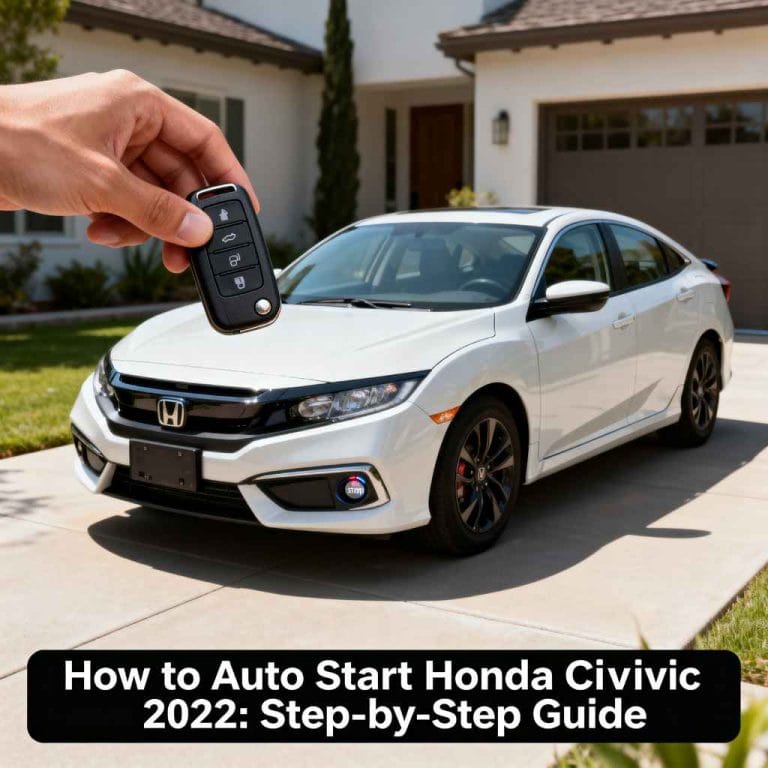
- Factory Systems: The remote start button is typically marked with a circular arrow on the key fob.
- Aftermarket Systems: Look for dedicated buttons or app controls. Some kits require pressing multiple buttons simultaneously.
Example: On a 2026 Honda Civic, the remote start is activated by pressing the lock button twice, then holding the circular arrow button.
Step 3: Prepare The Vehicle
- Ensure the doors are locked.
- Transmission must be in park.
- All windows should be closed for climate control.
- Check for warning lights or messages indicating system readiness.
Step 4: Initiate Auto Start
- Press the lock button on the fob twice (for factory systems).
- Hold the remote start button for 2, 5 seconds until the lights flash and engine starts.
- For aftermarket kits, follow specific instructions (may involve pressing lock and unlock simultaneously).
In my experience, aftermarket systems often require more precise timing; always check the manual for your kit.
Step 5: Enter And Drive
- Once started remotely, enter the vehicle.
- Insert the key or press the start button (for push-to-start models).
- The engine remains running; drive as usual.
Warning: If any doors are opened before entering, the engine will shut off for security.
Step 6: Turn Off Auto Start
- To stop the engine remotely, press the remote start button again.
- Alternatively, unlock and enter the car, then press the brake pedal or start button.
Step 7: Troubleshoot Common Issues
If the auto start fails:
- Check battery level in key fob.
- Ensure vehicle is locked and in park.
- Look for error codes on dashboard.
- Consult your kit’s troubleshooting guide or visit a professional installer.

Credit: www.youtube.com
Installation Process For Aftermarket Auto Start Systems
If your Honda Civic lacks a factory remote start, installing an aftermarket system is a popular solution. While DIY installation is possible for experienced users, professional installation is recommended due to the complexity of modern vehicle electronics.
Selecting The Right Aftermarket Kit
- Compatibility: Choose a kit designed for Honda Civics (model year and trim).
- Features: Decide on basic vs. advanced options (app control, range, climate presets).
- Brand Reputation: Opt for trusted brands like Compustar or Viper.
Example: Compustar CS4900-S is popular for 2016, 2026 Civics, offering extended range and smartphone integration.
Tools And Materials Needed
- Screwdrivers, wire strippers, electrical tape
- Vehicle-specific wiring harness (often included)
- Installation manual
Installation Steps
- Disconnect battery: Prevent electrical shorts.
- Access wiring: Remove dashboard panels to reach ignition and control module.
- Connect harness: Match wires according to color codes and instructions.
- Mount antenna: Place near windshield for optimal signal.
- Test system: Reconnect battery, test remote start function.
- Secure components: Reattach panels, secure loose wires.
Pro Tip: For push-to-start models, a bypass module is often required. Follow kit instructions closely to avoid immobilizer issues.
Professional Installation
Many drivers opt for professional installation to ensure:
- Warranty compliance
- Proper integration
- Reliable performance
Average installation costs range from $120, $250, depending on complexity.
| DIY Installation | Professional Installation |
|---|---|
| Requires technical skill | Handled by certified technicians |
| Risk of errors/warranty void | Warranty usually preserved |
| Lower cost ($0 labor) | Higher cost ($120, $250 labor) |
| Time-consuming (2, 4 hours) | Quick (1, 2 hours) |

Credit: www.earnhardthonda.com
Safety, Legal, And Environmental Considerations
While auto start is convenient, safety, legal compliance, and environmental impact must be considered.
Safety Precautions
- Child and pet safety: Never leave unattended in a running vehicle.
- Carbon monoxide risk: Only use auto start in open, ventilated areas.
- Security: Auto start keeps doors locked, but always verify before leaving the vehicle running.
Legal Regulations
Some states and municipalities restrict idling times or remote engine operation. According to the U.S. Environmental Protection Agency, excessive idling can incur fines and contribute to air pollution. Always check local laws before using auto start, especially for extended periods.
EPA Idling Reduction FAQ
Environmental Impact
Auto start increases idling time, leading to higher fuel consumption and emissions. Modern Civics with efficient engines minimize this effect, but responsible use is advised.
- Limit remote start duration to 5, 10 minutes.
- Use climate control settings wisely.
- Consider hybrid models for reduced impact.
Troubleshooting And Maintenance Tips
Ensuring reliable auto start performance involves regular maintenance and troubleshooting. Common issues include signal interference, battery problems, and wiring faults.
Signal And Range Issues
- Antenna placement: Keep clear of metal obstructions.
- Key fob battery: Replace annually for optimal performance.
- Interference: Avoid using near large buildings or other electronics.
Battery And Electrical Problems
- Vehicle battery: Weak batteries may prevent auto start.
- Wiring: Inspect connections for corrosion or loose wires.
- Control module: Update firmware if available.
Software And App Integration
For advanced aftermarket kits, smartphone app integration can fail due to software bugs or connectivity issues:
- Update app regularly
- Check Bluetooth or Wi-Fi settings
- Re-pair devices as needed
Example: Compustar’s DroneMobile app occasionally requires a reset after software updates.
Real-world Examples And Case Studies
To illustrate the value of auto start, let’s explore real-world scenarios and experiences from Honda Civic owners.
Cold Climate Comfort
In Minnesota, Civic owner Sarah reported that remote start helped her avoid freezing seats and windshield frost. By starting her 2020 Civic remotely, the cabin reached a comfortable temperature, saving her daily time and effort.
Aftermarket Installation Success
John, a 2012 Civic owner in California, installed a Compustar kit with professional help. He appreciated the extended range, allowing him to start the car from his office building, especially useful during summer heatwaves.
Security Enhancement
A Civic owner in New York mentioned that auto start, combined with locked doors and alarm integration, deterred theft attempts. The system automatically shut down if entry was forced, adding peace of mind.
Pro Tip: Always Verify Your System’s Shutdown Sequence For Security. Some Aftermarket Kits Offer Customizable Settings.
Comparing Honda Civic Auto Start With Other Brands
Auto start is increasingly common across car brands. Comparing Honda Civic’s implementation to competitors highlights strengths and areas for improvement.
| Brand | Factory Remote Start Availability | Aftermarket Options | Unique Features |
|---|---|---|---|
| Honda Civic | 2016+ models | Wide range, smartphone integration | OEM climate presets |
| Toyota Corolla | 2018+ models | Similar options | Remote climate control, app unlock |
| Ford Focus | 2017+ models | Available, Sync integration | App-based diagnostics |
| Chevrolet Cruze | 2016+ models | GM OnStar, aftermarket kits | Keyless entry, OnStar app |
Honda’s remote start is competitive, especially with the integration of climate presets and security features. However, some competitors offer more advanced app connectivity and diagnostics.
Consumer Reports Guide
Maximizing Auto Start Benefits: Tips And Best Practices
To get the most from your Honda Civic’s auto start, follow these expert tips:
Optimize Climate Control Settings
- Set HVAC to desired temperature before shutting down car.
- Use seat warmers or coolers if available.
- Adjust fan speed for rapid cabin conditioning.
Extend Range And Reliability
- Upgrade antenna placement for aftermarket kits.
- Use smartphone apps for extended control.
- Maintain key fob batteries and check for firmware updates.
Integrate With Security Systems
- Pair auto start with alarm systems for enhanced protection.
- Program automatic shutdown on forced entry.
- Enable location tracking if offered by your kit.
Responsible Use
- Limit idle time to reduce fuel consumption.
- Follow local regulations.
- Educate family members on safe operation.
Frequently Asked Questions
What If My Honda Civic Doesn’t Have A Factory Remote Start?
If your Civic lacks factory remote start, you can install an aftermarket system. Choose a kit compatible with your model and year, and consider professional installation for reliability and warranty compliance. Some kits offer advanced features like app control and extended range.
Can Auto Start Cause Battery Drain Or Engine Wear?
Auto start, when used responsibly, does not significantly increase battery drain or engine wear. However, frequent long idling can reduce battery life and increase fuel consumption. Modern Civics are designed to handle brief remote starts safely; limit idle times to 5, 10 minutes.
Are There Risks Of Theft With Auto Start?
Auto start systems keep the doors locked and engine running, deterring theft. If entry is forced, most systems automatically shut down the engine. However, always verify your kit’s security features and avoid leaving valuables in a running, unattended vehicle.
Can I Use Auto Start In A Manual Transmission Civic?
Most factory and aftermarket auto start systems are designed for automatic transmissions. Manual transmission Civics require specialized kits with additional safety checks (e.g., neutral detection, parking brake sensor) to prevent accidental starting. Consult a professional installer for manual models.
How Do I Maintain My Auto Start System For Long-term Reliability?
Regular maintenance includes:
- Replacing key fob batteries annually
- Inspecting wiring and connections for corrosion
- Updating software or firmware for app-based kits
- Scheduling professional checks if issues arise
Auto start is a practical, sought-after feature for Honda Civic owners, delivering comfort, security, and convenience. Whether you’re warming up your car on a winter morning or cooling it down in summer, understanding the steps, installation process, and best practices ensures you make the most of this technology.
By following the detailed guide above, you’ll enjoy reliable performance and peace of mind, knowing your Civic is ready when you are. If you’re ever uncertain, seeking help from a certified installer or consulting official resources is the best path forward.
Products related to this article
Sponsored / affiliate links. As an Amazon Associate I earn from qualifying purchases. I may earn additional commission from eligible campaigns.