How to Fix a Ford Car Key That’S Not Working Properly
If your Ford car key stops working, it can be more than a simple inconvenience—it can disrupt your entire day. Modern Ford vehicles rely heavily on advanced key fobs, transponder chips, and electronic systems to provide secure, convenient access and ignition.
When these keys malfunction, they can lock you out, leave you stranded, or force you to seek costly dealership services. Fortunately, most Ford key problems are solvable with a systematic approach, a little technical know-how, and the right resources.
In this comprehensive guide, you’ll discover expert methods to diagnose, troubleshoot, and fix a Ford car key that’s not working properly. Whether you own a traditional Ford key, a remote key fob, or a smart proximity key, understanding the root causes and best solutions can save you time, money, and frustration.
By the end, you’ll be well-equipped to tackle common Ford key issues—or know when it’s time to call in the professionals.
Key Takeaways
- Ford car key problems often stem from battery issues, programming faults, or physical damage.
- Basic troubleshooting can fix many issues without dealership intervention.
- Advanced keys (fobs, proximity keys) require specific diagnostic steps and sometimes professional tools.
- Preventive maintenance and careful handling can extend the life of your Ford car key.
- Knowing when to seek professional help can prevent further vehicle damage and unnecessary costs.
Credit: key.me
Common Reasons Ford Car Keys Stop Working
Understanding why your Ford key isn’t working is the first step toward a solution. Below, we break down the main causes and how each can impact your specific Ford key type.
Battery Failure In Remote Or Smart Keys
Dead batteries are the most frequent culprit behind non-functional Ford remote and proximity keys. Modern Ford fobs use small coin-cell batteries (usually CR2032 or CR2026), which typically last 1–3 years. Symptoms of a dying battery include:
- Intermittent response or reduced range
- Complete lack of remote functions
- Warning messages on your vehicle’s dashboard
Key Programming Issues
Ford keys with built-in transponders or electronic chips must be correctly programmed to your vehicle’s immobilizer system. Programming loss can occur due to:
- Battery disconnection or replacement in the car
- Faulty vehicle electronics (e.g., Body Control Module glitches)
- Use of aftermarket or cloned keys
When programming is lost, the key won’t start the car, even if it physically turns in the ignition.
Physical Damage Or Wear
Broken key blades, worn buttons, or cracked fob housings can prevent keys from working. Common physical issues include:
- Key blade won’t turn in the lock/ignition due to bending or chipping
- Buttons stick or fail due to internal debris or rubber wear
- Fob shells break from drops or pressure
Faulty Car Lock Or Ignition Cylinder
Sometimes, the problem lies with the vehicle’s lock or ignition barrel rather than the key itself. Signs include:
- Key works on doors but not ignition, or vice versa
- Other keys (spares) also fail to work in the same lock
Interference Or Electronic Malfunction
Modern Ford vehicles use encrypted radio signals. Signal interference or faults in the vehicle’s keyless entry system can cause:
- Inconsistent fob operation near strong radio sources (cell towers, airports)
- All keys failing to work due to receiver module failure
Case Study: 2018 Ford Escape Key Fob Failure
A 2018 Ford Escape owner noticed their key fob was only working from a few feet away. After replacing the fob battery, the problem persisted. A diagnostic scan at the dealership revealed a software glitch in the car’s Body Control Module, which was fixed with a software update.
This case highlights that not all key issues stem from the key itself—sometimes, the car’s electronics are at fault.
Credit: key.me
Step-by-step Troubleshooting Guide
Diagnosing a Ford key issue systematically can help you avoid unnecessary expenses and wasted time. Follow these steps to narrow down and resolve the problem.
Step 1: Identify Your Ford Key Type
Ford vehicles use several types of keys:
- Traditional blade key (no electronics)
- Transponder key (chip embedded in the plastic head)
- Remote key fob (controls door locks, often with integrated blade)
- Proximity/smart key (keyless entry and push-button start)
Refer to your owner’s manual or inspect your key for buttons, chips, or labels.
Step 2: Test All Available Keys
If you have a spare, test it in all locks and the ignition. This helps determine if the issue is with a specific key or the vehicle.
- If spares work: The problem is likely with the faulty key.
- If all keys fail: The issue may be with the vehicle’s locks, ignition, or electronics.
Step 3: Check Key Fob Battery
For remote or smart keys:
- Open the key fob (usually a small notch or screw).
- Remove the coin-cell battery.
- Test battery voltage with a multimeter (should be 3V).
- Replace with a new battery if low.
Pro Tip: Always use the battery type specified in your owner’s manual.
Step 4: Inspect For Physical Damage
Examine the key blade, fob shell, and buttons for cracks, bends, or debris. Clean with compressed air and ensure buttons depress and spring back cleanly.
Step 5: Attempt Manual Unlock/start
- Try unlocking and starting the car with the physical blade (if present).
- If your Ford has a hidden key slot (often found under a cover near the steering column), insert the fob or blade as directed in your manual.
Step 6: Reprogram Or Reset Key
Some Ford keys can be reprogrammed using a sequence of ignition cycles or button presses. Procedures vary by model and year—consult your manual or refer to online guides such as Ford Owner Resources.
Step 7: Scan For Diagnostic Trouble Codes (dtcs)
Use an OBD-II scanner or visit a mechanic to check for codes related to immobilizer or Body Control Module faults.
Step 8: Seek Professional Help
If none of the above steps resolve the issue, it’s time for a professional locksmith or dealer diagnosis.

Credit: www.youtube.com
How To Fix Specific Ford Key Problems
Each key type and problem requires a tailored approach. Here’s how to address the most common Ford key malfunctions.
Dead Key Fob Battery Replacement
Replacing a remote or smart key battery is straightforward:
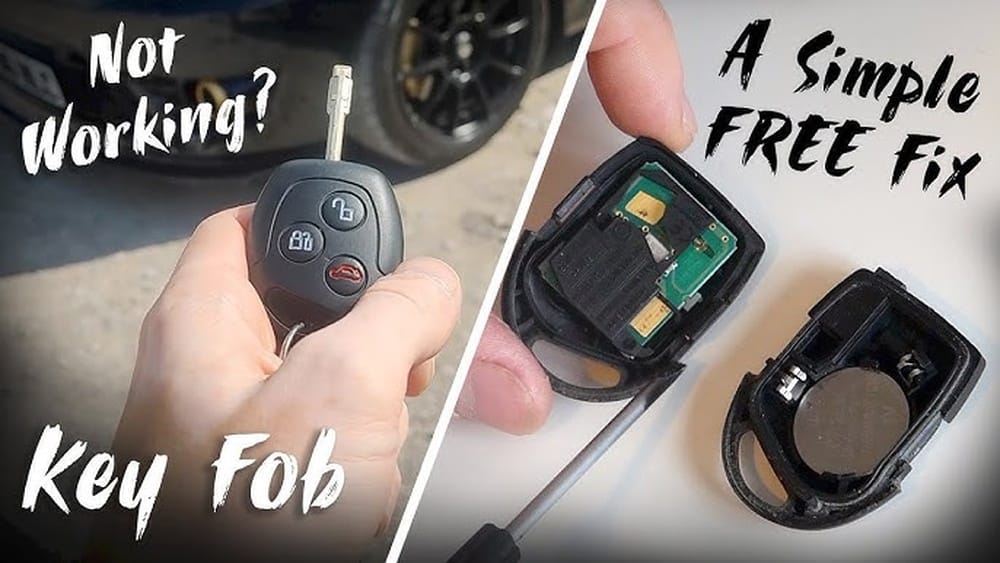
- Open the key fob shell using the provided notch or a small screwdriver.
- Remove the old coin battery, noting orientation.
- Insert a new, matching battery (e.g., CR2032).
- Snap the fob shell closed and test all functions.
Note: Some Ford models may require you to resync the fob by pressing lock/unlock near the car after battery replacement.
Reprogramming A Ford Key
If your Ford key has lost programming, you may be able to reprogram it yourself if you have two working keys. For most models (2000s–2010s):
- Insert the first programmed key and turn to ON (not start); hold for 3 seconds.
- Remove the key, insert the second programmed key, and turn to ON; hold for 3 seconds.
- Insert the new key and turn to ON within 10 seconds.
- Wait for the security light to stop flashing.
If you only have one key, dealer programming or an advanced locksmith tool is required.
Fixing A Bent Or Damaged Key Blade
A bent key can often be carefully straightened with pliers, but a cracked or chipped key should be replaced. Most Ford dealers and locksmiths can cut a new blade using your VIN or an existing key.
Repairing Or Replacing Broken Key Fobs
If the fob shell is cracked or buttons are worn:
- Purchase a replacement shell or button pad (widely available online).
- Carefully transfer the internal circuit board and transponder chip to the new shell.
- Test the key in the vehicle.
Resolving Ignition Or Door Lock Faults
If the key works in other locks but not one specific lock:
- Try lubricating the lock with graphite spray.
- If still stuck, the lock cylinder may need professional repair or replacement.
Case Study: 2016 Ford F-150 Spare Key Programming
A 2016 Ford F-150 owner bought an unprogrammed spare key online. Using two working keys, they followed the owner’s manual programming sequence and successfully added the new key—saving over $120 compared to the dealership’s quote.
When To Repair, Reprogram, Or Replace: A Comparison
Use the table below to decide the best course of action for your Ford key issue.
| Problem | DIY Solution | Professional Needed? | Estimated Cost (USD) |
|---|---|---|---|
| Dead Fob Battery | Replace battery | No | $2–$5 |
| Lost Programming (2 working keys) | Reprogram at home | No | Free |
| Lost Programming (1 or 0 working keys) | Not possible | Yes | $50–$150 |
| Bent/Broken Blade | Replace blade | Usually | $30–$90 |
| Broken Fob Shell | Replace shell | No | $5–$20 |
| Ignition/Lock Fault | Lubricate/clean | Yes, if persists | $80–$300 |
| Module/ECU Issue | Not possible | Yes | $150–$600 |
Real-world Examples And Case Studies
Learning from other Ford owners’ experiences can help you avoid common pitfalls and find the most effective solutions.
Example 1: Ford Focus Remote Not Unlocking Doors
A 2014 Ford Focus owner found their remote fob would not unlock the driver’s door but worked for the passenger side. After inspecting the door lock mechanism, they discovered the actuator motor had failed. Replacing the actuator resolved the problem—demonstrating that sometimes, the lock mechanism, not the key, is the root cause.
Example 2: Ford Fusion Key Not Starting Car
A Ford Fusion owner’s key would unlock the doors but would not start the car, with a security light flashing on the dashboard. An OBD-II scan revealed a P1260 immobilizer code. Dealer reprogramming was required, but the cost was minimized by bringing all keys at once, preventing future lockouts.
Example 3: Ford Explorer Proximity Key Battery Drain
A 2020 Ford Explorer owner noted their proximity key battery needed replacing every few months. The culprit was traced to proximity sensor interference: storing the key too close to the car overnight kept it in constant communication, draining the battery. Storing keys further from the vehicle solved the problem.
Preventive Maintenance And Best Practices
Proactive care can extend the life and reliability of your Ford car key. These strategies minimize the risk of failure and expensive repairs.
Regular Battery Checks
- Replace remote or smart key batteries every 1–2 years or at the first sign of reduced range.
- Keep a spare battery in your glovebox or wallet.
Safe Key Handling
- Avoid dropping your keys or exposing them to water and extreme temperatures.
- Store keys in protective cases.
Clean Locks And Fobs
- Use compressed air to clear debris from key fobs and locks.
- Lubricate locks with graphite spray every 6–12 months.
Update Vehicle Software
- Periodically check for Body Control Module or immobilizer software updates, especially if your Ford experiences key recognition glitches.
- Visit the official NHTSA Recalls site to check for relevant Ford recalls or Technical Service Bulletins.
Keep Spare Keys Safe
- Store spare keys in a secure, accessible location outside your vehicle.
- Test all keys periodically to ensure they are working.
How Ford Key Systems Compare To Other Brands
Understanding how Ford’s key systems stack up against the competition can provide useful context for troubleshooting and upgrades.
| Brand | Key Technology | DIY Friendliness | Average Replacement Cost | Common Issues |
|---|---|---|---|---|
| Ford | Transponder, Fob, Proximity | Moderate | $50–$300 | Battery, Programming, Fob Shell |
| Toyota | Transponder, Smart Key | Moderate | $80–$400 | Battery, Smart Key Recognition |
| Honda | Immobilizer, Fob | High | $40–$250 | Battery, Immobilizer Codes |
| BMW | Comfort Access, Digital Key | Low | $200–$700 | Module Failure, Battery |
For more on the evolution of car keys, see Wikipedia: Car Key.
When To Call A Professional
While many Ford key problems are DIY-friendly, some situations require expert intervention. Here’s how to know when to seek help.
Lost All Keys
If you have no working keys, only a dealership or advanced locksmith can generate and program new keys to your car’s immobilizer system.
Complex Programming Or Module Faults
Some Ford models require specialized diagnostic tools to program keys, reset immobilizer modules, or update Body Control Module firmware. Attempting DIY fixes can risk further damage.
Physical Key Extraction Or Lock Repair
If a key is stuck, broken off, or jammed in a lock/ignition, professional extraction and repair are recommended to avoid damaging the lock cylinder.
Vehicle Security System Resets
After battery jumps, immobilizer faults, or certain accidents, a full system reset may be necessary. Professionals can ensure all components communicate correctly.
Case Study: Ford Mustang Keyless Entry Module Failure
A 2017 Ford Mustang owner experienced total keyless entry failure after a battery jump-start. A mobile locksmith diagnosed a failed Passive Anti-Theft System (PATS) module. Dealer replacement and reprogramming restored all key functions.
For professional resources, check the Pop-A-Lock network or Ford’s official service locator.
Cost Analysis: Diy Vs Dealership Vs Locksmith
Ford car key repairs and replacements vary widely in cost. Here’s a breakdown of typical expenses for major fixes.
| Service Type | DIY Cost | Locksmith Cost | Dealership Cost | Turnaround Time |
|---|---|---|---|---|
| Battery Replacement | $2–$5 | $15–$25 | $25–$40 | 5–15 min |
| Spare Key Programming | Free–$10 | $50–$100 | $80–$150 | 15–60 min |
| Key Blade Replacement | $5–$20 | $40–$90 | $60–$120 | 30–90 min |
| Proximity Key Replacement | $60–$120 (shell only) | $120–$250 | $200–$400 | 1–3 hrs |
| Module/ECU Repair | Not possible | $150–$300 | $200–$600 | 1–2 days |
For more on Ford key costs, see Consumer Reports.
Upgrading Or Replacing Your Ford Key: Options And Considerations
If your key is beyond repair, consider the following options.
Oem Vs. Aftermarket Keys
OEM (Original Equipment Manufacturer) keys are guaranteed to work and often come with warranties, but cost more. Aftermarket keys may be less expensive but can have compatibility issues.
Where To Buy Replacement Keys
- Ford dealerships (highest reliability, highest cost)
- Certified automotive locksmiths (balance of cost and service)
- Online retailers (e.g., Amazon, eBay) for fob shells and unprogrammed keys
Tip: Always verify key compatibility using your VIN and model year.
Programming New Keys
Most new Ford keys (post-2000) require programming to your vehicle’s immobilizer system. Some can be programmed at home if you have two working keys; otherwise, dealer or locksmith programming is necessary.
Keyless Entry And Smart Key Upgrades
If your Ford is compatible, you can upgrade to a keyless entry system or proximity key for added convenience. Consult your owner’s manual and a professional installer.
For DIY keyless entry kits, see Car and Driver.
Frequently Asked Questions
What Should I Do If My Ford Key Won’t Turn In The Ignition?
If your key won’t turn, first check for debris or wear on the key and in the ignition slot. Try a spare key. If both keys fail, the ignition cylinder may be worn or damaged, requiring professional repair.
Can I Program A New Ford Key Myself?
If you have two working, programmed keys, you can often program a third key yourself by following the instructions in your owner’s manual. If you only have one or no working keys, you’ll need a locksmith or dealership.
How Long Do Ford Key Fob Batteries Last?
Most Ford key fob batteries last 1–3 years, depending on usage and storage habits. Replace at the first sign of reduced range or intermittent function.
What Is The Cost To Replace A Lost Ford Key?
Replacing a lost Ford key can cost between $50 and $400, depending on the key type, programming requirements, and whether you choose a dealer or locksmith.
Is It Safe To Buy Ford Keys Online?
It’s safe to buy replacement Ford key shells and unprogrammed keys from reputable sellers. For electronic keys, always check compatibility with your VIN and be prepared for professional programming.
If your Ford car key isn’t working, don’t panic. Most issues can be diagnosed and fixed with a logical, step-by-step approach. From replacing a simple battery to advanced programming, understanding your options puts you in control. Remember to maintain your keys, update your vehicle’s software, and consult professionals when needed. With these strategies, you’ll keep your Ford secure and running smoothly for years to come. For further reading and official documentation, visit the Ford Support Center.
Products related to this article
Sponsored / affiliate links. As an Amazon Associate I earn from qualifying purchases. I may earn additional commission from eligible campaigns.