How To Start Your Car With Ford Pass (Quick & Easy Guide)
Starting your car with the Ford Pass app is a remote start feature. It allows you to warm up or cool down your vehicle before you get in. This convenience is available for many Ford models.
You need a compatible vehicle and an active Ford Pass Connect subscription.
What is Ford Pass Remote Start?
Ford Pass is an app. It connects you to your Ford vehicle. One of its best features is remote start.
Start-X
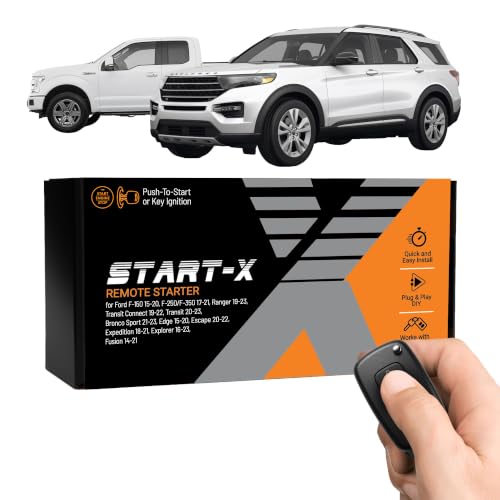
Start-X Remote Start Kit for Ford F-150/250/350,…
- 𝗩𝗲𝗵𝗶𝗰𝗹𝗲 𝗰𝗼𝗺𝗽𝗮𝘁𝗶𝗯𝗶𝗹𝗶𝘁𝘆: 2015-2020 F-150, 2017-2021 F-250, 2019-2023 Ranger, 2020-2022 Transit, 2019-2022 Transit Connect, 2021-2023…
- 𝗩𝗲𝗵𝗶𝗰𝗹𝗲 𝗿𝗲𝗾𝘂𝗶𝗿𝗲𝗺𝗲𝗻𝘁𝘀: This kit is designed for both push-to-start and key blade ignition vehicles. Gas and automatic transmission…
- *𝗜𝗠𝗣𝗢𝗥𝗧𝗔𝗡𝗧: A functional hood pin is required for this kit to function. Extra hood pin supplied in kit to use if necessary.
As an Amazon Associate I earn from qualifying purchases.
It lets you start your car’s engine using your smartphone. You can also lock or unlock your doors. Plus, you can check your fuel level.
You can even find where you parked.
This remote start function is part of Ford’s connected vehicle technology. It uses cellular and GPS signals. Your phone sends a command.
The Ford Pass Connect modem in your car receives it. Then, your car’s engine turns on. It’s like having a remote car starter, but way more advanced.
The app shows you the status of your car. You’ll know when it has started. You’ll also know when it stops.
This technology adds a lot of comfort. It’s especially nice in extreme weather. Think about those freezing winter days.
Or the sweltering summer afternoons. You can make your car’s cabin just right.
You can also set a schedule for starting your car. This is useful if you always leave at the same time. You can tell the app to start the car every weekday at 7 AM.
This way, it’s ready when you are. No more waiting for the engine to warm up.
How Does Ford Pass Remote Start Work?
To use remote start with Ford Pass, a few things must be true. First, your Ford vehicle needs the Ford Pass Connect modem. Most newer Fords have this.
Second, you need an active subscription to Ford Pass Connect. This service often comes with a trial period. After that, you’ll need to pay a monthly fee.
Your car must also be in a good state to start remotely. The system has safety checks. For example, your car’s hood must be closed.
Your doors must be locked. The transmission must be in Park (P). If any of these aren’t met, the remote start won’t work.
The Ford Pass app itself is easy to use. Once you open it, you’ll see a dashboard. It shows you your car’s status.
Look for the “Start” button. It’s usually a prominent icon. You tap this button.
Then, you might need to confirm. Some versions require a PIN or a swipe. This is a security measure.
After you confirm, the app sends the signal. The car’s modem receives it. The engine then starts.
You’ll see a confirmation in the app. It will say “Engine Started.” Or something similar. The car will run for a set time.
Usually, this is about 5 to 15 minutes. Then, it will shut off automatically. This is a safety feature.
It prevents the car from running indefinitely.
You can also stop the engine remotely. There’s usually a “Stop Engine” button. This is useful if you forget or change your mind.
Or if you need to move the car quickly. You just tap that button. The engine will turn off.
The climate control settings from your last drive usually carry over. If you had the heat on, it will stay on. If you had the AC set, that will run.
This helps make the cabin comfortable quickly. You can also use the app to adjust these settings before you start the car.
Setting Up Ford Pass for Remote Start
Getting your Ford Pass app ready for remote start is a key step. It involves a few simple actions. First, you need to download the Ford Pass app.
You can find it in your phone’s app store. It’s available for both iOS and Android devices.
Once downloaded, you’ll need to create an account. Or log in if you already have one. You’ll provide your email and create a password.
You may also need to verify your email address. This is standard for online accounts.
Next, you need to link your Ford vehicle to your account. This is where the Ford Pass Connect modem comes in. When you first set up your car, it should prompt you to connect.
If not, you might need your Vehicle Identification Number (VIN). You can usually find the VIN on the driver’s side dashboard. Or on a sticker inside the driver’s door jamb.
Follow the app’s instructions to add your vehicle. It might involve a confirmation code. This code could be sent to your phone or email.
Or it might appear on your car’s touchscreen. Once your car is linked, you’ll see it appear in the app.
Now comes the subscription part. For remote start and other connected features, you need Ford Pass Connect. Many new Ford vehicles come with a trial.
This trial can last for a few years. Check your vehicle’s purchase details. If your trial has ended, you’ll need to renew it.
You can do this through the Ford Pass app or the Ford website.
Look for the “Subscriptions” or “Connected Services” section. Here you can see what’s active. You can also choose to buy a new plan.
The pricing varies. It depends on the services you want.
Once your subscription is active and your car is linked, you’re almost there. You need to enable the remote start feature. Go into the app’s settings.
Find “Remote Start” or “Vehicle Settings.” Make sure the toggle switch is turned on. You might also set a custom PIN here. This PIN is for an extra layer of security.
Finally, ensure your vehicle is ready for remote start. Park your car on a level surface. Make sure the transmission is in Park (P).
Close all doors securely. And lock them. If your car has a key, it needs to be out of the ignition.
Or in the off position. These simple checks are vital.
Using the Remote Start Feature
Using the remote start feature is straightforward once everything is set up. Open the Ford Pass app on your smartphone. Make sure your phone has an internet connection.
Either Wi-Fi or cellular data works.
Navigate to your vehicle’s dashboard within the app. You should see a list of available actions. Look for the “Start” button.
It often looks like a power symbol or an engine. Tap this button.
You will likely be asked to confirm your action. This is a safety step. You might need to enter the PIN you set up.
Or you might need to swipe a confirmation on your screen. This prevents accidental starts. It also adds a layer of security.
Once confirmed, the app sends the command. The Ford Pass Connect modem in your car gets the signal. The engine will begin to start.
This process can take a few moments. The app should update to show the status. It will usually say “Engine Started.” Or “Starting Engine.”
Your car will run for a predetermined amount of time. This is typically around 10 minutes. It allows the engine to warm up or the cabin to cool down.
The climate control settings you last used will become active.
If you need to stop the engine remotely, just open the app again. Find the “Stop Engine” button. It’s usually next to or below the “Start” button.
Tap it. The engine will shut off. This is useful if you decide not to go out, or if you need to move the car.
What if you want to drive the car? You need to get in and start it properly. Unlock your doors using the app or your key fob.
Then, get inside. Before you can drive, you’ll need to put your foot on the brake pedal. Then, press the start/stop button as you normally would.
Or insert the key if your car uses one. This is a crucial safety step.
The remote start system will shut off the engine automatically after its set time. Or when you perform the normal start procedure. This ensures the car doesn’t run unattended for too long.
It also saves fuel.
Ford Pass Remote Start Quick Start
1. Open the App: Launch Ford Pass on your phone.
2. Select Your Vehicle: Tap on your car’s icon.
3. Tap ‘Start’: Find and press the remote start button.
4. Confirm: Enter your PIN or swipe to confirm.
5. Wait for Confirmation: The app will show when the engine starts.
6. Prepare to Drive: Unlock doors, get in, and press the brake and start button.
Troubleshooting Common Ford Pass Start Issues
Sometimes, the Ford Pass remote start might not work. This can be frustrating. But usually, there’s a simple reason.
Let’s look at some common problems and how to fix them.
Issue: Remote start button is grayed out or unavailable.
Reason: Your vehicle might not be ready for remote start. This happens if the hood is not fully closed. Or if the doors are not locked.
The transmission might also not be in Park (P).
Fix: Double-check all doors are shut. Make sure the car is locked. Ensure the gear shifter is firmly in Park.
Sometimes, a loose door sensor can cause this. If it persists, have it checked by a dealer.
Issue: The app says “Remote Start Failed.”
Reason: This can be due to several things. The vehicle might have shut off after its allotted time. Or the subscription to Ford Pass Connect might have expired.
There could also be a temporary network issue.
Fix: Check your subscription status in the app. Renew it if needed. Wait a few minutes and try again.
If the problem continues, check your car’s manual. It might have specific codes for failure.
Issue: The car starts but immediately shuts off.
Reason: This can happen if you don’t complete the “driver present” procedure correctly. You need to get in, put your foot on the brake, and then press the start button. If you try to drive before doing this, the car will turn off.
Fix: Ensure you follow the steps precisely: unlock, enter, press brake, then press start/stop button. The remote start is just to warm or cool the cabin. The car needs to be formally started to be driven.
Issue: The Ford Pass app is not showing the correct vehicle status.
Reason: This could be a syncing problem. Or the Ford Pass Connect modem in the car might not be communicating well.
Fix: Try refreshing the app. Log out and log back in. Sometimes, restarting your phone helps.
If the issue persists for days, contact Ford customer support. They can check the modem’s connection.
Issue: Remote start doesn’t work in very cold or very hot weather.
Reason: While designed for this, extreme temperatures can sometimes affect battery performance. Or the modem’s signal strength.
Fix: Ensure your car battery is in good health. A weak battery can cause issues. Check the app for any battery warnings.
If your car has been sitting for a long time, the battery might be low.
Ford Pass Start Checks
- Hood: Must be fully closed.
- Doors: All must be shut and locked.
- Transmission: Must be in Park (P).
- Subscription: Ford Pass Connect must be active.
- Signal: Your phone needs internet. The car needs cellular signal.
Understanding Ford Pass Subscription Tiers
Ford offers different levels of service for its connected vehicles. The capabilities of your Ford Pass app depend on your subscription. Remote start is a popular feature.
It’s usually part of a package.
Many new Ford vehicles come with a trial period. This trial often includes basic functions and advanced features like remote start. The length of the trial can vary.
It might be 6 months, 1 year, or even longer. It’s important to know when your trial ends.
After the trial, you’ll need to pay to keep these features. Ford typically offers a few tiers. These might be called things like “Ford Pass Connect Basic” and “Ford Pass Connect Plus.” Or similar names.
The “Basic” tier might offer just essential features. This could include vehicle location and basic health reports. The “Plus” or “Premium” tier usually includes the more exciting stuff.
This is where remote start, scheduled starts, and potentially Wi-Fi hotspot features live.
You can manage your subscription through the Ford Pass app. Look for a section labeled “Subscriptions” or “Connected Services.” It will show you what services you have. It will also tell you when they expire.
And it will give you options to renew or upgrade.
The cost of these subscriptions is generally reasonable for the convenience they offer. Especially when you consider the comfort of a pre-warmed or pre-cooled car. It’s like having a personal valet for your car’s climate.
It’s worth checking the current pricing on the Ford website or app.
Always ensure your subscription is active to avoid losing access to features. If you’re unsure, the app is the best place to check. It’s a good idea to set a reminder before your trial ends.
Subscription Tiers & Features
Basic:
- Vehicle Location
- Fuel Level Check
- Basic Health Alerts
Plus/Premium:
- Remote Start
- Scheduled Starts
- Remote Lock/Unlock
- Vehicle Health Reports
- Wi-Fi Hotspot (if equipped)
Safety and Security with Ford Pass Remote Start
Ford takes safety very seriously with its connected car features. The remote start system has several built-in safeguards. These ensure you can use the feature confidently.
First, as mentioned, the car will not start if any doors are open. Or if the hood is up. The transmission must be in Park (P).
These are non-negotiable requirements.
Second, when you use remote start, the engine runs for a limited time. This is typically 5 to 15 minutes. After this period, the engine shuts off automatically.
This prevents the car from running indefinitely. It also helps save fuel and reduce emissions.
Third, to actually drive the car, you must get inside. You need to press the brake pedal. Then, you must engage the start/stop button.
This confirms that a driver is present. It’s a critical step that ensures the car isn’t driven away by accident. The remote start function is only for warming or cooling the cabin.
For app security, Ford Pass requires a strong password for your account. You can also set up a PIN. This PIN is used for certain actions, like remote start.
This adds an extra layer of protection. If someone gets access to your phone, they would still need your PIN.
It’s always a good practice to keep your smartphone secure. Use a passcode or fingerprint lock. And never share your Ford Pass account details with anyone you don’t trust.
You should also be aware of your surroundings when using remote start. Don’t leave your car running unattended in an unsecured area for an extended period, even if the system has limitations. It’s a great tool for comfort, but common sense still applies.
Remote Start Safety Features
Condition Checks: Ensures doors are closed, hood is shut, and transmission is in Park.
Limited Run Time: Engine automatically shuts off after a set period (e.g., 10 minutes).
Driver Present Confirmation: Requires foot on brake and start button press before driving.
App Security: PIN protection and strong password requirements.
When Can You Not Use Ford Pass Remote Start?
While Ford Pass remote start is incredibly convenient, there are situations where it won’t work. Understanding these limits helps avoid frustration.
Emissions Testing: In some regions, running a car’s engine remotely without a driver present may be restricted during emissions testing periods or in specific zones. Always check local regulations.
No Cellular or Wi-Fi Signal: The Ford Pass Connect modem in your car needs a cellular signal to receive commands. Your phone needs an internet connection (cellular data or Wi-Fi) to send them. If either of you is in a dead zone, remote start won’t work.
Expired Subscription: If your Ford Pass Connect subscription has ended and you haven’t renewed it, the remote start feature will be disabled.
Vehicle Maintenance or Warning Lights: If your car has a critical warning light on, or if it’s in a state that requires immediate attention (like a low battery warning), the remote start system might prevent operation.
Extreme Weather Conditions (Rare): While designed for hot and cold weather, extremely low temperatures can sometimes impact battery performance significantly, potentially affecting the car’s ability to start remotely. Similarly, very high temperatures might trigger internal system protections.
Software Glitches: Like any technology, occasional software glitches can occur. The app or the car’s system might temporarily malfunction.
Security System Activation: If the vehicle’s anti-theft system has been triggered, remote start may be disabled until the security issue is resolved.
After a Crash: If the vehicle has been involved in an accident, the remote start system is typically disabled for safety reasons until it’s inspected and repaired.
Certain Parking Structures: Some multi-story parking garages or areas with poor cellular reception might prevent the remote start signal from reaching the vehicle.
Always ensure your Ford Pass app is updated to the latest version. Updates often include bug fixes and performance improvements that can help prevent issues.
Alternatives to Ford Pass Remote Start
If your Ford doesn’t have the Ford Pass Connect system, or if you prefer a different method, there are alternatives. Some owners choose aftermarket remote start systems. These are installed by specialized car audio or alarm shops.
These systems usually come with their own key fobs. You press a button on the fob to start your car. Some higher-end systems can even be controlled via a smartphone app, though these might require a separate subscription service.
Another option is using your key fob’s built-in remote start function if your Ford model is equipped with it. Many Ford vehicles have this feature. You typically press the lock button on the fob.
Then, you press and hold the remote start button for a few seconds. Check your owner’s manual to see if your car has this capability.
The advantage of Ford Pass is its integration. It combines remote start with many other vehicle management features. You can check your tire pressure, schedule service, and more, all in one app.
Aftermarket systems typically focus solely on remote start and security.
If you’re considering an aftermarket system, be sure to choose a reputable installer. Improper installation can damage your car’s electrical system. It can also void your car’s warranty.
However, for most Ford owners with compatible vehicles, Ford Pass offers the most seamless and feature-rich remote start experience. It’s designed specifically for your car.
Personal Experience with Ford Pass on a Cold Morning
I remember one winter morning vividly. It was about 20 degrees Fahrenheit, and a cold, biting wind was whipping around my house. I had a really important early meeting across town.
Usually, I’d drag myself out of bed early, make coffee, and then brace myself for the shock of getting into a freezing car.
But this time, I tried something new. I’d recently set up Ford Pass on my new F-150. I opened the app on my phone, still tucked under my warm duvet.
I saw my truck’s icon. I tapped it. Then, I found the “Start” button.
It looked like a little engine icon. I tapped it and then entered my PIN.
The app showed “Starting Engine.” for about 30 seconds. Then, it changed to “Engine Started.” A wave of relief washed over me. I could hear the low rumble of the engine even from inside my house.
I finished my coffee at a leisurely pace. I knew that when I walked out, my truck wouldn’t feel like an icebox.
When I finally got dressed and went outside, I could see faint puffs of exhaust. I unlocked the truck with the app. The seat heaters were already on, and the cabin air was noticeably warmer.
I got in, put my foot on the brake, pushed the start button, and the engine smoothly transitioned from remote start to ready-to-drive. It was a small thing, but it made a huge difference to my morning. That chill just didn’t hit me as hard.
I’ve used it countless times since then. On scorching summer days, I cool the car down before I leave. It’s truly one of those modern conveniences that makes life just a bit more comfortable.
It’s hard to imagine going back to a car without it.
My Ford Pass Remote Start Routine
Evening Before: Ensure car is locked and in Park.
Morning Of:
- Wake up.
- Make coffee.
- Open Ford Pass app.
- Tap ‘Start’ and enter PIN.
- Wait for confirmation in app.
- Get dressed at a normal pace.
- Walk to car, unlock with app.
- Enter, press brake, press start button.
What This Means for Your Ford Ownership
Having the Ford Pass remote start feature means a few things for your experience as a Ford owner. First, it adds a significant layer of comfort and convenience. No more shivering while your car warms up.
Or sweating while it cools down.
It also means you need to stay aware of your Ford Pass Connect subscription. This isn’t a one-time purchase feature. It requires ongoing service.
Keep an eye on expiration dates. And budget for the renewal if you plan to keep using it.
Understanding the safety features is also important. You need to know that the car won’t start if it’s not safe to do so. And you must follow the procedure to take control of the car after it has been remotely started.
If your Ford doesn’t have this feature, you can still check if your model is compatible with Ford Pass Connect. Sometimes, the hardware is present, but the subscription is needed. Or you might explore aftermarket options if Ford Pass isn’t an option for your vehicle.
Ultimately, Ford Pass remote start is a testament to how technology is making our daily lives easier. It’s a small luxury that can have a big impact on your daily routine.
Quick Fixes and Tips for Ford Pass
Here are some quick tips to get the most out of your Ford Pass remote start and app.
- Keep the App Updated: Always download the latest version of the Ford Pass app. Updates fix bugs and add new features.
- Check Your Subscription: Regularly confirm your Ford Pass Connect subscription is active. This prevents unexpected loss of features.
- Know Your PIN: Keep your remote start PIN handy. You’ll need it for confirmation.
- Car Battery Health: Ensure your car battery is healthy. A weak battery can affect remote start reliability.
- Restart Your Phone: If the app seems slow or unresponsive, try restarting your phone. This can clear temporary glitches.
- Log Out and Back In: If the app isn’t showing correct status, try logging out of your account and logging back in.
- Consult Your Manual: Your Ford owner’s manual has specific information for your vehicle model.
- Contact Ford Support: For persistent issues, Ford customer support is your best resource.

Frequently Asked Questions About Ford Pass Remote Start
Can I start my Ford with Ford Pass if it’s manual transmission?
No, Ford Pass remote start is designed for automatic transmissions only. The system requires the vehicle to be in Park (P) for safety. Manual transmission vehicles cannot engage this feature.
How long does the remote start run before shutting off?
The typical run time for Ford Pass remote start is about 5 to 15 minutes. This duration can sometimes be adjusted through the Ford Pass app settings, depending on your vehicle model and software version. It is designed to shut off automatically to save fuel and ensure safety.
What is the range for Ford Pass remote start?
The range is not limited by a physical key fob distance. Ford Pass uses cellular technology. This means you can start your car from virtually anywhere as long as you have a reliable internet connection on your phone and your car has a cellular signal.
Think miles, not feet.
Do I need a special subscription for Ford Pass remote start?
Yes, remote start and other advanced connected features typically require an active Ford Pass Connect subscription. Many new vehicles come with a free trial period. After the trial, you will need to purchase a subscription plan to continue using these services.
Can I use Ford Pass to start my car in extreme cold weather?
Yes, Ford Pass remote start is specifically designed to help warm up your vehicle’s cabin and engine in cold weather. However, extremely low temperatures can sometimes affect battery performance. Ensure your car’s battery is in good condition for optimal performance.
What happens if I don’t press the brake pedal and start button after remote start?
If you do not press the brake pedal and then the start/stop button within the allotted time after using remote start, the engine will automatically shut off. This is a critical safety feature to ensure a driver is present and ready to operate the vehicle.
Can someone steal my car if I use remote start?
Ford Pass has multiple security layers, including app passwords and optional PINs for remote start. The system also requires the driver to be present and perform the normal start procedure to actually drive the vehicle. This makes remote theft very difficult.
Conclusion
Starting your car with Ford Pass is a modern marvel. It adds comfort and saves you time on busy days. By following these steps, you can easily use this feature.
Remember to keep your app updated. And check your subscription status. Enjoy the convenience of a perfectly tempered car.
See also car won’t start here’s the fix for your ford focus.
Related pick: Check today's price on Amazon See also where are ford car parts made here’s what ford says.
Products related to this article
Sponsored / affiliate links. As an Amazon Associate I earn from qualifying purchases. I may earn additional commission from eligible campaigns.