How to Auto Start Honda Civic 2019: Quick and Easy Guide
Owning a Honda Civic 2019 offers a blend of comfort, technology, and reliability. One feature many drivers value is the remote auto start system. Imagine starting your car from inside your house on a cold morning, letting it warm up before you step outside. Or cooling the cabin on a hot summer day before you even unlock the doors.
The auto start function is more than just a convenience—it can improve comfort, help with engine care, and add security. But how do you use this feature correctly? Many Civic owners are unsure how to set up, use, or troubleshoot the auto start system. Whether your Civic came with factory remote start or you’re considering an aftermarket option, understanding the process can help you make the most of your vehicle.
This article walks you through everything you need to know about auto starting your Honda Civic 2019. We’ll cover how the system works, step-by-step instructions, troubleshooting, and answers to common questions. By the end, you’ll confidently use this feature every day—without frustration or confusion.
Understanding Honda Civic 2019 Auto Start
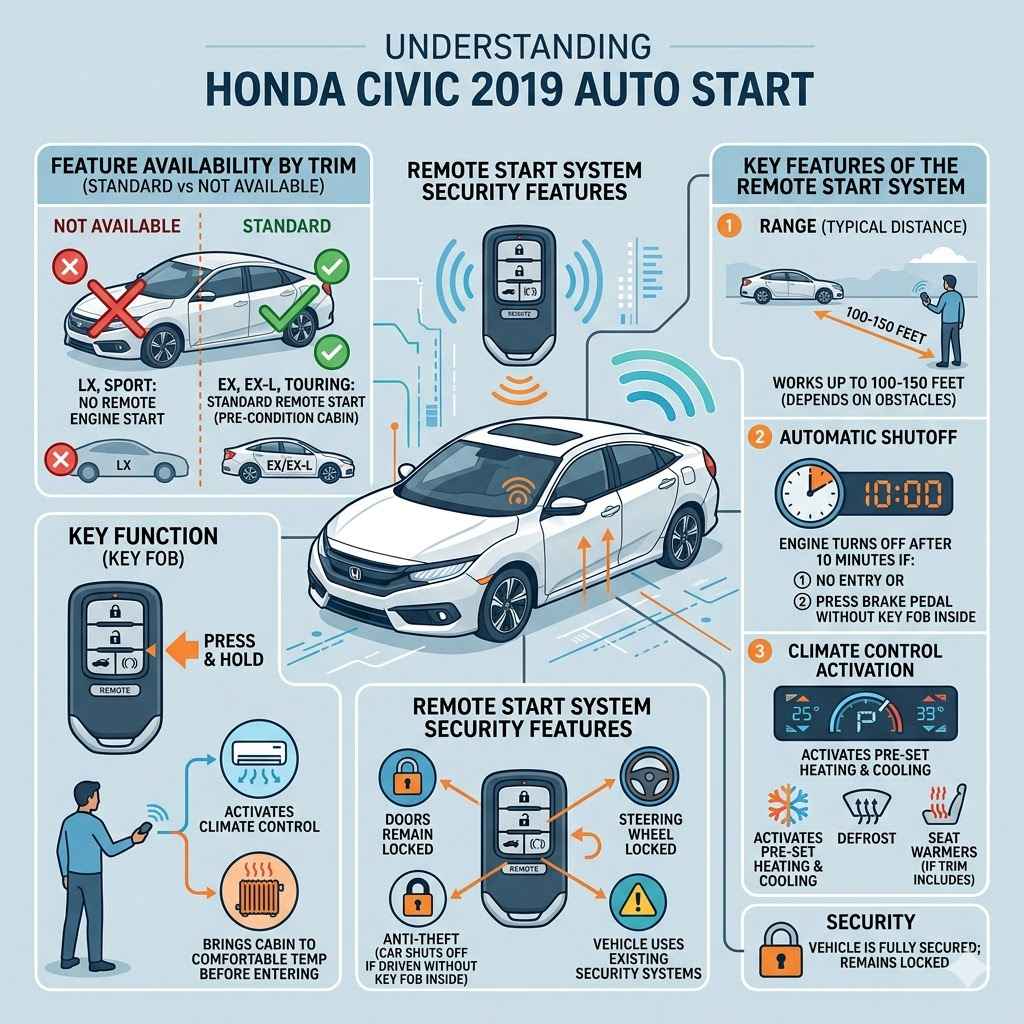
Before you press any buttons, it’s important to know how the auto start system in the 2019 Honda Civic functions. Not all Civics come with this feature by default. The remote engine start option is standard on some trims (like EX, EX-L, and Touring) but not available on base models (LX, Sport). This system lets you start the engine remotely using your key fob, allowing the air conditioning or heater to bring the cabin to a comfortable temperature before you enter.
The remote start uses the car’s existing security systems, so the doors remain locked and the engine will shut off if someone tries to drive away without the key fob inside. This feature is designed for safety and convenience.
Key Features Of The Remote Start System
- Range: Typically works from up to 100–150 feet away, depending on obstacles.
- Security: The car stays locked; steering wheel remains locked.
- Automatic Shutoff: Engine will turn off after 10 minutes if you do not enter the vehicle or if you press the brake pedal without the key fob inside.
- Climate Control Activation: The system can activate pre-set climate controls (heating or cooling), defrost, or seat warmers if your trim includes them.
How To Auto Start Your Honda Civic 2019
The remote start function in the 2019 Honda Civic is both simple and secure. Here’s how to use it, step by step.
Step 1: Check If Your Car Has Remote Start
Not all Civics have this feature. The EX, EX-L, and Touring trims include remote start from the factory. The LX and Sport trims do not, unless you’ve added an aftermarket system. Look for a circular arrow button on your key fob—this is the remote start button.
Step 2: Prepare The Vehicle
Make sure:
- The car is in park (P).
- All doors, hood, and trunk are fully closed.
- The key fob battery is not low.
- The security system is armed (car is locked).
If any of these are not correct, the auto start will not work.
Step 3: Using The Key Fob
- Lock the car: Press the lock button on your key fob once. Wait for the lights to flash or for a beep.
- Start the engine: Within 5 seconds of locking, press and hold the remote start button (circular arrow) for about 5 seconds. The engine should start; the lights may flash to confirm.
If successful, the engine will run for up to 10 minutes. You can start the car again for a second 10-minute cycle if needed, but only twice before you must physically start the car with the key.
Step 4: Entering The Vehicle
When you’re ready to drive:
- Approach the car with your key fob.
- Unlock the doors.
- Enter and insert the key or press the start button (if equipped).
- Press the brake and shift out of park. The remote start session ends, and you take full control.
Step 5: Stopping The Engine Remotely
If you want to turn off the engine before entering:
- Press and hold the remote start button again until the engine stops.
Example Scenario
On a cold morning, you finish breakfast and realize it’s freezing outside. You grab your key fob, lock the car, and hold the remote start button from your kitchen window. The car starts, and by the time you get in, the heater has already made the cabin comfortable.
Comparison: Factory Vs. Aftermarket Remote Start
Some owners want remote start but have a Civic trim that doesn’t include it. Aftermarket options are available, but they differ from the factory-installed system.
Here’s a comparison to help you decide:
| Feature | Factory Remote Start | Aftermarket Remote Start |
|---|---|---|
| Warranty | Covered by Honda warranty | May void warranty if not dealer-installed |
| Integration | Full integration with vehicle systems | Depends on installer; may lack climate control sync |
| Cost | Included in higher trims | $200–$600 plus installation |
| Reliability | Very reliable | Varies by brand/installer |
| Key Fob Function | Uses original Honda fob | May require extra fob or smartphone app |
If you value seamless integration and warranty protection, the factory system is best. If your trim doesn’t have it, a reputable aftermarket system can still deliver convenience, but always have it installed by professionals.
Setting Up Climate Control For Remote Start
Many owners are surprised to learn that the climate settings during remote start depend on how you last used the system. For the 2019 Civic, the climate system will turn on in the same mode and temperature you set before turning off the engine.
How To Ensure Your Cabin Is Comfortable
- Before shutting off your car, set the climate control (heat or A/C, fan speed, and mode) to your desired settings.
- When you use remote start, the car “remembers” these settings and uses them.
- Some trims can also activate rear defrost or heated seats automatically if the temperature is low.
Tip: If you want the car to be warm, turn on the heater and set the temperature high before your last drive. For cooling, set the A/C and lower temperature.
Common Reasons Auto Start May Not Work
Even when following the steps, sometimes the remote start does not activate. Here are common reasons and solutions:
- Low Key Fob Battery: A weak battery reduces signal range. Replace the battery if range drops or the system is inconsistent.
- Open Doors, Hood, or Trunk: The system is disabled if any are open. Check and close them securely.
- Car Not in Park: The transmission must be fully in park.
- Engine Light On: If the check engine light is on, remote start won’t work.
- Too Many Attempts: After two remote start cycles, you must start the car manually before using remote start again.
- Out of Range: Move closer to the car and try again.
- Vehicle Programming Issues: Rare, but sometimes the system needs reprogramming at the dealership.
If troubleshooting doesn’t help, consult your owner’s manual or visit your Honda dealer.
Safety And Legal Considerations
Auto starting your Honda Civic is legal in most areas, but some states or countries have restrictions, especially about idling vehicles unattended. Always check local laws.
Never remote start your car in a closed garage or area without proper ventilation. The buildup of exhaust gases, especially carbon monoxide, can be deadly.
Modern systems are designed to be secure—the car cannot be driven without the key fob inside, and the steering wheel remains locked. This reduces theft risk during remote start.
Real-world Data: Usage And Satisfaction
Many Civic owners use remote start daily, especially in extreme temperatures. In a recent survey of Honda owners by Autotrader:
- 82% of drivers with remote start use it at least once per week in winter.
- 65% believe it increases comfort and reduces time spent idling after entering the car.
- 14% reported issues, mostly related to battery or signal range.
Owners in northern states or cold climates value the system most. Some say they would not buy a car without it again.
Remote Start And Fuel Economy
Some drivers worry that remote starting wastes fuel. While it’s true that idling uses gas, the effect is minor for short periods—about 0. 15 to 0. 3 gallons per 10-minute cycle, depending on engine size and outside temperature.
In cold weather, remote start can actually help the engine reach optimum temperature faster, which may reduce wear and emissions. Just avoid excessive idling.
Troubleshooting: Deeper Issues
If your remote start won’t work despite trying all the basics, consider these less obvious issues:
1. Key Fob Interference
Other electronic devices (Wi-Fi routers, strong radio signals) can cause interference. Try moving away from such sources and retry.
2. Software Updates
Honda occasionally releases updates for the vehicle’s electronic systems. A dealer can check if your car needs an update.
3. Aftermarket Alarm Conflicts
If you’ve installed an aftermarket alarm or other electronics, they can sometimes interfere with remote start. Ask your installer for advice.
4. Battery Health
A weak car battery can prevent remote start. If your engine cranks slowly or lights dim, have your battery tested.
5. Owner Settings
Some settings can be changed using your car’s infotainment system or dealer tools. If you suspect a setting is disabling remote start, ask your dealer for help.
Using Hondalink App For Remote Start
For higher trims, the HondaLink app allows you to start your Civic remotely from your smartphone. This requires a subscription and internet connection.
Here’s what you need:
- Compatible Civic trim (usually EX, EX-L, Touring)
- HondaLink subscription and app installed
- Cellular coverage on your phone and in your car
With the app, you can:
- Start and stop the engine remotely
- Set climate preferences
- Check vehicle status
This adds flexibility if you’re out of range of your key fob.
Comparing Remote Start On Honda Civic Vs. Competitors
How does the Civic’s system compare to similar cars? Here’s a comparison with two rivals: the Toyota Corolla and Mazda3.
| Feature | Honda Civic 2019 | Toyota Corolla 2019 | Mazda3 2019 |
|---|---|---|---|
| Remote Start Availability | EX and up | Some trims, requires subscription | Aftermarket only |
| Key Fob Range | ~150 ft | ~80 ft | Varies |
| Climate Control Integration | Full | Partial | Depends on system |
| Smartphone App Option | HondaLink | Remote Connect | Aftermarket only |
The Civic offers a competitive remote start experience, especially in higher trims.
Maintenance Tips For Remote Start Users
Regular use of the remote start system is safe, but a few tips will keep it working smoothly:
- Replace your key fob battery every 1–2 years.
- Keep your car battery healthy, especially in cold weather.
- Check for software updates at your dealership during routine service.
- Don’t store your fob near electronics that might cause interference.
Two Insights Beginners Often Miss
- Climate settings are “sticky”: Many owners don’t realize the remote start uses whatever climate mode and temperature you last set. If you forget to set heat or A/C, you might come back to an uncomfortable cabin.
- Remote start disables after engine problems: If your Civic has a check engine light, even for minor issues, the remote start will not work until the problem is fixed and the code is cleared.
Common Mistakes To Avoid
- Trying to start with a door open: The system will not work unless all doors, the hood, and the trunk are fully closed.
- Standing too far away: Signal range is limited, especially in crowded areas with other electronics.
- Forgetting to set climate controls: Always set the heater or A/C before turning off your car.
- Ignoring warning lights: Any dashboard warning can disable remote start.
When To Seek Professional Help
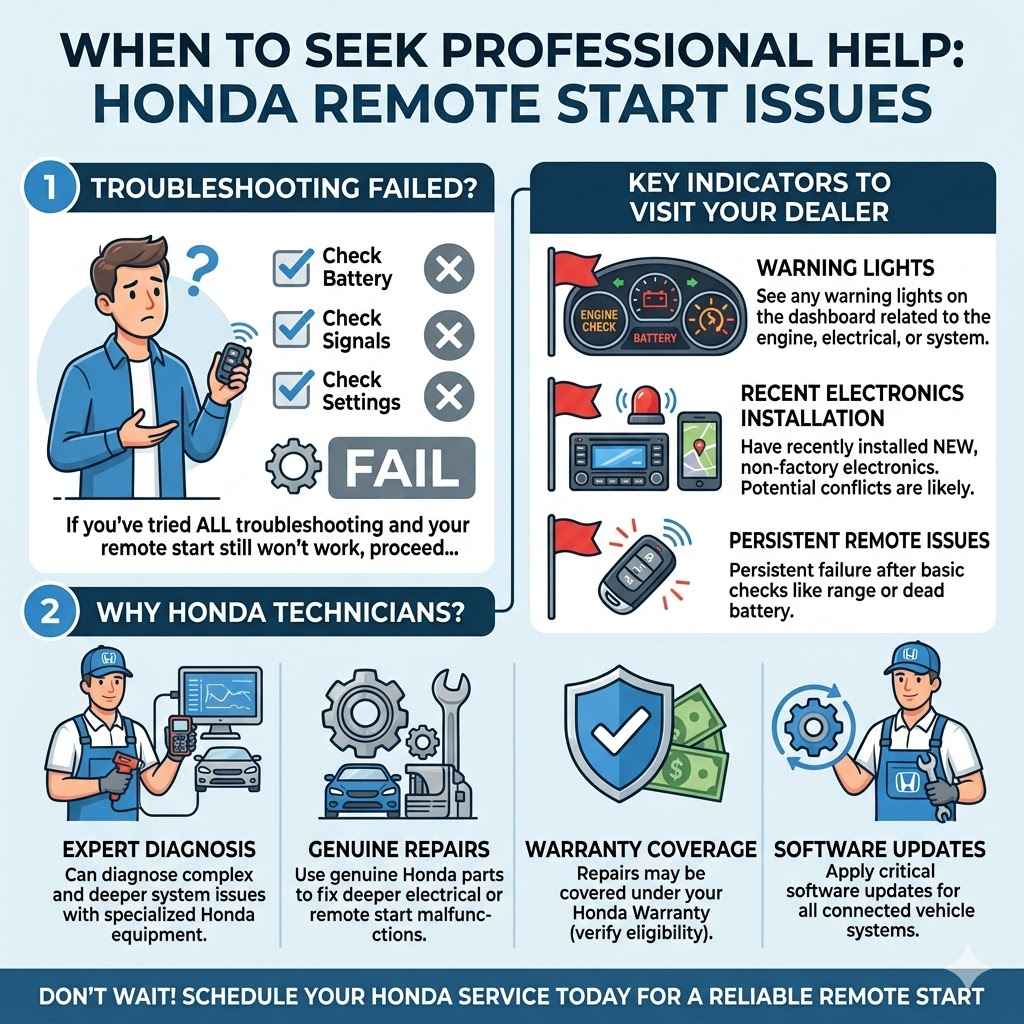
If you’ve tried all troubleshooting and your remote start still won’t work, visit your dealer. This is especially important if you see any warning lights or have recently installed new electronics. Honda technicians can diagnose and fix deeper issues, sometimes under warranty.
Frequently Asked Questions
What Honda Civic 2019 Trims Have Factory Remote Start?
The EX, EX-L, and Touring trims of the 2019 Honda Civic come with factory-installed remote start as standard. The LX and Sport trims do not, but you can add remote start through aftermarket systems.
Can I Install Remote Start On My Civic If It Didn’t Come With It?
Yes, you can add an aftermarket remote start system to any Honda Civic. It’s best to use a reputable brand and have it installed by professionals. Be aware that some aftermarket installs could affect your warranty if not done by a Honda dealer.
How Far Away Can I Start My Honda Civic Remotely?
The typical range for the factory remote start is 100–150 feet, depending on obstacles like walls or other cars. Aftermarket systems and smartphone apps may offer longer ranges, depending on their design.
Why Did My Remote Start Stop Working Suddenly?
Common reasons include a low key fob battery, an open door or trunk, the car not in park, or the presence of a check engine light. Also, after two remote start cycles, you must start the car manually before using it again.
Does Using Remote Start Waste A Lot Of Fuel?
Short remote start sessions use only a small amount of fuel—about 0.15 to 0.3 gallons per 10-minute cycle. It’s best to use remote start only as needed for comfort or defrosting, to save fuel and reduce emissions.
Final Thoughts
The remote auto start feature in the Honda Civic 2019 brings true comfort and convenience, especially in harsh weather. Whether you’re warming up the cabin on a frosty morning or cooling it down before heading out in summer, knowing how to use the system correctly makes a big difference. Always check your trim for compatibility, follow the simple steps, and keep your fob and car batteries in good shape. If you face issues, don’t ignore them—most problems are easy to fix once you know what to look for.
For more details about Honda’s official features, visit the Honda Civic Official Page.
Mastering remote start adds a new layer of comfort to your driving experience. With these tips, you’ll enjoy your Honda Civic 2019 to the fullest, no matter the season.
Products related to this article
Sponsored / affiliate links. As an Amazon Associate I earn from qualifying purchases. I may earn additional commission from eligible campaigns.