
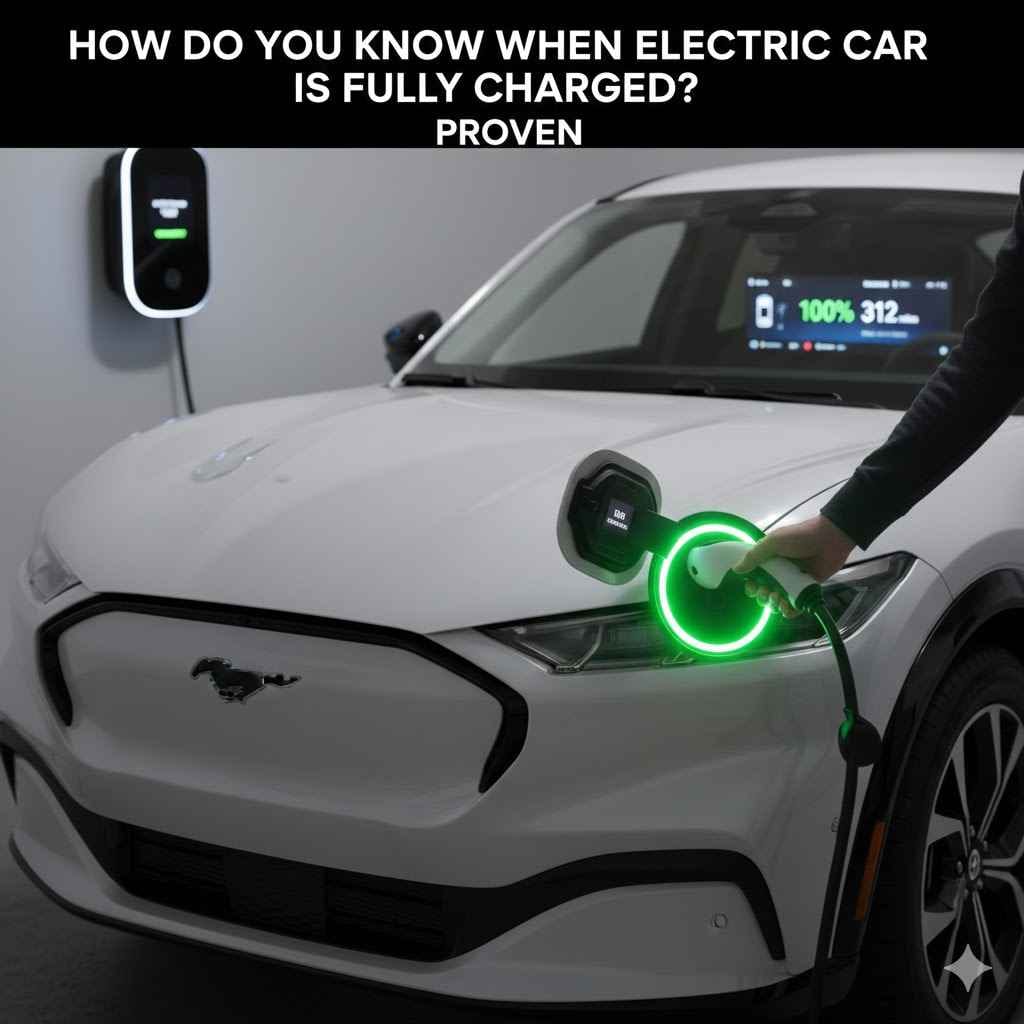
You’ll know your electric car is fully charged by checking three main indicators: the car’s dashboard display showing 100% (or your set limit), the charging station’s screen or status light (often turning green or solid), and a notification from your vehicle’s mobile app. Modern EVs stop charging automatically to protect the battery.
Switching to an electric car is exciting! But with new technology comes new questions. One of the first things new owners wonder is, “How do I know when it’s done charging?” It can feel a little uncertain at first, especially without a familiar gas pump clicking off. Don’t worry, it’s actually simpler than you think. Your car, the charger, and even your phone give you clear signals. In this guide, I’ll walk you through every easy way to know for sure your EV is ready to roll.
The Easiest Way: Checking Your Car’s Dashboard
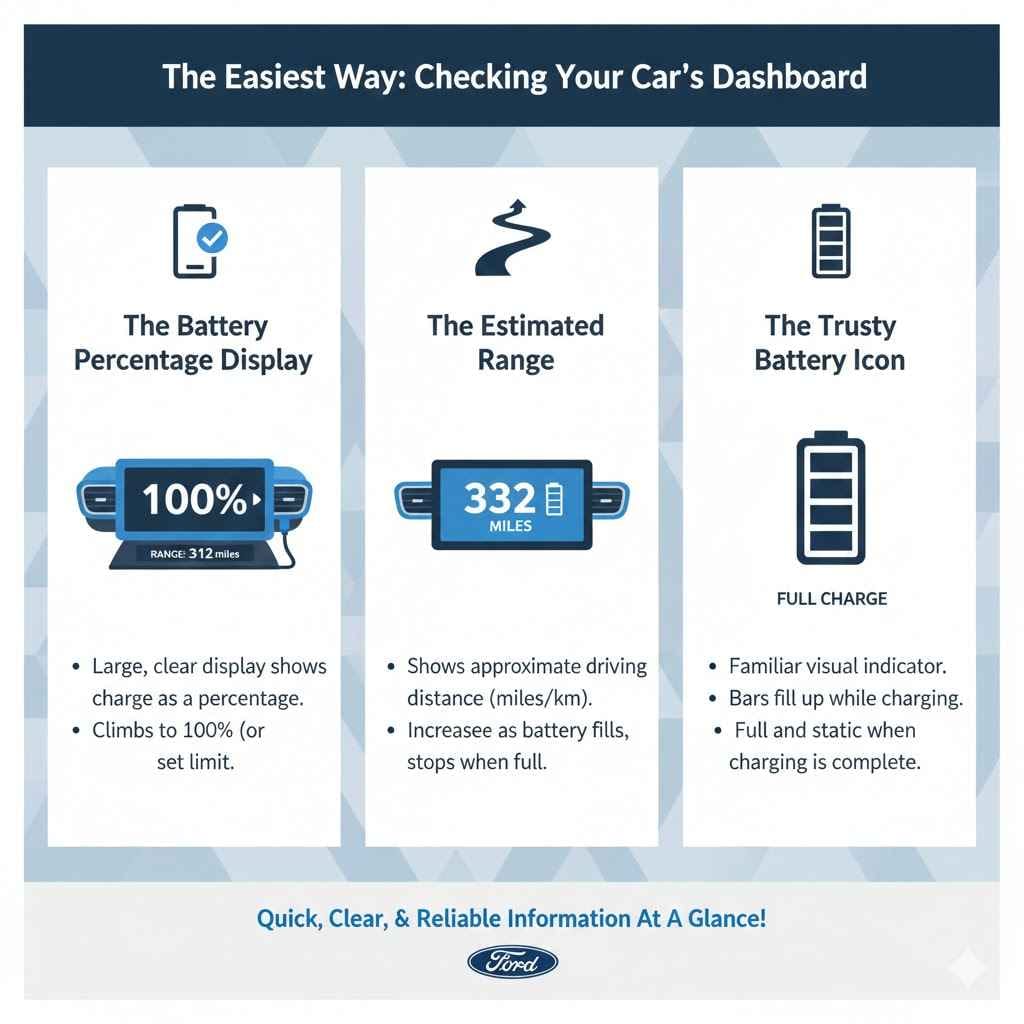
The most direct source of information about your car’s battery is the car itself. Your dashboard, also known as the instrument cluster, is designed to give you all the critical information you need at a glance. It’s the first place you should look for a reliable update on your charging status. Think of it as the fuel gauge for the electric age—only much smarter.
The Battery Percentage Display
Just like your smartphone, every electric vehicle has a large, clear display showing the battery’s state of charge (SoC) as a percentage. This is the most accurate and straightforward indicator. When you plug in your car, you will see this number start to climb. When it hits 100%, or the charging limit you’ve set (more on that later), the charging session is complete. Some cars even show this information on an exterior screen visible while the car is locked and charging, so you don’t even have to open the door.
The Estimated Range
Alongside the percentage, your dashboard will show an estimated driving range in miles or kilometers. This number tells you approximately how far you can drive on the current charge. As the battery fills up, you’ll see this range increase. When the charging is complete, this number will stop climbing and display the maximum range for that charge level. It’s a great real-world way to understand what a full charge means for your next trip.
The Trusty Battery Icon
We’re all familiar with the battery icon on our phones and laptops. Your EV has one too! It’s a simple visual representation of the charge level. While charging, you might see a lightning bolt symbol next to it or see the bars inside the icon fill up. Once charging is complete, the icon will appear full and static, and the lightning bolt symbol will typically disappear. It’s a quick, universal signal that your car is good to go.
Reading the Signals from the Charging Station
Your car isn’t the only thing that tells you what’s going on. The charging station itself, whether it’s a simple unit in your garage or a high-tech public charger, provides clear visual cues. Learning to read these signals will give you confidence, especially when you’re charging away from home.
Home Chargers (Level 1 & Level 2)
Most home charging units are designed for simplicity. They rely on a system of colored lights to communicate their status. While the exact color scheme can vary by brand, the pattern is usually very intuitive. Here’s a common breakdown:
- Solid Blue or White: The charger is on, has power, and is ready to be used. It’s waiting for you to plug in your car.
- Blinking Green or Blue: The car is actively charging. The blinking pace might even slow down as the battery gets closer to full.
- Solid Green: Success! The charging session is complete. The car is fully charged to its set limit.
- Blinking or Solid Red: This indicates a fault or an error. It could be a problem with the charger, the connection, or the car. If you see red, it’s best to unplug and try again. If it persists, check the manual or contact support.
Public Charging Stations (Level 2 & DC Fast Chargers)
Public chargers are more advanced and usually have a digital screen that provides detailed information. This screen is your best friend at a public station. It will show you:
- The current battery percentage of your car.
- The charging speed in kilowatts (kW).
- The amount of energy delivered so far (in kWh).
- The total time the car has been plugged in.
- The estimated cost of the session.
When the charge is complete, the screen will clearly state “Charging Complete” or “Session Ended.” The charging speed will drop to zero, and the station’s status light will often turn solid green. For DC fast chargers, the charging rate naturally slows down significantly as the battery approaches 80-90% to protect it, so seeing a low kW number is a good sign that your session is nearly finished.
| Indicator Location | While Charging | When Fully Charged |
|---|---|---|
| Car Dashboard | Percentage climbing, range increasing, battery icon filling up. | Percentage at 100% (or set limit), range is stable, battery icon is full. |
| Home Charger | Blinking green or blue light. | Solid green light. |
| Public Charger Screen | Shows charging speed (kW), time elapsed, and rising percentage. | Displays “Charging Complete,” charging speed drops to 0 kW. |
| Mobile App | Shows live progress, estimated time remaining. | Sends a push notification, status shows “Complete.” |
Your Smartphone: The Ultimate Charging Companion
Perhaps the most convenient tool for monitoring your EV’s charge is already in your pocket. Nearly every electric car manufacturer offers a dedicated mobile app that connects to your vehicle. These apps are incredibly powerful and give you full control and visibility over your charging, no matter where you are.
Why a Mobile App is a Game-Changer
Imagine plugging in your car at a public charger and then going into a store or restaurant. Instead of having to walk back out to check on it, you can simply open an app on your phone. You can see the current charge percentage, how much time is left, and the charging speed—all in real-time. This freedom and convenience are what make the app an essential tool for any EV owner.
Setting Up Charging Notifications
The best feature of these apps is the push notifications. You can configure the app to send an alert to your phone for various events. The most important one is the “Charging Complete” notification. As soon as your car reaches its target charge level, your phone will buzz, letting you know it’s time to unplug. This is especially courteous at busy public charging stations, as it allows you to move your car promptly so someone else can use the spot.
You can also set up other useful notifications, such as:
- Charging Started: Confirms that the session began successfully.
- Charging Interrupted: Alerts you if the charging stops unexpectedly, perhaps due to a power outage or a charger fault.
- Charge Nearing Completion: A heads-up when the battery reaches 80% or 90%, so you can prepare to leave.
Starting, Stopping, and Monitoring Remotely
Beyond just monitoring, most apps allow you to control the charging session remotely. If you need to stop the charge early, you can do so with the tap of a button. You can also use the app to set your charging schedule and target charge level, which leads us to a very important topic: the 80% rule.
The “Fully Charged” Myth: Why 80% is the New 100%
When we say “fully charged,” most of us think of 100%. However, in the world of electric vehicles, a full charge for daily driving is often best set to 80%. This might sound strange, but it’s a key practice for maintaining the long-term health of your car’s battery.
Understanding Lithium-Ion Battery Health
EV batteries are a type of lithium-ion battery, similar to the ones in your phone and laptop. These batteries are happiest when they are not kept at very high or very low states of charge for extended periods. Constantly charging to 100% and leaving it there, or letting it drop to near 0%, puts stress on the battery cells. This can, over many years, lead to slightly faster degradation of the battery’s total capacity.
Think of it like a rubber band. You can stretch it to its absolute maximum, but if you store it that way, it will eventually lose some of its elasticity. By charging to 80% for daily use, you are keeping the battery in a comfortable, low-stress state. According to the U.S. Department of Energy’s Office of Energy Efficiency & Renewable Energy, avoiding high-voltage and high-temperature conditions is key to extending battery life.
When to Charge to 100%
Of course, there are times when you absolutely need that extra 20% of range. Charging to 100% is perfectly fine when you are preparing for a long road trip. The key is to not let the car sit at 100% for a long time. The ideal practice is to set your car to finish charging to 100% shortly before you plan to depart. That way, you start your trip with maximum range without leaving the battery in a high-stress state overnight.
How to Set a Charging Limit
Virtually all modern EVs make this easy. You can set a maximum charge level directly from the car’s infotainment screen or through the mobile app. Simply go into the charging settings and slide the limit down to 80% or 90% for your daily charging routine. The car will then automatically stop charging when it reaches that target. It’s a simple, set-it-and-forget-it way to care for one of your car’s most important components.
Listen and Look: The Subtle Cues Your EV Gives You
Beyond the big, obvious indicators, cars and chargers often provide smaller, more subtle cues about the charging process. Paying attention to these can make you feel even more connected to and confident with your vehicle.
The Charge Port Light Show
Many EVs have an indicator light right on or around the charging port itself. This is incredibly useful because it gives you an instant status update as you plug in or walk by your car. The colors and patterns can differ between manufacturers, but they follow a general logic. A quick look at your owner’s manual will tell you exactly what your car’s lights mean.
| Light Color / Pattern | Common Meaning |
|---|---|
| White / Standby Blue | Ready to connect. The charge port is open and waiting for the plug. |
| Pulsing or Blinking Blue | Communicating with the charger, preparing to start the session. |
| Pulsing or Blinking Green | Actively charging. The battery is taking in power. |
| Solid Green | Charging is complete. The battery has reached its target level. |
| Yellow or Amber | A scheduled charge is set. The car is waiting for the right time to begin (e.g., off-peak electricity hours). |
| Red | Charging fault or error. The connection may be loose, or there’s an issue with the charger or vehicle. |
Audible Chimes and Clicks
Listen closely when you plug in your car. You will often hear a series of clicks. This is the sound of the connectors locking into place and the onboard relays engaging to start the flow of electricity. Many cars will also emit a soft chime or beep to confirm that charging has successfully started. Similarly, you might hear another click when the session ends. These sounds are normal and serve as an audible confirmation that everything is working as it should.
What Happens if You Leave Your EV Plugged In?
A common worry for new EV owners is, “Can I overcharge my car if I leave it plugged in too long, like overnight?” The short answer is a reassuring no. You cannot overcharge a modern electric car.
Every EV is equipped with a sophisticated Battery Management System (BMS). The BMS is the brain of the battery pack. It constantly monitors the voltage, current, and temperature of every cell. Its primary job is to protect the battery. When the battery reaches its target charge level (whether that’s 80% or 100%), the BMS automatically tells the onboard charger to stop drawing power from the charging station. The flow of electricity is cut off completely, even though the car is still physically plugged in.
In fact, leaving your car plugged in, especially in very hot or cold weather, can be beneficial. The car can use shore power (power from the wall) to run its battery thermal management system, warming or cooling the battery to its ideal temperature without draining it. It can also use this power to precondition the cabin before you leave, so you get into a comfortable car with a full battery.
Quick Troubleshooting: When Charging Doesn’t Go as Planned
While EV charging is generally very reliable, you might occasionally run into a hiccup. Here are a few common issues and what to do about them.
- My Car Stopped Charging Before It Was Full: First, check your charging limit in the car’s settings or app. You may have forgotten you set it to a lower percentage. If that’s not it, there could have been a brief power interruption. Sometimes, simply unplugging the car and plugging it back in will restart the session.
- The Charger Light is Red or Amber: This signals a fault. The most common cause is a poor connection. Unplug the connector from the car and the wall (if it’s a mobile charger) and plug everything back in firmly. Make sure there is no debris in the charge port. If the error persists, there might be an issue with the charger itself or the power source.
- The App and Car Show Different Percentages: There can sometimes be a slight delay in the app updating, especially if cell service is poor. The car’s dashboard is always the most accurate, real-time source. Give the app a minute to refresh. If it’s consistently wrong, try restarting the app or your phone.
Putting It All Together: A Step-by-Step Charging Checklist
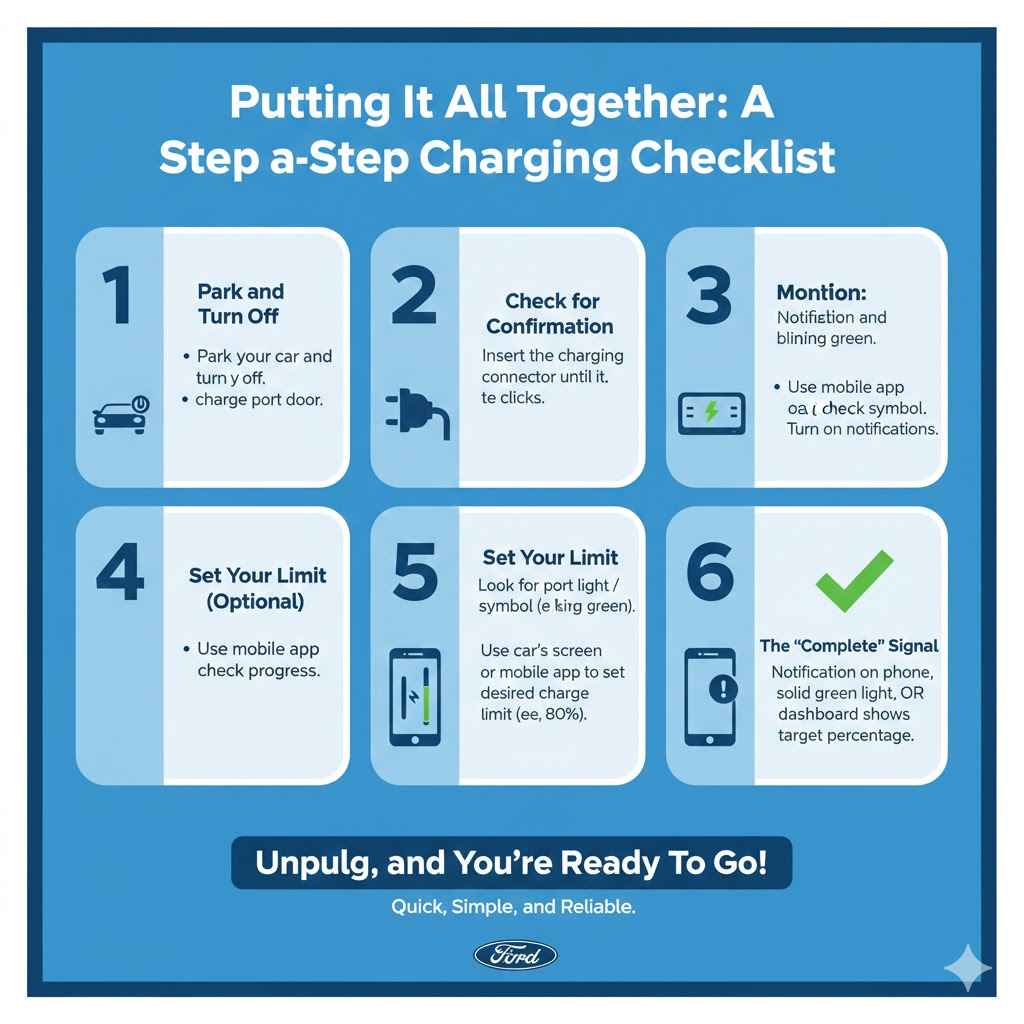
Feeling confident? Here’s a simple checklist to follow every time you charge, ensuring you know exactly when your EV is ready.
- Park and Turn Off: Park your car and turn it off. Open the charge port door.
- Plug In Firmly: Insert the charging connector into your car’s port until you hear it click into place.
- Check for Confirmation: Look at the charge port light or the charger’s status light. It should indicate that charging has begun (e.g., blinking green). You can also check your car’s dashboard for the charging symbol.
- Set Your Limit (Optional but Recommended): Use your car’s screen or mobile app to set your desired charge limit, like 80% for daily driving.
- Monitor Remotely: Use your manufacturer’s mobile app to check the progress from anywhere. Make sure notifications are turned on.
- Look for the “Complete” Signal: You’ll know it’s done when you get a notification on your phone, the charger light turns solid green, and/or your dashboard shows you’ve reached your target percentage.
- Unplug and Go: Once charging is complete, unlock the connector from your car and be on your way!
Frequently Asked Questions
Does the car stop charging automatically when full?
Yes, absolutely. Every modern electric car has a Battery Management System (BMS) that automatically stops the charging process once the battery reaches its set limit (e.g., 80% or 100%). You cannot overcharge your car’s battery.
Is it bad to leave my EV plugged in overnight?
No, it is not bad at all. In fact, it is common practice and perfectly safe. The car stops drawing power when it’s full. Leaving it plugged in can also be beneficial in extreme temperatures, as the car can use wall power to keep its battery at a healthy temperature.
Why does my car only charge to 80%?
This is likely because a charging limit has been set to 80% in your vehicle’s settings. This is a recommended practice to improve long-term battery health for daily driving. You can easily change this limit to 100% via your car’s touchscreen or mobile app before a long trip.
How can I check the charge level from inside my house?
The easiest way is to use your car manufacturer’s official smartphone app. It connects to your car and allows you to see the real-time charging status, percentage, and estimated time remaining from anywhere.
What do the different colors on the charging port mean?
The colors are a quick visual guide. Generally, pulsing green or blue means it’s actively charging. A solid green light means charging is complete. Red usually indicates an error, and yellow or amber can mean a scheduled charging session is pending.
Why does charging slow down near 100%?
This is a normal and deliberate function to protect the battery. As the battery cells fill up, the car’s BMS reduces the charging speed to prevent stress and overheating. This is most noticeable at a DC fast charger, where charging speed will drop significantly after about 80%.
Your Charging Confidence Starts Now
Knowing when your electric car is fully charged is simple once you know what to look for. Between the clear information on your dashboard, the simple status lights on the charger, and the convenience of your smartphone app, you have multiple ways to stay informed. Remember to embrace the 80% rule for daily driving to keep your battery healthy for years to come, and don’t be afraid to charge to 100% when you need the extra range for a big adventure.
Welcome to the world of electric driving! With these tips, you can charge with confidence, knowing you’re in complete control and ready for any journey that lies ahead.