

It’s a question many new Favero pedal users wonder about. How do you tell if your power meter pedals have enough juice? Sometimes it’s not super clear, especially when you’re just starting out.
But don’t worry, it’s actually quite simple once you know what to look for. This guide will walk you through the easy steps so you’ll always know. We’ll cover the signs your pedals are ready to go and what to do if they’re not.
Understanding Favero Pedal Charging Basics
Knowing when your Favero pedals are charged is key to getting the most out of your rides. These smart devices need power to send accurate data to your bike computer or head unit. When the battery is low, you might miss out on valuable performance metrics, which can be frustrating.
This section breaks down the fundamental ways Favero indicates battery status. It’s all about recognizing the subtle cues your pedals give you.
The Role of Indicator Lights
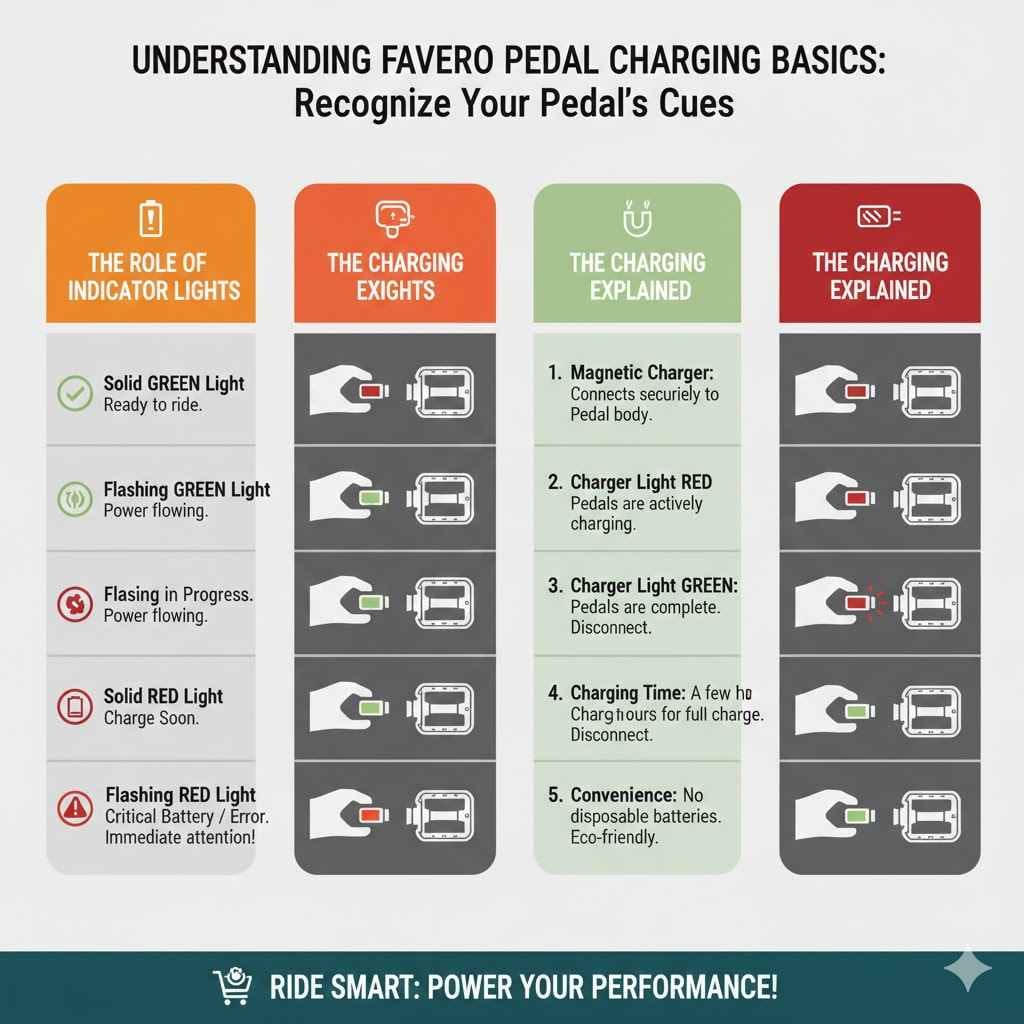
Favero pedals use small LED lights to communicate their status. These lights are your primary visual cue for charging and battery levels. Understanding the different colors and blinking patterns is the first step to knowing if your pedals are ready for action.
The lights are designed to be easy to see, even in bright sunlight. They provide a quick check before you head out the door for your training session.
A solid green light often means the pedals are fully charged and ready to go. This is the ideal state, indicating optimal battery performance for your ride. You want to see this green glow before embarking on a long training block or a race.
It gives you peace of mind that your power meter is functioning at its best.
A flashing green light might suggest that the pedals are charging. This is a positive sign, showing that power is flowing into the battery. Continue to monitor the light; a solid green should appear when charging is complete.
This visual confirmation is an important part of the charging process.
A solid red light typically signifies a low battery. This is your signal that it’s time to charge the pedals soon. Don’t ignore this warning, as a completely drained battery will prevent data transmission.
You’ll want to plug them in before your next ride to avoid interruption.
A flashing red light can indicate a critical low battery or a charging error. If you see this, it’s urgent to address the charging situation. It’s best to stop your activity and immediately plug in the charger to resolve the issue.
This light demands your immediate attention for proper functioning.
The Charging Process Explained
Charging your Favero pedals is a straightforward procedure. It typically involves a special magnetic charger that connects to the pedal body. Ensure the charger is clean and securely attached for optimal power transfer.
The magnetic connection makes it easy to attach and detach. This simplifies the routine maintenance of your power meter.
The charger itself will also have an indicator light. This light shows the status of the charging process. When the charger’s light is red, it usually means the pedals are actively charging.
This is separate from the pedal’s own indicator light. It provides confirmation that the charger is working and the battery is receiving power.
Once the pedals are fully charged, the charger’s light will typically turn green. This is your cue that the charging cycle is complete. You can then disconnect the charger.
It’s important to disconnect them once fully charged to prevent overcharging, though most modern systems have safeguards against this. This ensures the battery’s longevity and performance.
Some users might wonder about charging times. A full charge typically takes a few hours, depending on the model and the remaining battery level. Refer to your specific Favero pedal manual for exact charging times.
Consistent charging habits ensure your pedals are always ready when you are.
The convenience of charging is a significant benefit for cyclists. Instead of dealing with disposable batteries, you simply plug in your pedals. This is not only cost-effective over time but also more environmentally friendly.
Many cyclists appreciate this sustainable approach to power meter maintenance.
Checking Battery Status Through The Favero App
Beyond the physical indicator lights, Favero provides a digital way to monitor your pedal’s battery life. The dedicated Favero app offers a more precise view of the remaining charge. This app connects wirelessly to your pedals, giving you real-time data.
It’s a great way to stay on top of battery levels without having to guess.
Connecting Your Pedals to The App
To use the app for battery checks, you’ll first need to download it from your device’s app store. Once installed, you’ll need to pair your Favero pedals with your smartphone. This usually involves turning on your pedals and enabling Bluetooth on your phone.
The app will then scan for nearby devices.
Follow the on-screen prompts within the app to establish a connection. You may need to confirm a pairing code. Once connected, your pedals will appear in the app’s device list.
This connection is crucial for accessing detailed information.
It’s important to ensure your pedals are active when trying to connect. Waking them up by pedaling or spinning the crank a few times will make them discoverable. This active state is necessary for the Bluetooth signal to be recognized by your phone and the app.
A few quick rotations are all it takes.
Regularly checking the app connection is a good practice. It allows you to catch potential connectivity issues early. A strong, consistent connection ensures you receive all available data, including battery status.
This proactive approach avoids surprises on ride day.
The app is also useful for firmware updates. Keeping your pedals updated ensures they have the latest features and bug fixes. This contributes to overall performance and reliability.
Always check for updates when you connect.
Interpreting App Battery Readings
Within the Favero app, you’ll see a clear battery percentage or icon. This gives you a very accurate estimate of how much charge is left. Unlike the lights, which offer a general indication, the app provides a numerical value.
This allows for more precise planning of charging cycles.
For instance, seeing 80% battery life tells you that you have plenty of power for multiple rides. A reading below 20% suggests you should plan to charge them soon. This digital readout helps you avoid unexpected power loss during a critical workout.
It provides actionable information.
Some apps might also provide estimated ride time based on the current battery level. This feature is incredibly useful for planning long endurance events. You can gauge if you have enough power for the entire duration.
This foresight prevents any mid-ride anxiety about battery life.
The app also logs historical battery usage. This can help you understand how often you need to charge based on your riding habits. Over time, you can create a charging schedule that fits your routine perfectly.
This personalized approach is highly effective.
If you ever encounter issues with the app reading your battery, first ensure a stable Bluetooth connection. Sometimes, simply restarting the app or your phone can resolve temporary glitches. Favero support is also available if problems persist.
They can help troubleshoot any persistent display issues.
Troubleshooting Common Charging Issues
While Favero pedals are generally reliable, occasional charging issues can arise. These problems are usually easy to fix once you know where to look. Understanding common pitfalls will save you time and frustration.
This section addresses what to do when things don’t go as planned.
Charger Connectivity Problems
One of the most common issues is a faulty connection between the charger and the pedal. Ensure the magnetic pins on both the charger and the pedal are clean and free of debris. Even a small amount of dirt or sweat can disrupt the electrical connection.
A soft, dry cloth is usually sufficient for cleaning.
Sometimes, the charger itself might not be properly plugged into a power source. Double-check that the USB cable is securely inserted into a working adapter or port. Try using a different power source if you suspect the outlet or adapter is the issue.
Power adapters designed for phones or tablets usually work well.
If you’re using a computer’s USB port, ensure it’s providing enough power. Some older or unpowered USB hubs may not supply sufficient current for charging. It’s often better to use a wall adapter.
The adapter should be rated for at least 1A for reliable charging.
Inspect the charger cable for any signs of damage. Frayed wires or bent connectors can indicate a problem. If the cable looks compromised, it might be time to consider a replacement.
A damaged cable is a safety hazard as well as a functional issue.
Ensure you are using the original Favero charger or a certified compatible one. Generic chargers might not provide the correct voltage or current, leading to inefficient charging or even damage to the pedals. Always stick to approved accessories for best results.
Inaccurate Battery Readings
Occasionally, you might see a battery reading that seems off. This could be due to a temporary software glitch or an issue with the battery sensor. First, try restarting the Favero app and re-pairing your pedals.
This often resolves minor display errors.
Another step is to perform a full charge cycle. Let the pedals charge until the indicator light turns solid green, and then disconnect them. Sometimes, the battery management system needs a complete cycle to recalibrate accurately.
This process helps the system re-establish its baseline.
Ensure your pedal firmware is up to date. Favero periodically releases updates that can improve battery reporting accuracy and overall performance. Check the Favero app for available firmware updates and install them.
Firmware updates fix many bugs.
If the problem persists, try deleting the Favero app from your phone and reinstalling it. This can clear out any corrupted app data that might be causing inaccurate readings. Then, pair your pedals again through the app.
This fresh installation often solves persistent software-related problems.
In rare cases, a consistently inaccurate battery reading might indicate a hardware problem with the pedal itself. If you’ve tried all troubleshooting steps and are still experiencing issues, contact Favero customer support. They can provide further assistance or arrange for a repair if necessary.
Pedals Not Turning On
If your Favero pedals refuse to turn on, the first thing to check is their battery level. Even if the indicator lights don’t show anything, they might be completely depleted. Try charging them for at least an hour using the correct charger and power source.
A full charge is often needed to bring them back to life.
Ensure the pedals are not in sleep mode. Some pedals have a deeper sleep function that requires a specific wake-up action. Try spinning the crank for a good 10-15 seconds to see if that activates them.
This is a common way to wake up many electronic cycling devices.
Check the charger connection again. Make sure it’s securely attached and that the charger’s light indicates it is receiving power and trying to charge. A loose connection can prevent the pedals from receiving any charge.
Try wiggling the charger slightly to ensure good contact.
Inspect the pedals for any physical damage. A hard impact could have dislodged internal components. If you see any cracks or visible damage, this could be the cause.
In such cases, professional inspection or repair might be needed.
If all else fails, and the pedals are still unresponsive after a full charge attempt, it’s time to reach out to Favero support. They can guide you through advanced troubleshooting or advise on warranty service if the pedals are indeed faulty. Don’t hesitate to contact them for help.
Maximizing Battery Life And Usage
Understanding how to keep your Favero pedals charged is one thing, but maximizing their battery life is another. This means using them smartly and taking care of them properly. Longer battery life means less frequent charging and more time spent riding.
Here are some tips to help you get the most out of each charge.
Smart Charging Habits
Avoid leaving your pedals plugged in for extended periods after they are fully charged. While most modern devices have overcharge protection, it’s still a good practice to disconnect them once the charger indicates a full battery. This helps maintain battery health over the long term.
Think of it like not leaving your phone plugged in all night, every night.
Charge your pedals when the battery level drops to around 20-30%. Letting the battery drain completely frequently can reduce its overall lifespan. A partial charge is often better for lithium-ion batteries.
Aim to keep the charge level in a moderate range for optimal longevity.
Use the recommended charger and cable. Using third-party chargers that don’t meet the specifications can lead to inefficient charging or even damage the battery. Stick with the charger that came with your pedals or a certified alternative.
This ensures compatibility and safety.
Keep the charging contacts clean. As mentioned in troubleshooting, dirt and grime can impede charging. Regularly wipe down the magnetic charging points on both the pedals and the charger with a dry, soft cloth.
This ensures a solid connection every time.
If you store your pedals for long periods, try to keep them at around 50% charge. Storing batteries at extreme charge levels (fully charged or fully depleted) can degrade them over time. This is a common recommendation for most rechargeable battery-powered devices.
Factors Affecting Battery Drain
The primary factor affecting battery drain is usage. The more you ride with your power meter active, the faster the battery will deplete. Longer rides and more frequent use naturally require more frequent charging.
This is directly proportional to your activity level.
Environmental conditions can also play a role. Extreme temperatures, both hot and cold, can affect battery performance and longevity. Avoid leaving your bike or pedals in direct sunlight for long periods, especially in hot weather.
Cold temperatures can temporarily reduce battery capacity.
The type of connection also matters. Bluetooth Low Energy (BLE) is quite efficient, but the constant searching for a signal or maintaining a connection can still consume power. If you’re using a head unit that polls your pedals frequently, it can contribute to drain.
However, the impact is usually minimal.
Firmware version can sometimes influence power consumption. Manufacturers sometimes release firmware updates that optimize power usage. Always ensure your pedals are running the latest software for the best efficiency.
Updates often include power-saving improvements.
The presence of other connected devices can also indirectly affect battery life. For example, if your head unit is also managing other sensors, its power management might influence how it interacts with your pedals. However, this is usually a minor factor compared to direct usage.
Real-World Battery Performance
Favero pedals are known for their excellent battery life. A single charge can often last for many hours of riding, sometimes even hundreds. For example, the Favero Assioma Duo pedals, with their dual-sided power measurement, can typically last around 50-60 hours on a single charge.
This is more than enough for most cyclists’ weekly needs.
This impressive battery performance means you likely won’t need to charge them after every single ride. For a recreational cyclist riding a few hours a week, a single charge might last several weeks. This convenience is a major selling point for power meter users.
It reduces the mental load of device management.
For competitive cyclists or those who ride daily for extended periods, charging might become a weekly or bi-weekly routine. This is still very manageable. For instance, a rider doing 10-15 hours of training per week might find themselves charging their pedals roughly every 3-4 weeks.
This predictable schedule makes maintenance easy.
The exact battery life can vary based on factors like temperature, signal strength, and specific usage patterns. However, the reported figures from Favero are generally consistent with real-world experiences. Users often report being pleasantly surprised by how long a charge lasts.
This reliability is crucial for performance tracking.
Favero’s commitment to efficiency means you can focus on your training, not on battery anxiety. This extended operational time is a testament to their engineering. It allows for uninterrupted data collection during crucial training blocks.
You can trust them to perform.
When To Contact Support
Most of the time, knowing when your Favero pedals are charged is straightforward. However, if you encounter persistent issues that you can’t resolve on your own, it’s time to seek help. This section guides you on when and how to contact Favero customer support for assistance.
They are there to help you.
Signs You Need Professional Help
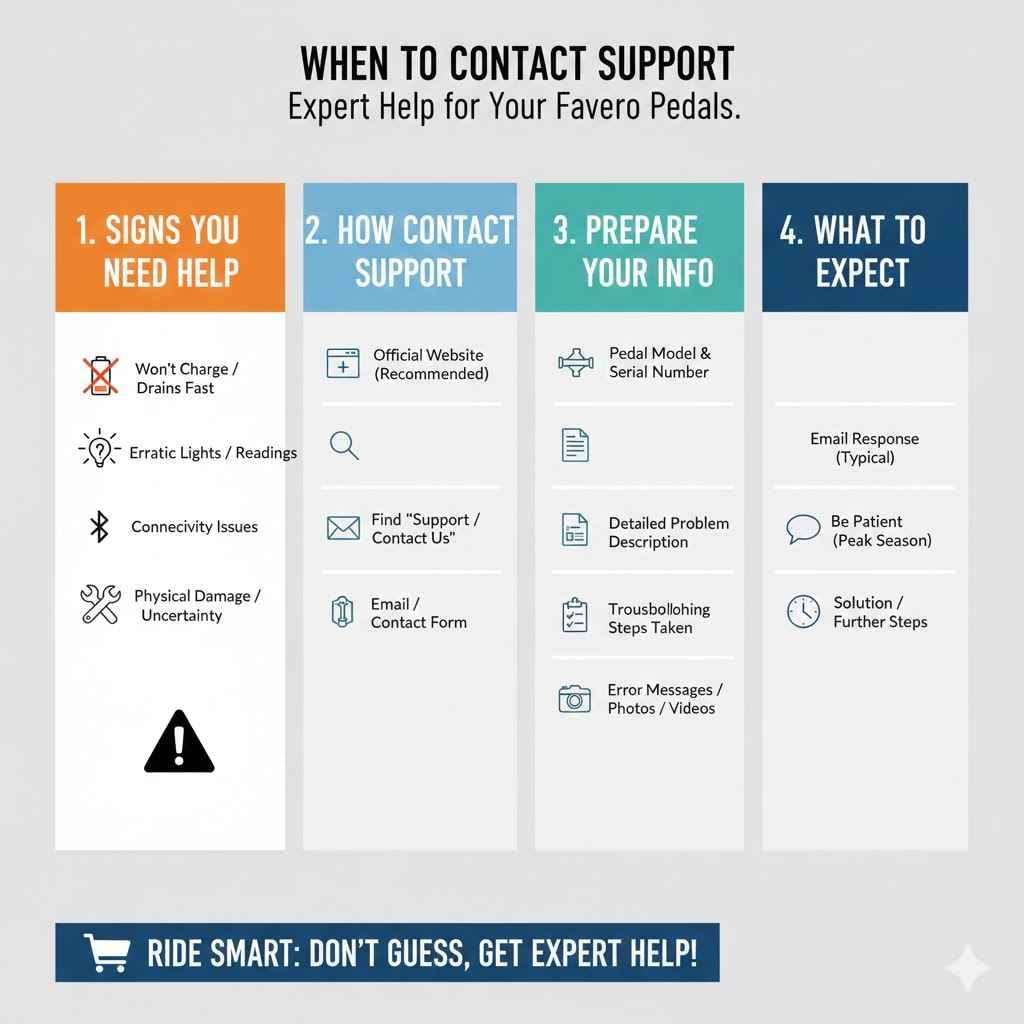
If you’ve tried all the troubleshooting steps for charging issues or battery readings and the problem persists, it’s a clear sign to contact support. This includes situations where the pedals simply won’t charge at all, or the battery percentage never seems to change, even after prolonged charging. These indicate a deeper problem.
If the indicator lights on the pedals behave erratically and don’t match the expected patterns, this might also warrant support. For example, if the light is solid red but the app shows 100% charge, or if the light stays off entirely even when charging, there might be a sensor malfunction. Such anomalies require expert diagnosis.
Another reason to contact support is if your pedals consistently fail to connect to the Favero app or your bike computer after following all connection instructions. Connectivity issues that are not resolved by basic troubleshooting can point to a hardware or firmware problem. Stable communication is vital for data collection.
If you notice any physical damage to the pedals that you are not comfortable repairing yourself, or if the damage is significant, it’s best to consult Favero. They can advise on whether the pedals can be repaired or if they need replacement. Do not attempt repairs if you are not experienced.
Finally, if you are unsure about any aspect of your pedals’ operation, including charging or battery maintenance, it’s always better to ask. Favero support is there to provide clarity and ensure you are using their products correctly. Proactive communication can prevent future problems.
How To Contact Favero Support
The best way to contact Favero support is through their official website. Look for a “Support” or “Contact Us” section. This will usually provide you with their customer service email address or a contact form.
Filling out the form often ensures all necessary details are captured from the start.
When you contact them, be prepared to provide detailed information about your issue. This includes your pedal model (e.g., Assioma DUO, UNO), the serial number of the pedals, your bike computer model, and a clear description of the problem. Also, mention all the troubleshooting steps you have already taken.
This helps them diagnose the issue faster.
Include any relevant error messages you’ve seen. If you have photos or videos demonstrating the problem, offer to send them. Visual evidence can be extremely helpful for support agents to understand the situation.
They might ask for this to aid their assessment.
Check if Favero offers phone support in your region. Some companies provide a phone number for more immediate assistance. However, email or web forms are common for technical support, allowing for detailed written communication.
Be patient. Customer support teams can be busy, especially during peak cycling seasons. Allow them reasonable time to respond to your inquiry.
They will typically get back to you with a solution or further steps.
Frequently Asked Questions
Question: How long do Favero pedals typically take to charge?
Answer: A full charge for Favero pedals usually takes around 2 to 4 hours, depending on the specific model and how depleted the battery is. It’s always a good idea to refer to your pedal’s user manual for the exact charging time.
Question: Can I use any USB charger to charge my Favero pedals?
Answer: It is best to use the original Favero charger or a certified compatible charger. While many standard USB chargers might work, using an unapproved charger could lead to inefficient charging or potentially damage the pedals’ battery.
Question: Does the Favero app show the exact battery percentage?
Answer: Yes, the Favero app provides a precise battery percentage reading for your pedals, giving you a clear idea of how much charge is remaining. This is more detailed than the LED indicator lights.
Question: What does a flashing red light on Favero pedals mean?
Answer: A flashing red light on Favero pedals typically indicates a critical low battery or a potential charging error. It’s a signal to address the charging issue immediately.
Question: How often should I charge my Favero pedals?
Answer: This depends on your riding frequency and duration. Many users find they can go weeks between charges with typical usage. It’s best to charge them when the battery level drops below 20% or when the indicator lights suggest it’s time.
Summary
Knowing when your Favero pedals are charged involves a few simple checks. Watch the indicator lights for color cues like green for charged and red for low battery. Use the Favero app for a precise battery percentage.
Clean the charger contacts and ensure a secure connection. Regular charging and smart habits maximize battery life. If problems arise, contact Favero support for help.