
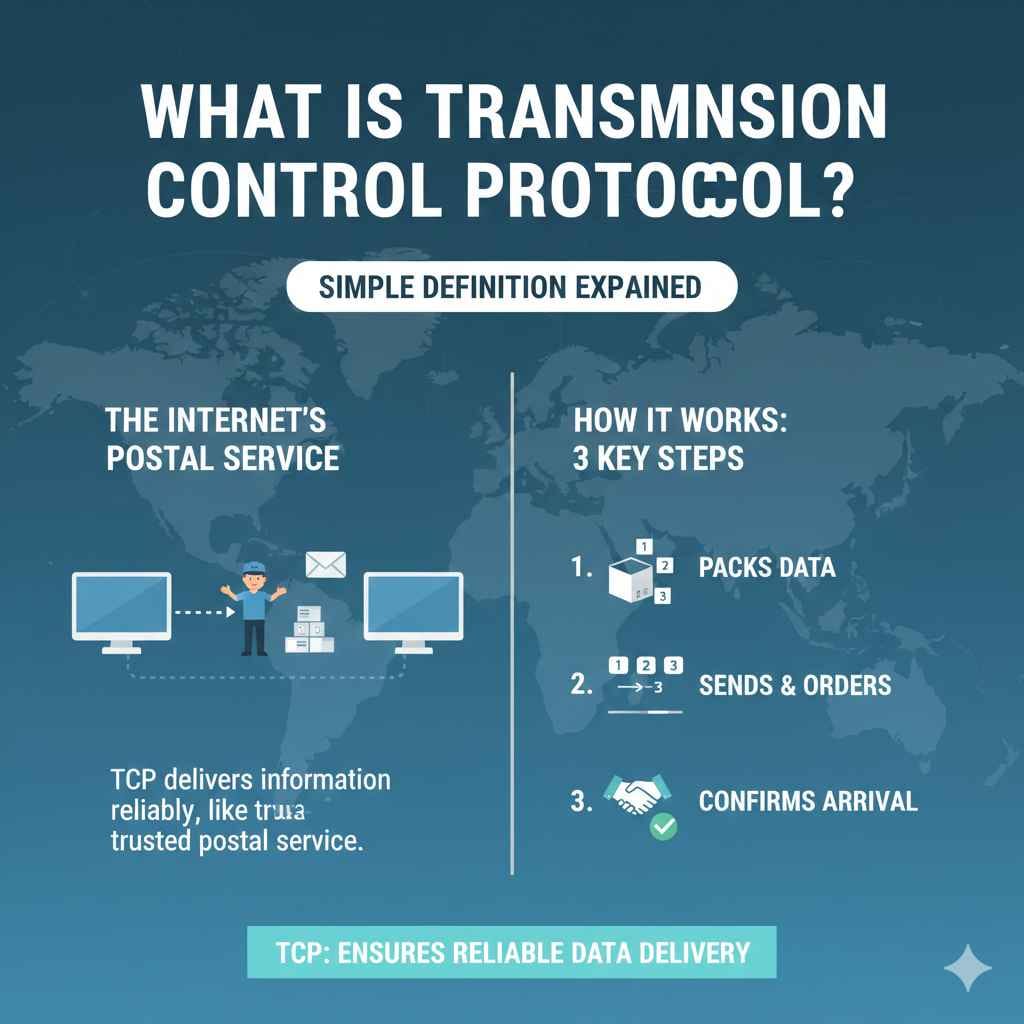
Figuring out What Is Transmission Control Protocol? Simple Definition can seem tricky at first. It’s a bit like learning a new language for computers, but don’t worry! Many people find this topic a little confusing when they start. This guide will break it down into easy-to-understand parts. We’ll explore it step-by-step so you can grasp the basics. You’ll learn how data moves around the internet like a well-organized mail system. We’ll start with the very foundations!
Data Delivery Protocol: TCP Explained
At the core of how the internet works is the Transmission Control Protocol, often shortened to TCP. It is one of the fundamental protocols that enables data transfer. TCP ensures that data gets delivered reliably between applications running on different devices connected to a network. Think of it as the post office of the internet. It takes your messages, breaks them into smaller pieces, makes sure they arrive, and puts them back together in the correct order. Without it, the internet would be a chaotic place.
How TCP Works Under the Hood
TCP operates by establishing a connection between the sender and the receiver before any data is sent. This connection setup, also known as a three-way handshake, ensures both parties are ready to communicate. Once the connection is established, data is broken down into packets, each containing information about where it belongs within the larger message. TCP then manages the sending and receiving of these packets, making sure they arrive safely and in the right order. If any packets are lost or damaged, TCP retransmits them to guarantee data integrity. It’s a bit like a diligent postal worker checking every package.
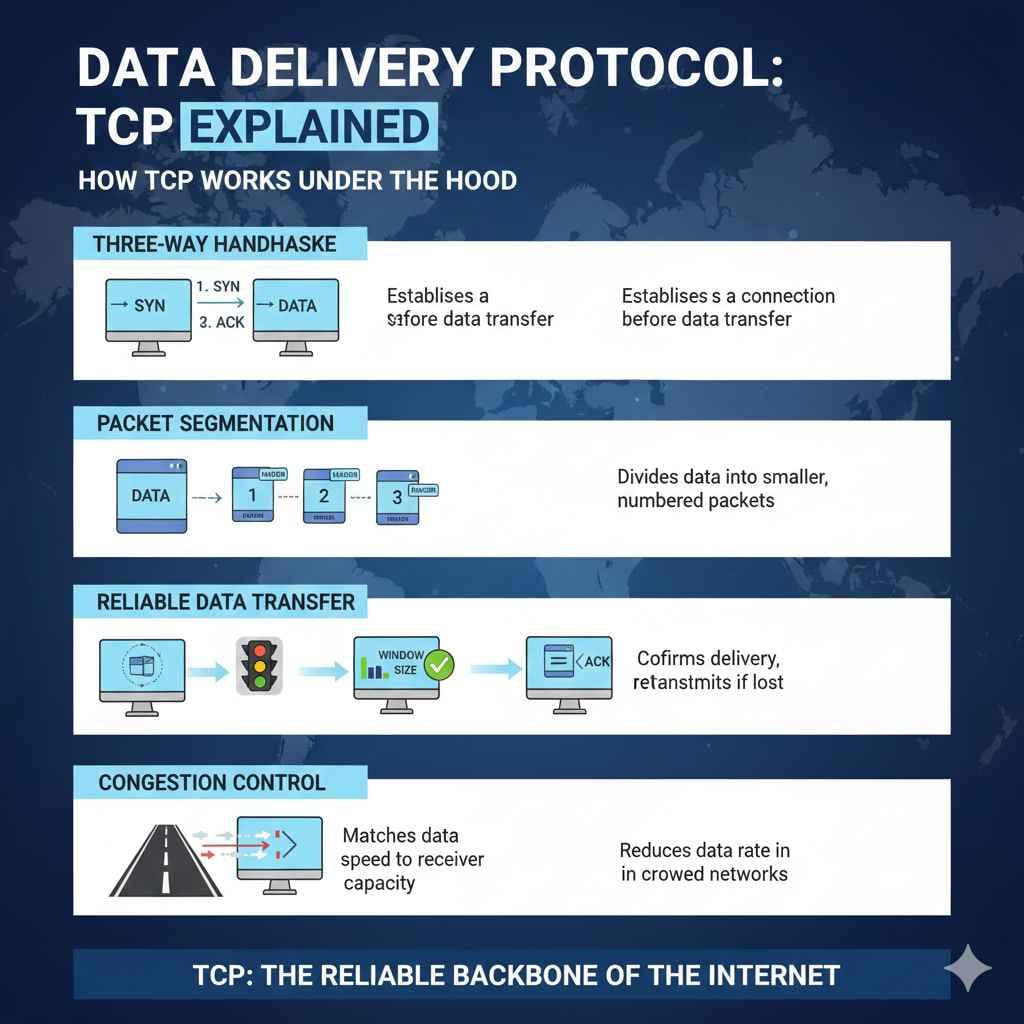
- Three-Way Handshake: This is how TCP establishes a connection. It involves three steps: the sender sends a SYN (synchronize) packet, the receiver replies with a SYN-ACK (synchronize-acknowledge) packet, and the sender responds with an ACK (acknowledge) packet. This ensures both devices are ready to talk.
- Packet Segmentation: Large data files are split into smaller pieces called packets. Each packet has a header with information like the destination address and sequence number. This helps TCP manage the flow of data.
- Reliable Data Transfer: TCP is designed to ensure data reliability. It uses acknowledgments (ACKs) to confirm successful packet delivery. If an ACK isn’t received, the sender retransmits the packet. This makes sure that no data is lost during transmission.
- Flow Control: This mechanism prevents a fast sender from overwhelming a slow receiver. TCP uses windowing to control the amount of data sent at once, matching the receiver’s processing capabilities. This prevents data loss due to buffer overflow.
- Congestion Control: TCP also addresses network congestion. If the network is crowded, TCP reduces the rate at which it sends packets. This helps prevent network bottlenecks and ensures fair access for all users.
The Importance of TCP in the Digital Age
TCP is important because it provides reliability and order in the delivery of data. Without TCP, information could be lost, corrupted, or delivered in the wrong order, making the internet unusable for most applications. Every time you send an email, visit a website, or stream a video, TCP is working behind the scenes. Its functions are vital in modern digital communications, making online experiences seamless and dependable. Consider it the backbone of internet communication, managing the smooth transfer of everything from simple text messages to high-definition video streams. Imagine trying to read a book where pages arrive out of order! That’s what the internet would be like without TCP.
For example, if you download a large file, TCP ensures every piece of that file arrives intact. If even a single part is missing, the file could be unusable. Think of it as the equivalent of a shipping company ensuring your packages arrive at their destination safely and on time. Any website you visit relies on TCP to deliver web pages to your browser in the correct order, so you can see the content as intended.
The Main Functions of Transmission Control Protocol
TCP carries out several key functions to ensure reliable data transmission. These include establishing and managing connections, breaking data into packets, and ensuring data integrity. It also handles flow control and congestion control to optimize network performance. These functions make TCP a vital protocol for applications that require guaranteed data delivery, such as web browsing, email, and file transfers. Understanding these core functions helps you understand how TCP keeps everything running smoothly.
Connection Establishment and Termination
Before any data can be transferred, TCP establishes a reliable connection. This is done through a three-way handshake, which is a process where the sender and receiver exchange synchronization and acknowledgment messages. Once the connection is set up, data transfer can begin. When the data transfer is complete, the connection is properly terminated to free up resources. This methodical process guarantees a dependable channel for communication.
- Three-Way Handshake Explained: This process ensures both sides are ready to communicate. The sender sends a SYN (synchronize) message to the receiver. The receiver responds with a SYN-ACK (synchronize-acknowledge), and then the sender sends an ACK (acknowledge) back to the receiver. This completes the handshake.
- Connection Termination: When the communication is finished, the connection is terminated using a similar four-way process. This process ensures all data is sent, and both sides agree to close the connection, releasing network resources.
- Port Numbers: TCP uses port numbers to identify specific applications or services on a device. For example, HTTP (web traffic) typically uses port 80, while HTTPS (secure web traffic) uses port 443. This allows data to be directed to the correct application.
Data Segmentation, Reassembly, and Sequencing
TCP takes large data blocks and splits them into smaller packets. Each packet is labeled with a sequence number, which enables the receiver to put the packets back together in the correct order. This is a crucial function, allowing large files to be transferred efficiently across the network. If packets get lost or arrive out of order, TCP’s mechanisms ensure the data is delivered correctly. Consider this as assembling a jigsaw puzzle; each piece (packet) has a specific position so it can be reassembled correctly.
- Packet Headers: Each packet includes a header containing information about the data, such as source and destination ports, sequence numbers, and checksums. These headers allow TCP to manage the packets properly.
- Sequence Numbers: Every packet receives a sequence number. This helps the receiver put the packets back in the right order. If packets arrive out of order, TCP reorders them.
- Reassembly Process: At the receiving end, TCP uses the sequence numbers to reassemble the packets in their original order. If any packets are missing, the receiver requests that they be resent.
Error Detection and Correction
TCP includes mechanisms to detect and correct errors in data transmission. It uses checksums to identify if a packet has been corrupted during transit. If errors are detected, TCP requests the sender to retransmit the corrupted data. This error-checking process guarantees the integrity of the data being transmitted. These safeguards are key to a reliable data transfer.
- Checksums: These are calculations performed on the data in a packet. The sender creates a checksum before sending the packet. The receiver performs the same calculation after receiving the packet. If the checksums don’t match, an error is detected.
- Acknowledgments (ACKs): The receiver sends an ACK to the sender after successfully receiving a packet. If the sender does not receive an ACK within a certain time (timeout), it retransmits the packet.
- Retransmission: TCP ensures that missing or corrupted packets are resent. This guarantees data reliability, even in networks with potential issues.
Controlling Traffic: Flow and Congestion Control
TCP also regulates the flow of data to prevent issues on the network. Flow control regulates the rate at which data is sent, preventing the receiver from being overwhelmed. Congestion control manages the amount of data in transit to prevent network bottlenecks. These processes are essential for the smooth and efficient operation of data transmission across the internet. They make sure the network is used efficiently.
Flow Control Mechanisms
Flow control makes certain a fast sender doesn’t send data faster than the receiver can process it. TCP uses a mechanism called “windowing” to control the amount of data in transit at any given time. The receiver tells the sender how much data it can handle. The sender then sends data in chunks based on this “window size.” This prevents the receiver’s buffers from overflowing and ensures that no data is lost during transfer. This control is important for maintaining data transfer.
- Windowing: The receiver advertises a “window size,” indicating how much data it can accept. The sender then sends data in segments until it reaches the window size limit.
- Sliding Window: This technique allows the sender to send multiple packets without waiting for an acknowledgment for each one. The window “slides” along as acknowledgments are received, allowing more data to be sent.
- Buffer Management: The receiver manages its buffers to store incoming data. If the buffers are full, the receiver reduces the window size, slowing down the sender.
Congestion Control Techniques
Congestion control is used to prevent the network from becoming overloaded. TCP employs several techniques to adapt to network conditions. When congestion is detected, TCP reduces the rate at which it sends data to avoid network bottlenecks. This ensures fair use of network resources. This adaptation to network conditions maintains the quality of the transfer.
- Slow Start: When a connection begins, the sender starts with a small window size and gradually increases it. This method slowly probes the network capacity.
- Congestion Avoidance: If the network starts to become congested, TCP reduces the sending rate. This helps prevent further congestion and allows the network to recover.
- Fast Retransmit/Fast Recovery: When a sender receives multiple duplicate acknowledgments (indicating packet loss), it retransmits the lost packets and enters the recovery phase more quickly.
Common Applications and Real-World Examples
TCP underpins various applications you use every day. From web browsing and email to online gaming and video streaming, it ensures reliable and ordered data transmission. This widespread use makes TCP an essential protocol for almost any online activity. Understanding how TCP is used in everyday scenarios provides insight into its importance. It’s the silent engine running the internet behind the scenes.
Consider the process of browsing a website: when you enter a URL, your device uses TCP to request the webpage. The server responds by sending the HTML, images, and other resources. TCP makes sure all these pieces arrive in the right order so that the website displays correctly. When you send an email, TCP ensures the email reaches the recipient’s server without any pieces missing. Even playing an online game relies on TCP to deliver game data, so your actions are properly reflected in the game.
Web Browsing and HTTP
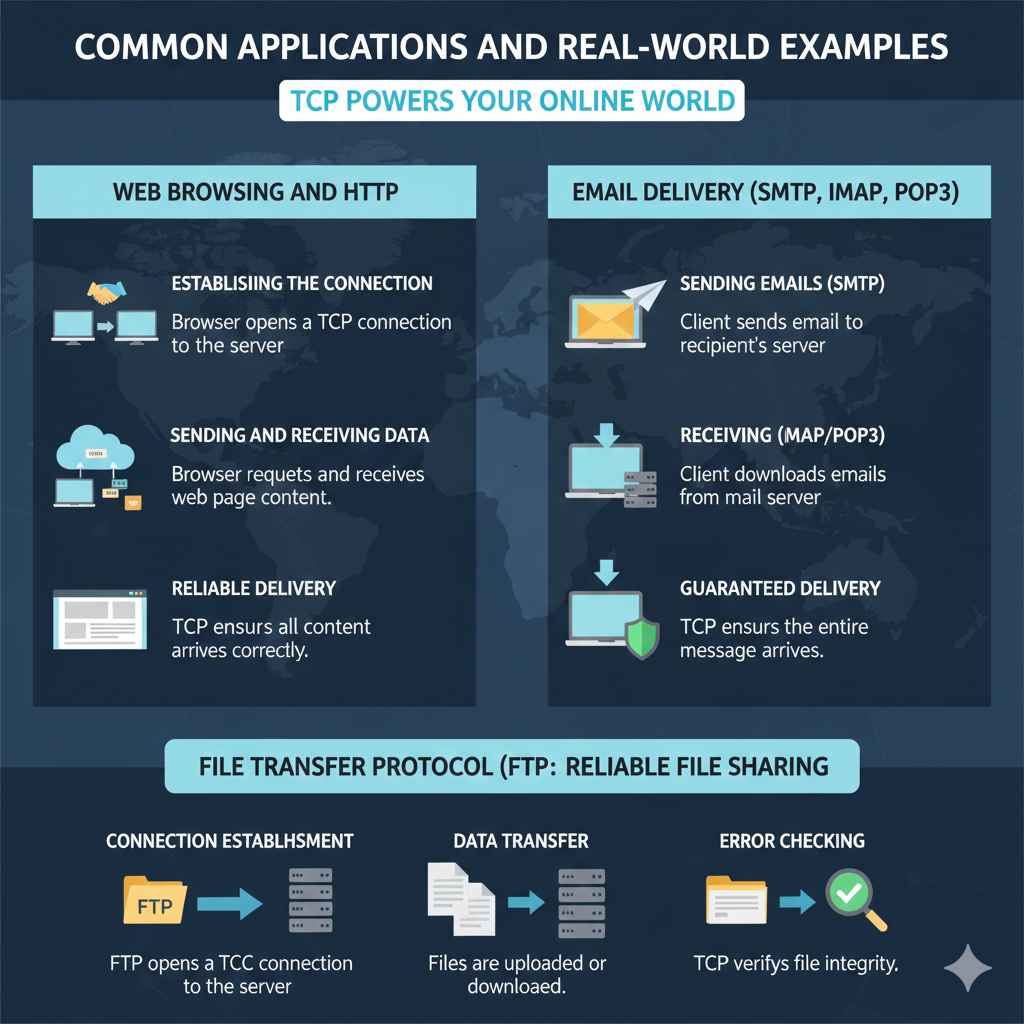
Hypertext Transfer Protocol (HTTP), the protocol used for web browsing, uses TCP as its foundation. When you browse a website, your web browser opens a TCP connection to the web server. It then sends requests for web pages and receives the content. TCP guarantees that the web pages are delivered completely and in the correct order, enabling you to experience seamless web browsing. This fundamental relationship is essential for using the internet.
- Establishing the Connection: The browser uses TCP to establish a connection with the web server (e.g., Google’s server). This allows it to request web pages.
- Sending and Receiving Data: The browser sends HTTP requests for resources (HTML, images, scripts). The server sends the requested resources back to the browser over the TCP connection.
- Reliable Delivery: TCP ensures that all data (web pages, images, and scripts) is delivered completely and in the proper order. This avoids broken images or incorrect website layouts.
Email Delivery (SMTP, IMAP, POP3)
Email services depend on TCP to reliably deliver emails. Protocols such as Simple Mail Transfer Protocol (SMTP), Internet Message Access Protocol (IMAP), and Post Office Protocol version 3 (POP3) all use TCP to transport email messages. When you send an email, TCP ensures the message gets to the recipient’s mail server without any loss or corruption. Whether you’re sending a quick message or a detailed report, TCP enables the smooth transfer.
- Sending Emails (SMTP): When you send an email, your email client uses SMTP and TCP to send the email to the recipient’s mail server.
- Receiving Emails (IMAP/POP3): When you check your email, your client uses IMAP or POP3 and TCP to download messages from the mail server.
- Guaranteed Delivery: TCP ensures that the email is delivered completely and in the proper order, avoiding incomplete messages.
File Transfer Protocol (FTP)
File Transfer Protocol (FTP) uses TCP to facilitate the transfer of files between a client and a server. This is widely used for uploading and downloading files over the internet. TCP provides the reliable transport of files, making sure files reach their destinations intact. Whether you’re transferring documents, images, or software, TCP ensures the transfer is reliable. This method is used when moving large amounts of data.
- Connection Establishment: FTP establishes a TCP connection to the server. This is used for both control commands and data transfer.
- Data Transfer: Files are transferred over the TCP connection. The client can upload files to the server or download files from the server.
- Error Checking: TCP ensures the integrity of the files transferred, preventing corruption and loss of data.
Frequently Asked Questions
Question: What is a port number?
Answer: A port number is a way to identify a specific process or application on a computer. It’s like an address on a building, guiding traffic to the right place. TCP uses port numbers to direct data to the correct application.
Question: What happens if a TCP packet is lost?
Answer: If a TCP packet is lost during transmission, the sender doesn’t receive an acknowledgment. The sender then retransmits the packet. This ensures that the data is eventually delivered.
Question: Is TCP faster than other protocols?
Answer: TCP is not the fastest protocol, as it emphasizes reliability over speed. It has a higher overhead because it includes error checking and connection management. For faster data transfer, some applications use UDP (User Datagram Protocol), which sacrifices reliability for speed.
Question: What is the three-way handshake?
Answer: The three-way handshake is the process TCP uses to establish a reliable connection. The sender sends a SYN, the receiver sends a SYN-ACK, and the sender sends an ACK. It’s the foundational step before any data transmission can happen.
Question: Does TCP protect against security threats?
Answer: TCP itself doesn’t offer encryption or built-in security features. However, it can be used with secure protocols like HTTPS (which uses SSL/TLS) to provide secure data transmission. TCP ensures the reliable transport of data, but additional security measures are needed to encrypt and protect data.
Final Thoughts
What Is Transmission Control Protocol? Simple Definition is more than just a question; it’s a doorway to a basic knowledge of how the internet works. It’s the protocol that makes sure all your online activities run smoothly. Now you understand TCP’s key functions—from establishing connections to ensuring data integrity and controlling network traffic. You’ve also explored how TCP supports web browsing, email, and file transfers, which are essential parts of our daily lives. This knowledge can give you a deeper understanding of the technology that powers the digital world.
Keep exploring and learning. The more you explore, the more you’ll uncover! There are lots of resources available to delve deeper. Understanding these fundamentals helps you to understand the broader concepts of networking. Consider TCP as a base for learning more about computers and networks. This information will help you be confident as you explore further.