
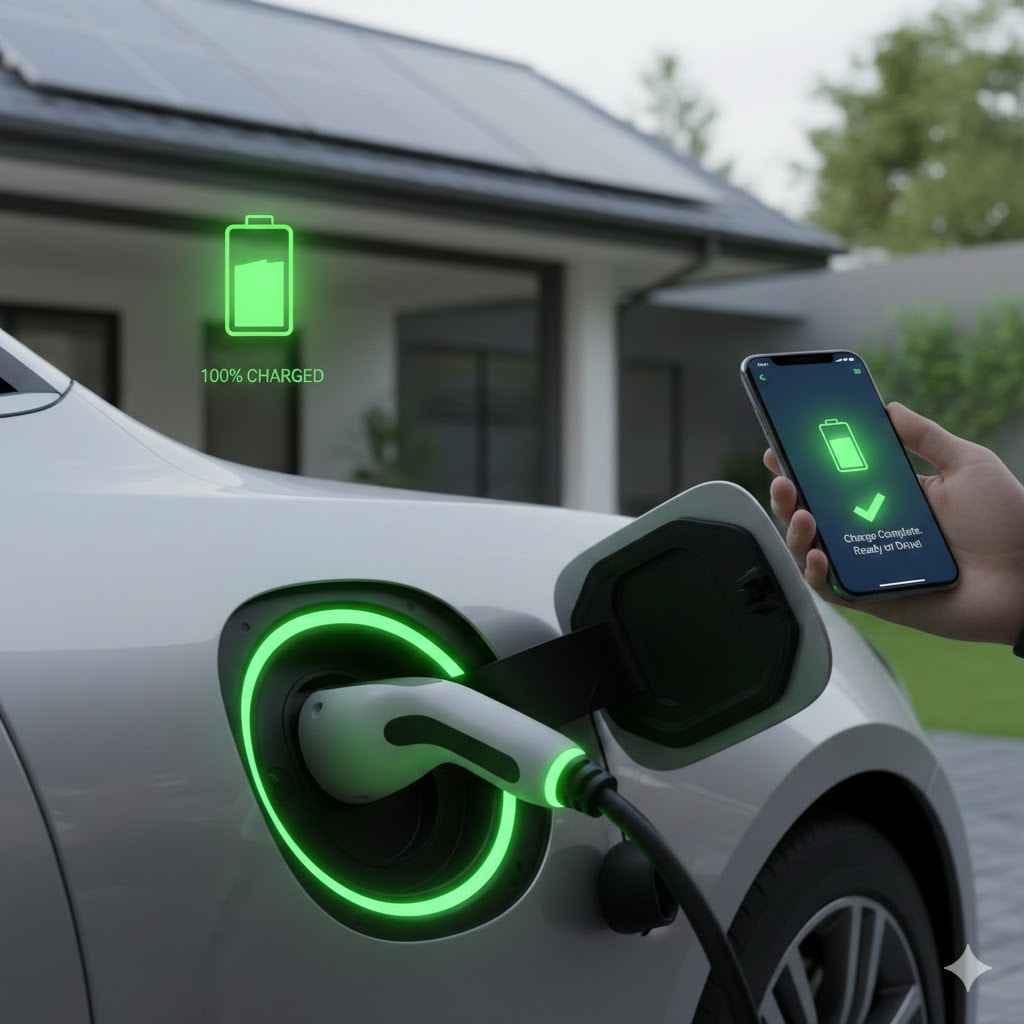
To know when your electric car is fully charged, check your vehicle’s dashboard display or the manufacturer’s mobile app, which will show a 100% State of Charge (SoC). Additionally, the charging station’s screen will often read “Charging Complete,” and the indicator light on your car’s charging port will typically turn solid green.
Welcome to the world of electric vehicles (EVs)! If you’re new to driving an EV, one of the first questions you’ll have is simple: “How do I know when it’s done charging?” It can feel a little confusing at first, especially when you’re used to the simple click of a gas pump nozzle. Don’t worry, it’s much easier than you think.
Figuring out your car’s charge is straightforward, and your car gives you plenty of signals. In this guide, I’ll walk you through the four main ways to tell your EV is fully charged. We’ll make it simple, clear, and stress-free. Let’s get you charging like a pro.
Your Car Tells You Everything: The Main Ways to Check Your Charge
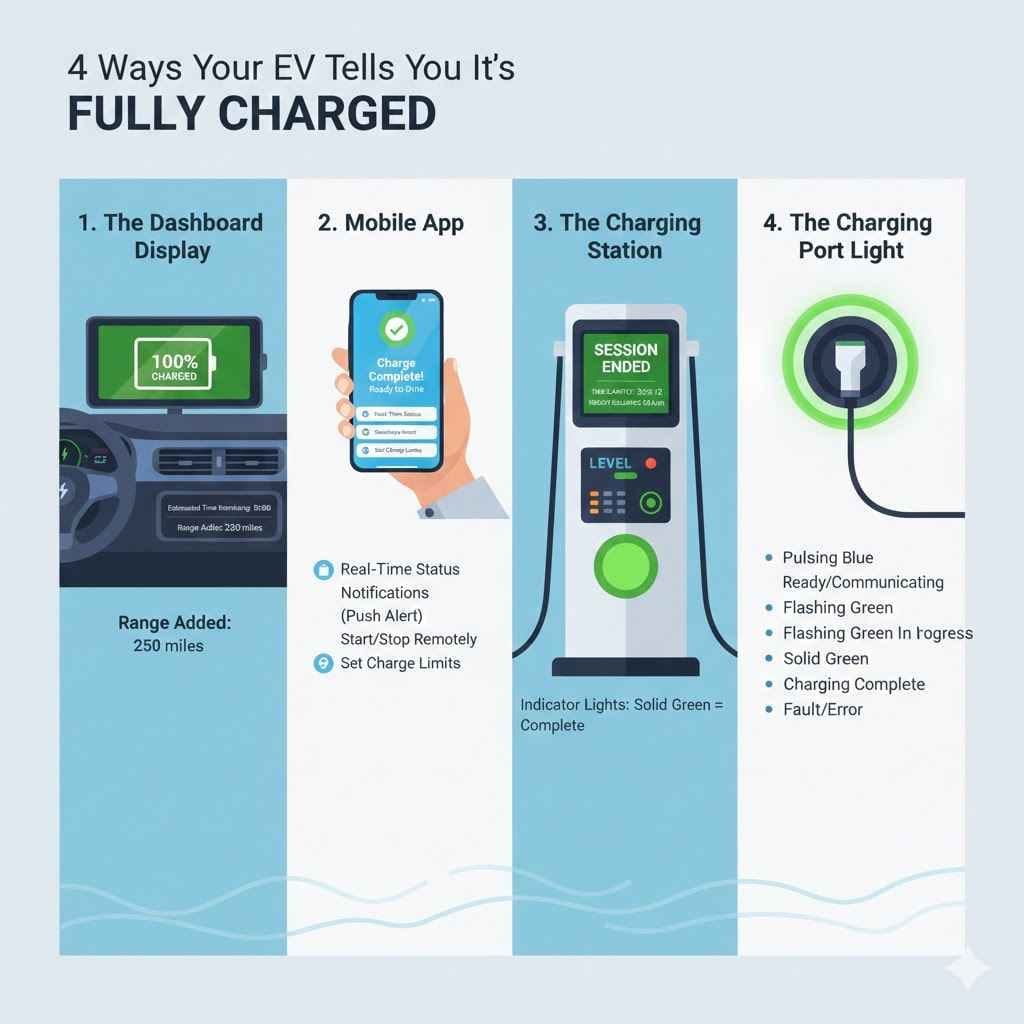
Your electric car is designed to communicate with you clearly. It doesn’t want you to guess! There are four primary places to look for information about your charging status. You can use any of them, but learning them all will make you feel more confident no matter where you plug in.
1. The Dashboard Display: Your Primary Source of Truth
The easiest and most direct way to know your car’s charge level is by looking at the driver’s dashboard display—the screen right behind your steering wheel or in the center console. This is your command center.
When you plug your car in, the dashboard will light up and show you key information:
- State of Charge (SoC): This is the most important number. It’s shown as a percentage, just like your smartphone battery. When it says “100%”, your car is fully charged. Many drivers set a charging limit (like 80% or 90%) to protect battery health, so “fully charged” for you might be when it hits that target.
- Estimated Time Remaining: Your car will give you an estimate of how long it will take to reach your set charging limit. It might say “1:20 until full” or “Complete at 10:30 PM.” This is great for planning your day.
- Range Added: The display will often show how many miles of range you have at the current charge level. Watching this number go up is one of the most satisfying parts of owning an EV!
You can usually check this by simply opening the car door without turning the car on. The display will wake up and give you a quick status update.
2. The Mobile App: Your Remote Control Center
Nearly every modern electric car comes with a companion smartphone app (like the Tesla app, MyChevrolet, FordPass, etc.). This is arguably the most convenient way to monitor your charging because you don’t even have to be near your car.
Here’s what you can do with the app:
- Check Real-Time Status: Open the app anytime, anywhere, and see the current State of Charge (SoC) percentage and estimated range.
- Get Notifications: This is the best part! You can set the app to send a push notification to your phone when charging is complete or has reached your preset limit. No more running out to the garage to check.
- Start or Stop Charging Remotely: If you need to stop charging for any reason, you can do it right from your phone. You can also start a charging session if your car is plugged in but not actively charging.
- Set Charging Limits: You can use the app to tell your car to stop charging at 80% or 90% to help preserve long-term battery health.
The mobile app is your best friend for charging, especially when using a public charger. You can go run errands or grab a coffee and get a simple alert when it’s time to head back to your car.
3. The Charging Station: Visual and Audio Cues
The charging station itself—whether it’s a home charger in your garage or a public unit—also gives you clear signals. This is especially helpful when you’re using a public charger and don’t have your car’s app handy.
What to look for on the charger:
- The Screen Display: Most Level 2 and all DC fast chargers have a screen. When charging is in progress, it will show the time elapsed, the amount of energy delivered (in kWh), and the current charging speed. When finished, it will clearly display a message like “Charging Complete” or “Session Ended.”
- Indicator Lights: Chargers have status lights. A blue or blinking green light often means “charging in progress,” while a solid green light usually means “charging complete” or “available.” A red or amber light can signal a fault or a problem with the connection.
- Sounds: Some chargers will make a distinct “click” when the session starts and another when it ends. This is the sound of the contactors inside engaging or disengaging.
4. The Charging Port Light: Your Car’s Quick Signal
Your car has its own indicator light right on or near the charging port. This is perfect for a quick, at-a-glance check without having to open the door or pull out your phone.
While the colors can vary slightly by manufacturer, they generally follow a common pattern:
| Light Color / Status | Common Meaning | What It Tells You |
|---|---|---|
| Solid or Pulsing Blue | Ready to Charge / Communicating | The car is connected and talking to the charger, but charging hasn’t started yet. |
| Pulsing or Flashing Green | Charging in Progress | Energy is actively flowing into your battery. You’re good to go! |
| Solid Green | Charging Complete | The battery has reached its target (either 100% or your preset limit). |
| Solid or Flashing Red/Amber | Charging Fault / Error | There’s a problem. Try unplugging and plugging back in. If it persists, check the charger or your car’s display for an error message. |
Think of it like a traffic light: green means go (or in this case, charging is good/done), and red means stop (there’s a problem). A quick peek at the port is often all you need.
Understanding “Full”: The 80% Rule and Battery Health
Here’s a tip that every new EV owner should know: “fully charged” doesn’t always have to mean 100%. For daily driving, most manufacturers and experts recommend charging your car’s battery to only 80% or 90%.
Why You Shouldn’t Always Charge to 100%
An EV’s lithium-ion battery is happiest when it’s not at extreme states of charge—either completely empty or completely full. Routinely charging to 100% and leaving it there for long periods can put a small amount of extra stress on the battery cells, which may slightly speed up battery degradation over many years.
Think of it like a rubber band. You can stretch it all the way, but if you keep it stretched to its absolute limit all the time, it will eventually lose some of its elasticity. Charging to 80% is like stretching it most of the way—it’s effective and much healthier in the long run.
The U.S. Department of Energy provides excellent resources on maximizing your EV’s battery life, confirming that avoiding very high and very low charges can be beneficial.
When Is It Okay to Charge to 100%?
Of course, there are times when you absolutely should charge to 100%! The main reason is for long road trips. If you need every mile of range to get to your next destination, charge it all the way up. The key is to start your trip soon after it reaches 100% so the battery doesn’t sit at a full charge for hours on end.
Your car’s battery management system (BMS) is very smart and has built-in protections, so you won’t harm your car by charging to 100% occasionally. The 80% rule is simply a best practice for daily use to maximize its lifespan over the long term.
Why Does Charging Slow Down Near the End?
Have you ever noticed that your EV charges super fast at the beginning but seems to slow down for the last 10-20%? This is completely normal and is designed to protect your battery. This is known as the “charging curve.”
Imagine filling a glass of water. You can pour quickly at first, but as you get close to the top, you slow down to avoid spilling. Your EV’s battery does the same thing. The BMS slows the charging speed as the battery cells fill up to prevent overcharging and manage heat. This process ensures the battery is filled safely and efficiently, which is crucial for its health.
So, if you’re at a public DC fast charger, it’s often more time-efficient to charge to 80% and continue your trip rather than waiting the extra time it takes to get to 100%.
Putting It All Together: A Simple Checklist for Perfect Charging
Feeling more confident? Let’s recap with a simple step-by-step checklist you can use every time you charge.
- Set Your Target: Before you plug in, decide if you need a full 100% charge for a long trip or if your daily 80% or 90% target is sufficient. You can set this in your car’s infotainment system or mobile app.
- Plug In Securely: Park your car, open the charge port, and plug the connector in. You should hear a solid “click” as it locks into place.
- Confirm Charging Has Started: Glance at one of the four indicators:
Is the charge port light flashing green?
Does the dashboard show “Charging” and an estimated time?
Does the charging station screen confirm the session has started?
Does your mobile app show the car is charging?
- Walk Away and Relax: Let your car and the charger do the work. If you want updates, rely on your mobile app for notifications.
- Check for Completion: When you return, a solid green light on the port or a “Charging Complete” message on the charger or app will tell you it’s done.
- Unplug and Go: Unlock the connector (usually by unlocking your car) and return the cable to the station. You’re ready to drive!
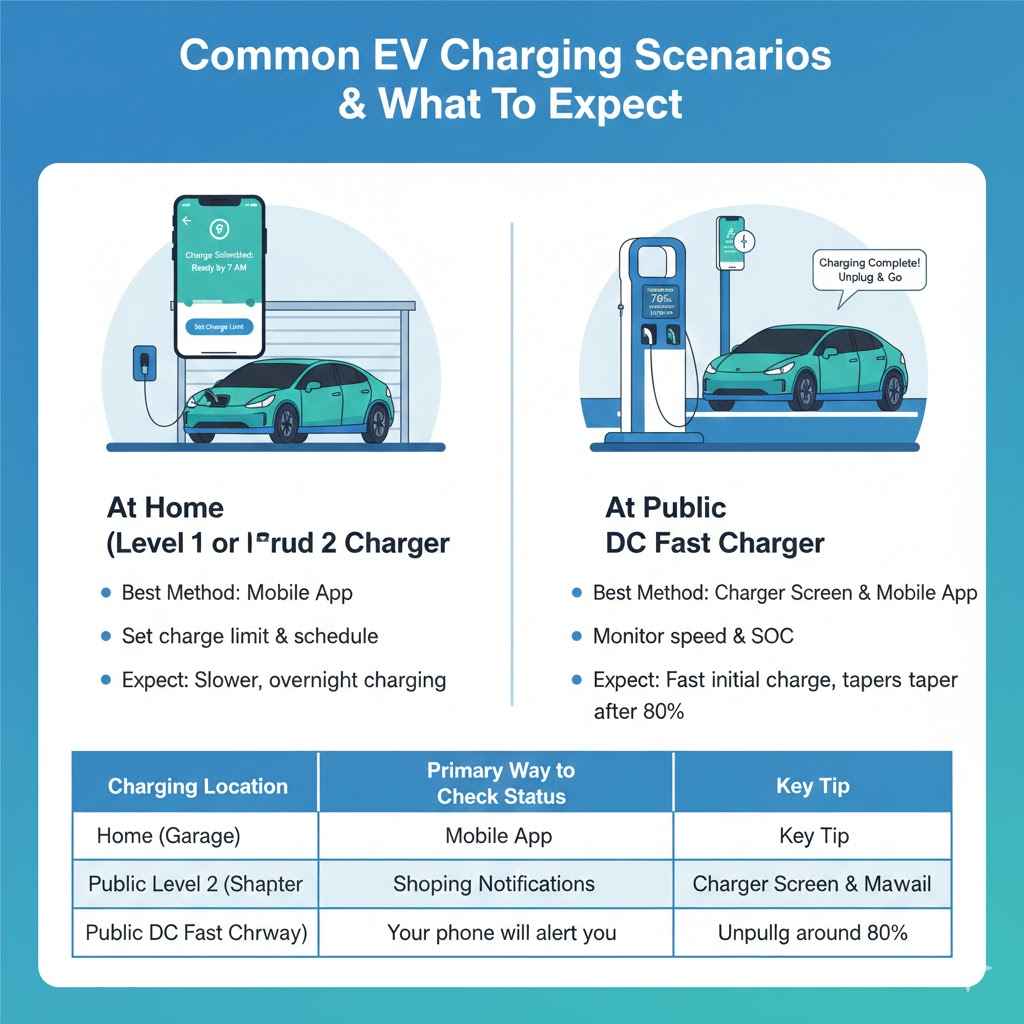
Common Charging Scenarios and What to Expect
How you check your charge might change slightly depending on where you are. Here’s a quick look at the two most common scenarios.
At Home (Level 1 or Level 2 Charger)
Home charging is all about convenience. Since you’re not in a hurry, you can rely on the car’s scheduled charging features and the mobile app.
- Best Method: The mobile app. Set your charge limit (e.g., 80%) and a departure time. The car will automatically manage its charging to be ready for you in the morning. You’ll get a notification when it’s done.
- What to Expect: Charging will be slower, often taking overnight. The goal isn’t speed, but waking up to a “full” battery every day.
At a Public DC Fast Charger
Fast charging is for road trips or when you need a quick boost. Here, time is important, so you’ll be paying more attention.
- Best Method: The charging station screen and your mobile app. The station’s screen will show you the charging speed in real-time. Your app is perfect for knowing when you’ve hit your target (like 80%) so you can unplug and let someone else use the charger.
- What to Expect: The charging speed will be very high initially and then taper off significantly after about 80%. Don’t be surprised when this happens—it’s normal!
| Charging Location | Primary Way to Check Status | Key Tip |
|---|---|---|
| Home (Garage) | Manufacturer’s Mobile App | Set a charge limit (e.g., 80%) and a schedule. “Set it and forget it.” |
| Public Level 2 (Shopping Center) | Mobile App Notifications | Go about your business; your phone will tell you when the car is ready. |
| Public DC Fast Charger (Highway) | Charger’s Screen & Mobile App | Plan to unplug around 80% to save time and be courteous to other drivers. |
Frequently Asked Questions (FAQ)
Is it bad to leave my EV plugged in after it’s fully charged?
No, it is not bad. Every modern EV has a smart Battery Management System (BMS) that automatically stops the flow of electricity once the battery reaches its target charge. Leaving it plugged in is perfectly safe and won’t overcharge or harm the battery. In cold weather, it can even be beneficial, as the car can use shore power to keep the battery warm.
Why does my car sometimes stop charging at 80%?
Your car likely has a charging limit set to 80%. This is a common factory default or a setting that owners choose to maximize long-term battery health for daily driving. You can easily adjust this limit to 90% or 100% through your car’s infotainment screen or mobile app when you need more range for a long trip.
How long does it take to fully charge an electric car?
This varies greatly depending on your car’s battery size and the charger’s speed. A Level 1 charger (standard wall outlet) can take over 24 hours. A Level 2 charger (home or public) typically takes 4-8 hours. A DC fast charger can charge from 20% to 80% in as little as 20-30 minutes.
Can I check my car’s charge from my phone?
Yes, absolutely! Almost all new electric cars come with a dedicated smartphone app that allows you to monitor your charging status in real-time, set charging limits, and receive notifications when your car is finished charging. This is one of the most convenient features of owning an EV.
What does the solid green light on the charger or car port mean?
A solid green light is the universal signal for “Charging Complete.” If you see a solid green light, it means the battery has reached the charging target you set (whether that’s 80%, 90%, or 100%), and it’s safe to unplug the vehicle.
Does charging speed change in cold weather?
Yes, cold weather can temporarily reduce charging speeds. Lithium-ion batteries charge most efficiently when they are warm. If the battery is very cold, the car’s BMS will deliberately slow down the charging rate to protect the battery cells. Some cars have a preconditioning feature that warms the battery as you navigate to a fast charger to ensure faster speeds.
Conclusion: Charging with Confidence
Knowing when your electric car is fully charged is simple once you know where to look. Whether you glance at your dashboard, check the app on your phone, see the light on the charging port, or look at the station’s screen, you have multiple easy ways to stay informed.
Remember the 80% rule for daily driving to keep your battery healthy for years to come, and don’t hesitate to charge to 100% when you need the extra range for a big adventure. Welcome to the EV family! You’ve made a great choice, and with these simple tips, you’ll find that charging is an easy, seamless part of your daily routine. Happy driving!